Power / Solar Panels
User Manual for BALDR 120W Solar Panel
Quick guide for the BALDR 120W Solar Panel. Learn about setup, charging compatibility, technical specifications, safety warnings, and troubleshooting tips for optimal performance.
Table of contents
Manual images
Click an image to enlargeQuick Guide from the Manual
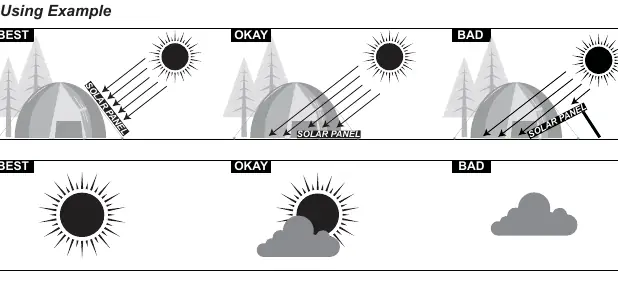
The BALDR 120W Solar Panel is designed to charge various devices, including power stations, cell phones, tablets, power banks, and flashlights. For optimal charging efficiency, place the panel in direct sunlight and ensure it forms a 90-degree angle with the sun. The panel is compatible with BALDR/TogoPOWER series power stations and other brands with appropriate power requirements.
Accessories
The package includes the following items:
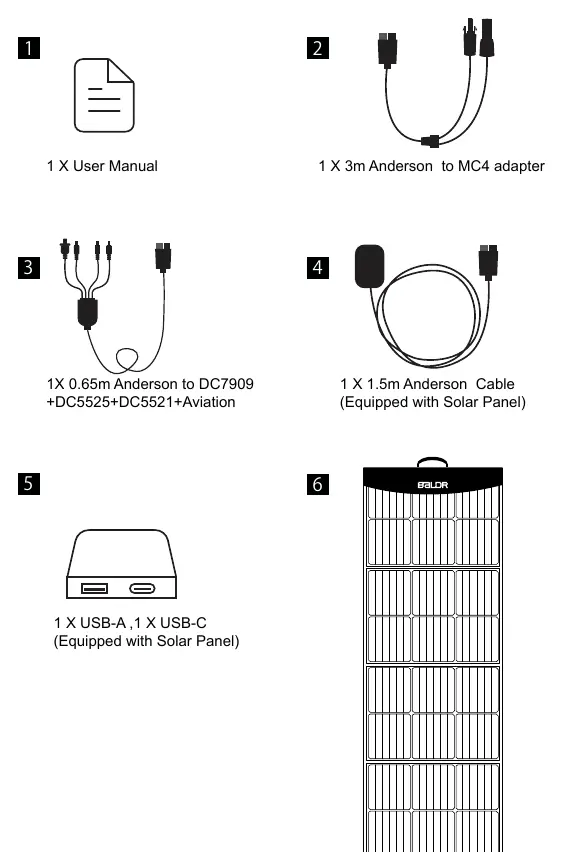
- 1 x User Manual
- 1 x 3m Anderson to MC4 adapter
- 1 x 0.65m Anderson to DC7909 + DC5525 + DC5521 + Aviation cable
- 1 x 1.5m Anderson Cable (attached to the solar panel)
- 1 x USB-A and 1 x USB-C port (integrated into the solar panel)
Technical Specifications
- Peak Power: 120W
- DC Output: 18V/6.6A Max
- USB-A Output: 5V/3.4A, 9V/2.5A, 12V/2A Max
- USB-C Output: 5V/4.5A, 9V/3A, 12V/3A, 15V/3A Max
- Cell Type: Monocrystalline (4pcs)
- Dimensions (Unfolded): 1660 x 520 x 25mm
- Dimensions (Folded): 520 x 370 x 55mm
- Weight: 10.25lbs (4.65kg) excluding accessories
Using Tips
To ensure correct operation, please observe the following:
- Ensure connecting cables match your charging equipment.
- Verify that the charging voltage of the solar panel matches the input voltage of your batteries.
- Note that the red part of the Anderson plug is positive, and the black part is negative. Connect positive to positive and negative to negative.
- Charging efficiency is directly related to the intensity and angle of sunlight.
Safety Warnings
- Do not operate or assemble the solar panel until you have read and understood the manual.
- Do not immerse the solar panel in water. While the panel is splash-proof, the connectors on the bag are not.
- Do not disassemble, break, or drop the solar panel.
- Do not use nails or sharp objects to scratch the surface.
- Do not place heavy objects on the panel or step on it.
- Keep away from fire, heaters, and excessive heat.
- Do not modify the product, as this may impair function and safety.
Frequently Asked Questions
Is the solar panel waterproof? Both sides are protected from splashing water, but the connectors on the bag are not waterproof. Do not immerse in water or use in rain/moist environments.
Is it chainable? Yes, you can chain other solar panels with the same nominal output voltage in parallel. Ensure the superimposed current does not exceed the capacity of the cables and plugs.
What if it is not charging? Check that your device input voltage fits 5V or supports QC3.0/PD. Ensure the panel is in direct sunlight and clean the panels with a damp cloth.
Warranty and Contact
BALDR provides a 12-month limited warranty for the original consumer purchaser covering defects in workmanship and material. For warranty service or support, contact the customer service team at [email protected] or call 1-855-801-0798. The office is located at 322 Paseo Tesoro, Walnut, CA 91789.
Practical help
Common problems
Device not charging
Check that your device input voltage fits 5V or supports QC3.0/PD. Ensure the panel is in direct sunlight and clean the panels with a damp cloth.
Water exposure
The panel is splash-proof, but the connectors on the bag are not. Do not immerse in water or use in rain.
Low charging efficiency
Ensure the panel is at a 90-degree angle to the sun and that there is no shade or cloud cover.
Before use
- Ensure connecting cables match your charging equipment.
- Verify that the charging voltage of the solar panel matches the input voltage of your batteries.
- Ensure the red part of the Anderson plug is connected to positive and the black part to negative.
- Place the panel in direct sunlight for the best charging effect.
Specs in practice
- Peak Power (120W)
- The maximum power output the panel can generate under ideal sunlight conditions.
- DC Output (18V/6.6A)
- The power output used for charging power stations.
- USB-A/C Outputs
- Integrated ports for charging mobile devices; supports fast charging protocols like QC3.0 and PD.
Images and diagrams
- The 'How it works' diagram illustrates the connection flow from the sun to the solar panel, and then to various devices like power stations, phones, and tablets.
- The 'Using Example' diagram demonstrates that a 90-degree angle to the sun provides the best charging efficiency compared to angled or shaded positions.
Model compatibility
- Compatible with BALDR/TogoPOWER series power stations.
- Compatible with other brands of power stations with appropriate power requirements.
- Chainable with other solar panels of the same nominal output voltage in parallel.

Manual page author
Emily Carter
User documentation editor
Prepares concise manual descriptions and highlights the most useful setup, operation, and maintenance information for readers.