Power / Solar Panels
User Manual for EcoFlow 160W Bifacial Portable Solar Panel
Quick guide for the EcoFlow 160W Bifacial Portable Solar Panel. Learn how to set up, wire in series or parallel, optimize power output, and maintain your solar panel.
Table of contents
Manual images
Click an image to enlargeQuick guide from the manual
The EcoFlow 160W Bifacial Portable Solar Panel is designed to harness sunlight from both sides. To get started, unfold the panel, position the junction box toward the sun, and use the integrated solar angle guide to ensure the panel is at a 90-degree angle for maximum efficiency. Ensure all connections are secure before use.
Overview
The solar panel consists of the following key components:
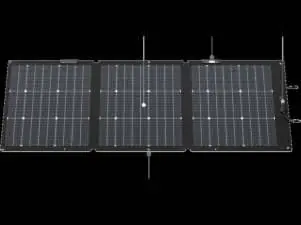
- Photovoltaic module (Front/Rear): Designed to harness direct and reflected sunlight.
- Solar angle guide: Helps align the panel with the sun. When the shadow point is in the center, the panel is at a 90-degree angle.
- Junction box: Contains the output cable (1.5m) with MC4 connectors.
- Preset holes: 6 holes (8mm diameter) for mounting with zip ties or hooks.
- Bracket: Elastic straps to adjust the panel's angle.
Getting Started
To set up the panel:
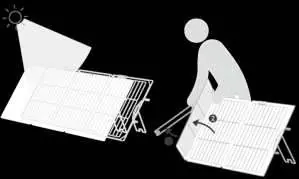
- Lay the panel flat and remove it from the case.
- Unfold the bracket first, then unfold the panel.
- It is recommended to stand behind the panel while unfolding for easier operation.
- Adjust the brackets so the shadow point on the angle guide aligns with the center.
Powering Your Devices
You can connect the panel to an EcoFlow portable power station or a compatible third-party device. Ensure the device's input range matches the panel's output parameters (open circuit voltage and short circuit current) to avoid damage.
Connection steps:
- Connect the panel's output cable to the solar-to-XT60i charging cable.
- Connect the male connectors to the female ones.
- Connect the other end of the charging cable to the solar input port of your device.
- If the device does not use an XT60 port, refer to the device's specific user manual.
Maximizing Power Output
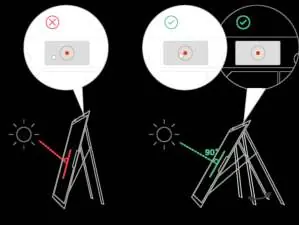
- Environment: Use on sunny days. Cloudy or rainy weather will significantly decrease output.
- Shading: Keep the panel free from dust, leaves, droppings, and shadows.
- Angle: Regularly check the shadow point on the angle guide to maintain a 90-degree angle as the sun moves.
Wire Your Panels
Panels can be wired in series or parallel to increase output.
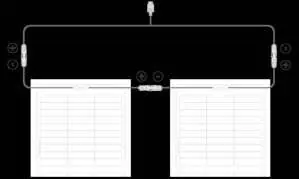
- Series connection: Connect the male connector of the first panel to the female connector of the next. Use the solar-to-XT60i charging cable for the final connection to the power station.
- Parallel connection: Connect all positive ends to a solar parallel connection cable and all negative ends similarly. Then connect to the charging cable.
Always verify the electrical parameters of your solar array against the requirements of the connected device before wiring.
Storage and Maintenance
- Storage: Disconnect the panel, fold it, and store it in the case. Secure the output cable to prevent contact with the module.
- Cleaning: Ensure the panel is disconnected and cooled to room temperature. Use a soft cloth dampened with clean water. Do not wash or wipe the photovoltaic connectors.
Specifications
- Rated Power: 160W (Front), 125W (Rear)
- Open Circuit Voltage: 21.3V
- Short Circuit Current: 9.1A (Front), 7.1A (Rear)
- Operating Temperature: -20°C to 85°C
- Connector Type: Photovoltaic connectors (adapted to MC4)
- Weight: Approx. 5.1 kg
Manufacturer information
EcoFlow
Practical help
Common problems
Panel not generating power
Check that connections are secure, the panel is in direct sunlight, and the device input range is compatible.
Weak power output
Ensure the panel is not shaded, dirty, or misaligned. Check the angle guide to ensure the shadow is centered.
Water in connectors
The panel is IP68 rated, but if water enters connectors, dry them immediately with a cloth. Do not soak the panel.
Before use
- Unfold the bracket before unfolding the panel.
- Ensure the junction box is facing the sun.
- Align the shadow point on the angle guide to the center.
- Verify that the device input range matches the panel's output parameters.
- Ensure all cable connections are firm.
Specs in practice
- Open Circuit Voltage
- 21.3V; used to calculate total voltage when wiring in series.
- Short Circuit Current
- 9.1A (Front) / 7.1A (Rear); used to calculate total current when wiring in parallel.
Images and diagrams
- Angle Guide: A visual indicator where the shadow must be centered for optimal 90-degree sun exposure.
- Series Wiring: Connects panels end-to-end to increase total voltage.
- Parallel Wiring: Connects positive to positive and negative to negative to increase total current.
Model compatibility
- Compatible with EcoFlow portable power stations.
- Compatible with third-party devices that support solar input, provided electrical parameters match.
- Do not use third-party cables unless they meet the required specifications.

Manual page author
David Miller
Documentation analyst
Organizes user manual content into clear summaries, with attention to model details, product context, and everyday usability.