Tools / Generators
User Manual for EcoFlow Smart Generator EFG100
Comprehensive user guide for the EcoFlow Smart Generator EFG100. Includes setup, operation, maintenance, troubleshooting, and technical specifications.
Quick answers from the manual
Quick answer
- The EcoFlow Smart Generator EFG100 is a petrol inverter generator. It features electric start, app connectivity, and integrates with EcoFlow DELTA power stations for automatic DC charging. p. 1, 15
Key actions
- Turning Off p. 10
First start
- Add engine oil, connect the internal battery, and add unleaded fuel. p. 6, 7
Problems and fixes
Unable to start
Check fuel level, engine switch, oil level, and battery connection.
p. 20Maintenance and reset
- Replace engine oil every 50 hours or 3 months. p. 14
Technical specifications
| Parameter | Value | Meaning | Pages |
|---|---|---|---|
| Rated Power | 1800W | Continuous power output | p. 21 |
Where to find it in the PDF
- Safety Guidelines p. 5
- Quick Start p. 7
- Maintenance p. 14
Table of contents
Manual images
Click an image to enlargeQuick Guide
The EcoFlow Smart Generator EFG100 is designed to provide reliable power. Before use, ensure the generator is placed on a level surface in a well-ventilated area. Always check the fuel and engine oil levels before starting. The generator features an electric start, manual start, and app-based control. It is compatible with EcoFlow DELTA Max and DELTA Pro power stations for automatic DC charging.
Appearance and Controls
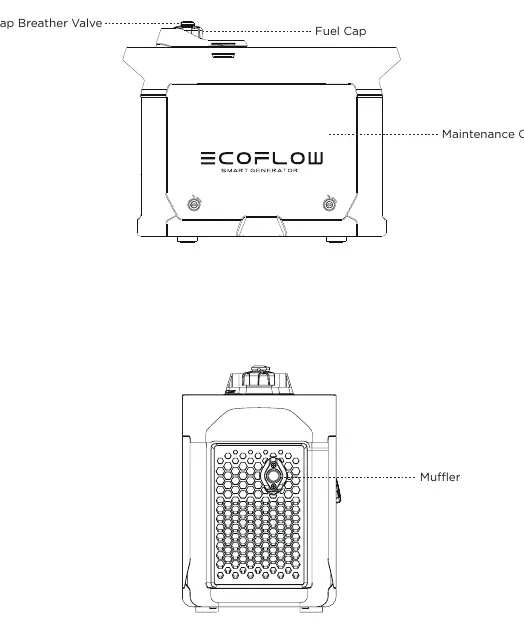
The generator features a main control panel including an Electric Start Switch, AC Output Sockets, and an LCD screen. The LCD screen displays real-time information such as remaining power, output power, and error codes. The maintenance cover on the side provides access to the engine oil dipstick, air filter, and spark plug.
Before First Use
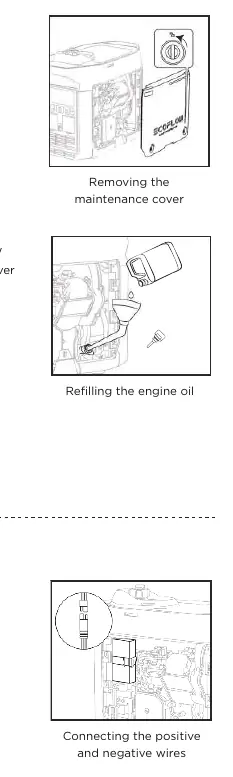
- Refueling: Use unleaded fuel. Do not overfill; fill only up to the red indicator inside the fuel tank.
- Engine Oil: The generator is delivered without oil. Use SAE SJ 10W-40 oil. Capacity is 0.38 L.
- Battery Connection: The electric start requires the internal battery to be connected. Open the maintenance cover and connect the positive and negative wires.
Operation
Startup
- Turn the fuel cap breather valve knob to ON.
- Turn the Engine Switch to ON.
- Use the Electric Start Switch (press for 2 seconds) or pull the Manual Starter Grip.
Turning Off
- Switch off and disconnect all electrical equipment.
- Turn the Engine Switch to OFF.
- Wait for the generator to cool down, then turn the fuel cap breather valve knob to OFF.
AC and DC Connections
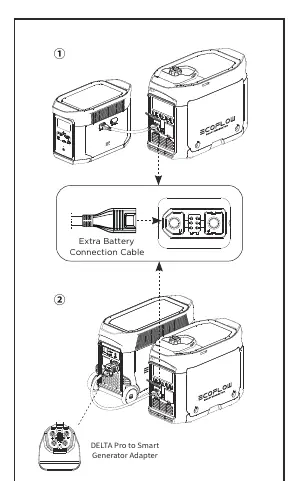
For AC power, plug equipment into the AC Output Socket. For DC charging with EcoFlow DELTA series, connect the Extra Battery Connection Cable between the generator and the power station. The generator will automatically start and stop based on the power station's battery levels.
Maintenance and Servicing
Regular maintenance is essential for optimal performance.
- Spark Plug: Check regularly. Standard plug is A5RTC. Gap should be 0.6-0.8 mm.
- Engine Oil: Replace after the first 20 hours, then every 50 hours or 3 months.
- Air Filter: Clean every 10 hours in harsh environments, or every 50 hours. Do not twist the foam element.
- Muffler: Clean carbon deposits from the muffler block and spark plug arrestor.
Storage and Transportation
If storing for a long period, drain the fuel from the tank and carburetor. Lubricate the cylinder by removing the spark plug, adding 10 mL of engine oil, and pulling the starter grip. Always transport the generator in an upright position.
Troubleshooting
If the generator fails to start, check the fuel level, engine switch position, and oil level. If there is no output, check for overload conditions. Communication failures with EcoFlow power stations can often be resolved by pressing a button to wake the generator from sleep mode.
Technical Specifications
- Rated Power: 1800W (Peak 1900W)
- Rated Voltage: 230V
- Frequency: 50Hz
- Fuel Tank Capacity: 4 L
- Engine Oil Volume: 0.38 L
- Weight: 29.3 kg
Manufacturer information
EcoFlow
Practical help
Common problems
Generator will not start
Check fuel level, ensure fuel cap breather is ON, check engine switch is ON, check oil level, and ensure battery is connected.
No output
Check for AC/DC overload. Remove the load, shut down, and restart the generator.
Communication failure with EcoFlow power station
Press a button on the generator to wake it from sleep mode.
Before use
- Check fuel level and fill with unleaded fuel if necessary.
- Check engine oil level and add SAE SJ 10W-40 if low.
- Ensure the internal battery is connected.
- Place the generator on a level surface.
- Ensure the area is well-ventilated.
Specs in practice
- Fuel Tank Capacity
- 4 Liters (1.05 gal).
- Engine Oil Capacity
- 0.38 Liters (0.1 gal).
Images and diagrams
- Control Panel: Shows Electric Start Switch, AC/DC ports, and alert lights.
- Maintenance Access: Side panel for oil, air filter, and spark plug access.
Model compatibility
- Compatible with EcoFlow DELTA Max and DELTA Pro for automatic DC charging.

Manual page author
Emily Carter
User documentation editor
Prepares concise manual descriptions and highlights the most useful setup, operation, and maintenance information for readers.