Power / Power Management Systems
User Manual for EcoFlow DELTA Max Portable Power Station
Comprehensive user guide for the EcoFlow DELTA Max portable power station. Includes setup instructions, charging methods, safety guidelines, troubleshooting, and technical specifications.
Quick answers from the manual
Quick answer
- The EcoFlow DELTA Max is a portable power station. To turn it on, short press the Main Power Button. To charge, use the AC, solar, or car charging inputs. It supports X-Boost for high-wattage appliances and EPS for emergency power. p. 5, 10, 11, 12
Key actions
- Powering on/off p. 10
- Charging via AC p. 12
First start
- Turn on the unit by short pressing the Main Power Button. p. 10
Problems and fixes
USB-A Overload
Remove the electrical device connected to the USB-A port.
p. 16Maintenance and reset
- For long-term storage, discharge the battery to 30% and recharge to 60% every three months. p. 17
Technical specifications
| Parameter | Value | Meaning | Pages |
|---|---|---|---|
| Capacity (DELTA Max 2000) | 2016Wh | Total energy storage capacity. | p. 5 |
| AC Output | 2400W (Surge 5000W) | Maximum continuous and surge power for AC devices. | p. 5 |
Where to find it in the PDF
- Specifications p. 5, 6
- Troubleshooting p. 16
Table of contents
Quick guide from the manual
The EcoFlow DELTA Max is a high-capacity portable power station. To begin, ensure the unit is placed on a flat surface and the fan vents are not obstructed. Turn the unit on by short-pressing the Main Power Button. You can charge the unit via AC, solar, or car charging inputs. The device supports X-Boost for high-wattage appliances and features an Emergency Power Supply (EPS) mode for automatic power switching during blackouts.
Product Details
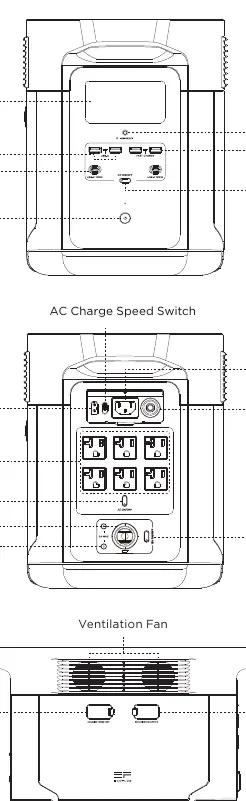
The front panel features the LCD screen, USB-A and USB-C output ports, and the main power button. The back panel houses the AC input port, AC output sockets, car outlet, DC5521 output ports, and the overload protection switch. The side panels contain the ventilation fans and ports for connecting Smart Extra Batteries.
LCD Screen
The LCD screen displays critical information including remaining battery percentage, input/output power in Watts, remaining charge/discharge time, and various warning icons (e.g., overload, high/low temperature, battery failure). The Wi-Fi status icon indicates connectivity for app pairing.
General Product Usage
- Power On: Short press the Main Power Button.
- Power Off: Press and hold the Main Power Button.
- LCD Screen: Short press the Main Power Button to toggle the screen on or off.
- Sleep Mode: The unit enters sleep mode after 5 minutes of inactivity.
Charging Methods
AC Charging
Use the AC Charge Speed Switch on the back of the unit to control charging power. The X-Stream technology allows for fast charging. You can customize the charging power range via the EcoFlow App.
Solar Charging
Connect solar panels in series to the Solar/Car Charging Input Port. Ensure the solar panel output voltage is within 100V to prevent damage.
Car Charging
Use the provided car charging cable to charge via a 12V/24V car outlet. It is recommended to start the car before connecting the charger to avoid battery drain.
Smart Extra Battery
You can connect up to two Smart Extra Batteries to increase capacity. Ensure both the main unit and the extra battery are turned off before connecting. Verify that the extra battery icon appears on the LCD screen before use.
X-Boost and EPS
X-Boost: Automatically enabled to power high-wattage appliances by exceeding rated output power. Best suited for heating devices; not compatible with all appliances, especially those with strict voltage requirements.
EPS (Emergency Power Supply): When connected to grid power, the unit can power devices through its AC sockets. In a blackout, it switches to battery power within 30ms. Note: This is not a 0ms UPS; do not use with sensitive equipment like data servers.
Storage and Maintenance
- Store in a dry, ventilated place at room temperature.
- For long-term storage, discharge the battery to 30% and recharge to 60% every three months.
- If the battery is severely low, it may enter deep sleep protection; charge the unit to wake it up.
- Clean ports with a dry, soft cloth.
Manufacturer information
EcoFlow
Practical help
Common problems
Overload protection triggered
Remove the overloaded device and restart the product.
High temperature protection
Allow the product to cool down; it will resume operation automatically.
Fan blockage
Check if the fan is blocked by foreign materials.
Battery failure
Contact EcoFlow Customer Service.
Before use
- Ensure the product is on a flat surface.
- Check that the fan inlet/outlet is not blocked.
- Verify the power requirements of your devices.
- Ensure the product is not in a humid or dusty environment.
- Check that all cables are in good condition.
Images and diagrams
- The front panel features the LCD screen, USB ports, and main power button.
- The back panel contains AC input, AC output sockets, and the overload protection switch.
- The side panel includes ports for extra batteries.
Model compatibility
- Supports up to 2 DELTA Max Smart Extra Batteries.
- Not recommended for medical emergency equipment like ventilators.
- Not suitable for 0ms UPS requirements.

Manual page author
Emily Carter
User documentation editor
Prepares concise manual descriptions and highlights the most useful setup, operation, and maintenance information for readers.