Industrial / Cleaning Systems
Software Manual for Ecolab Multi Booster Units
Comprehensive software manual for the Ecolab Multi Booster control panel. Includes navigation instructions, operating modes, menu structures, error code troubleshooting, and system configuration settings.
Table of contents
Manual images
Click an image to enlargeQuick Guide
This manual covers the operation of the control panel for Ecolab Multi Booster units. The system is operated via five buttons: OFF, ON/STANDBY, ERROR indicator, four navigation arrows, and an OK button. The default password for the Setup menu is 6802.
Control Panel Overview
The control panel allows full management of the booster unit. Key components include:
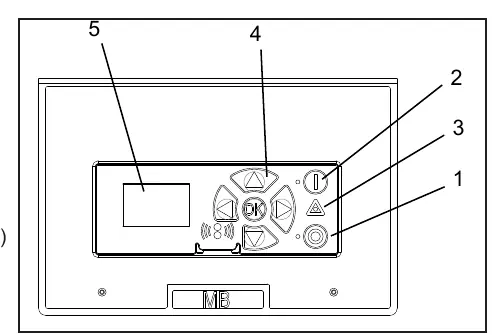
- OFF Button (1): Switches the unit off.
- ON/STANDBY Button (2): Switches the unit on.
- ERROR Indicator (3): Flashes red in case of an error.
- Navigation Buttons (4): Four arrow buttons used to navigate menus.
- OK Button: Activates the menu and confirms selections.
- Display (5): Shows system status, readings, and menu options.
Display Layout and Navigation
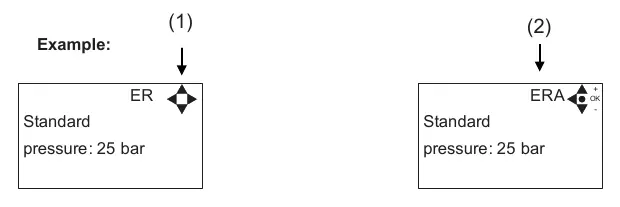
The display provides real-time feedback. An arrow symbol in the top right corner indicates active navigation directions. Scrolling right allows you to enter values, while up/down arrows adjust settings. A letter combination in the top right corner is used for service reference.
Operating Modes
- Power On: Upon first startup, set the date and time in the Setup menu. The system uses battery backup to save these settings.
- Standby: The unit is ready for operation and will start based on flow or pressure loss settings.
- Run Mode: The unit operates in High, Standard, or Low pressure modes. You can switch between these modes using the navigation buttons without entering the settings menu.
- Power Off: In this mode, the display shows a small dot. You can still access menus without the pump running by pressing the OK button.
Menu Structure
The main menu consists of four sections:
- Info (A): View software version, service contact info, and counters.
- Errors (B): View the last 999 incidents.
- Setup (C): Password-protected area (default 6802) to change system performance settings.
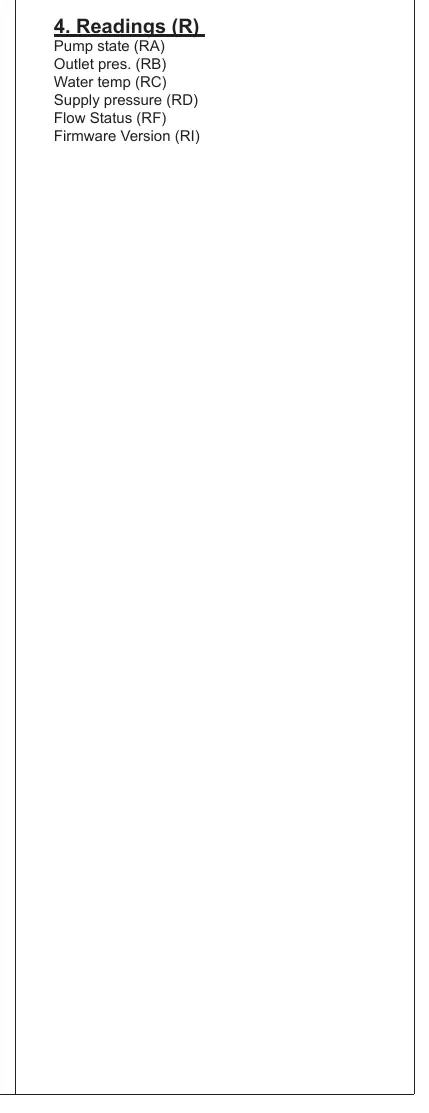
- Readings (R): Real-time data including pump output pressure, water temperature, and inlet pressure.
Error Handling and Troubleshooting
If an error occurs, the red triangle flashes, and the unit automatically switches to a new pump. To reset, press the OFF button. If the error persists, scroll right to view the specific error code. Common errors include:
- C1 Inverter Error: Frequency inverter in error state. Switch off power, wait 180 seconds, and restart.
- C2 Low Supply Pressure: Insufficient water supply. Check inlet filter and supply pressure.
- C3 High Water Temp: Pump column overheated. Lower inlet water temperature.
- C11/C13 Inlet Pressure Warnings: Insufficient water supply. Check filters and supply.
Setup and Configuration
The Setup menu allows for advanced configuration, including:
- Settings (E): Adjust post-run time, dry run levels, pressure settings (High/Standard/Low), and startup methods.
- Languages & Units (F): Change display language and units (Metric/Imperial).
- Supply Tank (H): Configure tank control and low-level alarm delays.
- Communication (I): Firmware upgrades (authorized personnel only).
- I/O Settings (J): Configure inputs and outputs for external control.
- Installation (K): Installation-specific settings.
- Resets (D): Reset trip counters.
Manufacturer information
Ecolab Inc.
Practical help
Common problems
C1 Inverter Error
Switch off power, wait 180 seconds, and restart. If it persists, contact service.
C2 Low Supply Pressure
Secure sufficient water supply pressure and check the inlet filter for impurities.
C3 High Water Temperature
Lower the inlet water temperature (max 70°C) and ensure sufficient water consumption.
C11/C13 Inlet Pressure Warning
Secure sufficient water supply or reduce consumption; check inlet filter.
Before use
- Ensure the unit is connected to power.
- Check that the water supply is open and sufficient.
- Set the correct date and time in the Setup menu upon first startup.
- Verify that the default password (6802) is changed if necessary.
- Check that all air channels are open and not blocked.
Specs in practice
- High Pressure
- Predefined pressure setting for high-demand operation.
- Standard Pressure
- Default operating pressure for normal conditions.
- Low Pressure
- Predefined pressure setting for low-demand operation.
Images and diagrams
- The control panel features 5 main buttons: OFF, ON/STANDBY, ERROR indicator, 4 navigation arrows, and OK.
- The display shows current pressure, temperature, and status icons.
- The Setup menu is hierarchical, organized by letters (e.g., C for Setup, E for Settings).
Model compatibility
- Compatible with Multi Booster units.
- Firmware upgrades require a PC application and authorized technician access.
- I/O settings allow for external control via voltage source or release signals.

Manual page author
Michael Turner
Technical manual editor
Reviews PDF manuals for structure, safety notes, and practical product details so readers can find the right information quickly.