Power / Solar Inverters
Firmware Update Guide for EG4 12kPV Hybrid Inverter
A comprehensive firmware update guide for the EG4 12kPV Hybrid Inverter. This document provides step-by-step instructions for updating firmware via the EG4 Electronics mobile app and the Monitor Center website, along with essential safety...
Quick answers from the manual
Quick answer
- To update the firmware on the EG4 12kPV Hybrid Inverter, you can use the EG4 Electronics mobile app (via Local Connect) or the Monitor Center website (via the Maintenance tab). Ensure you have the correct firmware file from your distributor before starting. p. 5, 6
Key actions
- Update via App p. 5
- Update via Website p. 6
Problems and fixes
Firmware update fails
Check Wi-Fi dongle connection and battery level on the mobile device.
p. 5Technical specifications
| Parameter | Value | Meaning | Pages |
|---|---|---|---|
| Max. AC Input Power | 12000W | Maximum AC input power capacity. | p. 3 |
| Max. Charge/Discharge Current | 167A | Maximum battery charge/discharge current. | p. 4 |
Where to find it in the PDF
- Technical Specifications p. 3, 4
- Safety Instructions p. 5, 6
- Firmware Updates p. 7, 8
Table of contents
Manual images
Click an image to enlargeQuick guide from the manual
This document serves as the official firmware update guide for the EG4 12kPV Hybrid Inverter. It outlines the necessary safety precautions, technical specifications, and the specific procedures required to update the inverter's firmware using either the EG4 Electronics mobile application or the online Monitor Center website.
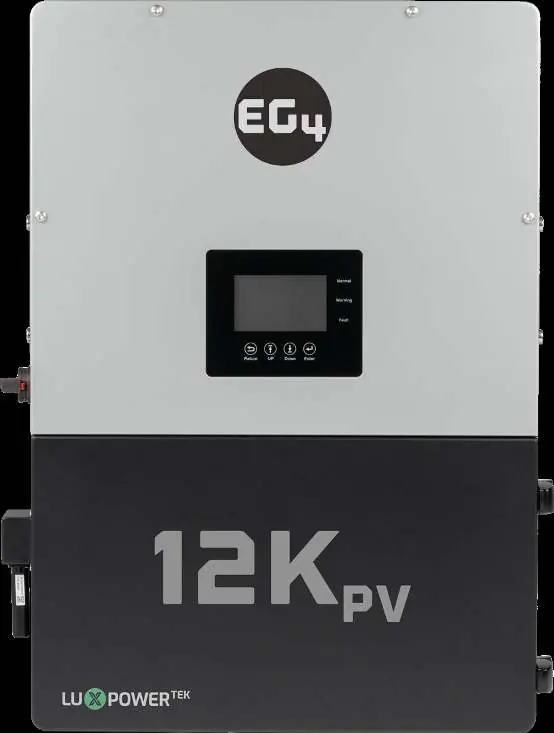
Safety Instructions
All work on the inverter, including installation, operation, and maintenance, must be performed by qualified personnel. Failure to follow safety instructions may result in injury, death, or equipment damage.
- High Voltage Warning: Always ensure AC and DC breakers are in the 'off' or 'open' position before working on the unit. Use a voltmeter to verify that no voltage is present.
- Personal Protective Equipment: Installers should use appropriate PPE.
- System Handling: Some components are heavy; use team-lifting techniques.
- Operational Safety: Do not open the inverter while it is operating. Do not make connections or disconnections while the system is live.
- Temperature: The inverter surface may become hot during operation; touch only the LCD and buttons.
Technical Specifications
Key specifications for the EG4 12kPV Hybrid Inverter include:
- AC Input: 120/240VAC or 120/208VAC, 50/60Hz.
- Max AC Input Power: 12000W.
- Max Charge/Discharge Current: 167A @ 48 VDC.
- Efficiency: Up to 97.5% (PV to Grid) and 99.9% (PV to Battery).
- Ingress Protection: IP65.
- Communication: RS485/Wi-Fi/CAN.
Firmware Update via EG4 Electronics App
- Open the EG4 Electronics app and select 'DOWNLOAD FIRMWARE'.
- Download the correct firmware file to your mobile device.
- Connect your mobile device to the Wi-Fi Dongle's network (Network ID matches the Dongle's Serial Number).
- Return to the app home screen and select 'LOCAL CONNECT'.
- Select 'Set' and swipe up to find the 'Update Firmware' button.
- Select the installation package and click 'UPDATE FIRMWARE'.
Ensure the Wi-Fi dongle is correctly configured and the mobile device has sufficient battery before starting.
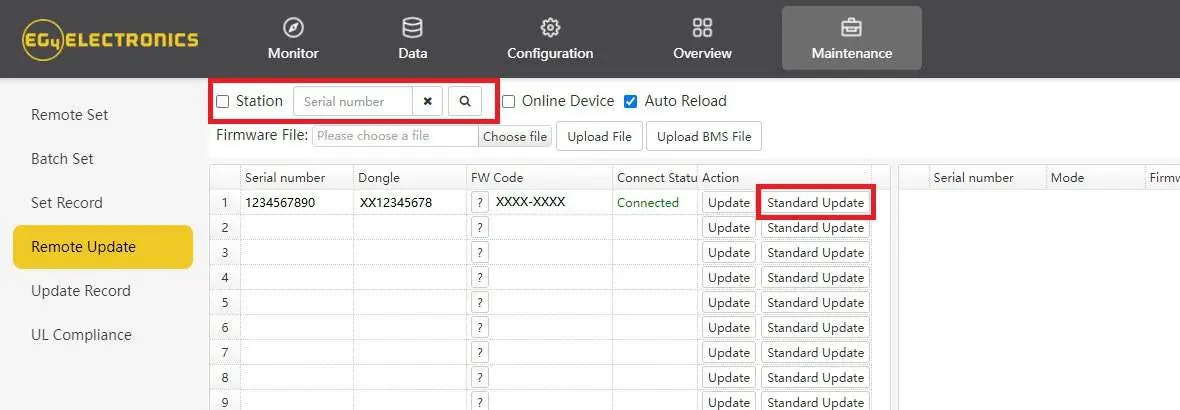
Firmware Update via Monitor Center (Website)
- Log into the EG4 Electronics Monitor System.
- Navigate to 'Maintenance' and select 'Remote Update'.
- Select the desired inverter from the list.
- Click 'Standard Update' to begin the process.
The latest firmware version will be displayed in the bottom right window once the update is complete.
Manufacturer information
EG4 Electronics
Practical help
Common problems
Firmware update fails via app
Ensure the Wi-Fi dongle is securely connected and configured. Verify the mobile device has sufficient battery life and that the app remains open during the process.
Cannot locate correct firmware file
Contact your distributor to obtain the most up-to-date firmware files for your specific unit.
Before use
- Ensure all AC/DC breakers are in the 'off' or 'open' position before installation.
- Verify all wiring meets local and national standards.
- Use a voltmeter to confirm no voltage is present before working on the unit.
- Ensure the Wi-Fi dongle is securely connected and configured.
- Wear appropriate personal protective equipment (PPE).
Specs in practice
- Max. AC Input Power
- The maximum power the inverter can accept from the grid or generator (12000W).
- Max. Charge/Discharge Current
- The maximum current capacity for battery charging and discharging (167A @ 48 VDC).
- Ingress Protection Rating
- IP65 rating indicates the unit is protected against dust ingress and low-pressure water jets.
Images and diagrams
- The firmware update interface in the EG4 Electronics app requires selecting 'LOCAL CONNECT' followed by the 'Set' button to access the update options.
- The Monitor Center website interface allows for batch or individual updates via the 'Maintenance' tab.
Model compatibility
- Compatible with both Lead-Acid and Lithium battery types.
- Requires L1/L2/N connection for 120/240VAC input.

Manual page author
Emily Carter
User documentation editor
Prepares concise manual descriptions and highlights the most useful setup, operation, and maintenance information for readers.