Power / Solar Inverters
LCD Firmware Update Guide for EG4 12kPV Hybrid Inverter
A step-by-step guide for updating the LCD firmware on the EG4 12kPV Hybrid Inverter via USB flash drive, including formatting requirements, file preparation, and installation procedures.
Table of contents
Quick guide from the manual
This document provides instructions for updating the LCD firmware on the EG4 12kPV Hybrid Inverter. The process involves formatting a USB flash drive, downloading the firmware from the EG4 website, and installing it via the communications board USB2 port. Ensure your USB flash drive is 16GB or smaller for compatibility.
Formatting the USB Flash Drive
Before starting the update, the USB flash drive must be prepared correctly:
- Plug the USB flash drive into a Windows computer.
- Open File Explorer and locate the USB drive.
- Right-click the drive and select Format.
- Ensure the Capacity is set to 2, 4, 8, or 16GB.
- Set File system to FAT32.
- Set Allocation unit size to 4096 bytes.
- Deselect the Quick Format checkbox.
- Select Start to begin formatting.
Downloading and Unzipping Firmware
Follow these steps to prepare the firmware files:
- Navigate to the 12kPV Hybrid Inverter product page on the official EG4 website.
- Download the 12kPV LCD Version 18 Firmware file from the Firmware tab.
- Right-click the downloaded file and unzip it to your desktop.
- Open the unzipped folder.
- Copy the DWIN_SET folder.
- Paste the DWIN_SET folder directly onto the USB drive.
- Safely remove the USB drive from the computer.
Installing the Update
Once the USB drive is prepared, perform the following steps to update the inverter:
- Power off the inverter.
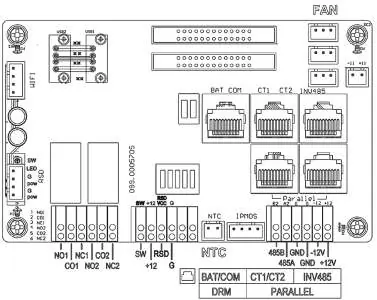
- Plug the flash drive into the USB2 port on the communications board.
- Power on the inverter. The update will begin automatically, and the screen will display a start-up screen for several minutes.
- After approximately 3 minutes, the screen will restart and return to the standard home screen.
- Remove the USB flash drive from the communications board.
Verification
To confirm the update was successful, check the LCD version number displayed in the lower right-hand corner of the physical display.
Manufacturer information
EG4 Electronics
Practical help
Common problems
Update does not start automatically
Ensure the USB flash drive is formatted to FAT32 with an allocation unit size of 4096 bytes and that the DWIN_SET folder is in the root directory.
USB drive not recognized
Ensure the USB flash drive capacity is 16GB or smaller.
Before use
- USB flash drive (16GB or smaller)
- Windows computer for formatting
- Downloaded firmware file from the EG4 website
- Access to the inverter communications board
Specs in practice
- Allocation Unit Size
- Must be set to 4096 bytes.
Images and diagrams
- The communications board diagram identifies the location of the USB2 port required for the update process.
Model compatibility
- This procedure is specifically for the EG4 12kPV Hybrid Inverter.

Manual page author
David Miller
Documentation analyst
Organizes user manual content into clear summaries, with attention to model details, product context, and everyday usability.