Power / Solar Inverters
Quick Reference Guide for SMA Sunny Tripower X Inverter
Quick reference guide for the SMA Sunny Tripower X (STP 20-US-50, STP 25-US-50, STP 30-US-50) solar inverter. Includes installation, electrical connection, safety instructions, and commissioning steps.
Table of contents
Manual images
Click an image to enlargeQuick guide from the manual
This document provides essential safety, installation, and commissioning information for the SMA Sunny Tripower X series (STP 20-US-50, STP 25-US-50, STP 30-US-50). All tasks must be performed by qualified personnel.
Safety Instructions
Danger to life due to electric shock: Disconnect the product from voltage sources before working. Wait 5 minutes after disconnecting before touching any parts. Do not touch PV module cables except by their insulation.
Fire and explosion risks: In case of a fault, do not perform direct actions on the product. Ensure unauthorized persons have no access. Use personal protective equipment (safety gloves, eye/face protection, respiratory protection) when performing troubleshooting or repairs.
Environmental precautions: Only open the product if the ambient temperature is not below -5°C. Ensure the environment is free of sand, dust, and moisture. Ground yourself before touching any electronic components to prevent electrostatic discharge.
Installation
The product is suitable for indoor and outdoor use. Ensure the mounting location allows for proper heat dissipation and complies with the weight requirements of the unit. Use the provided carrying handles or a hoist system for transport and mounting.
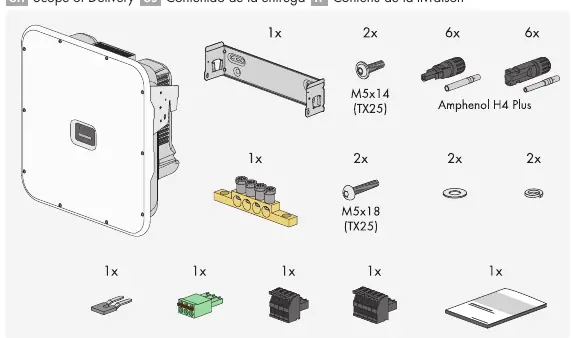
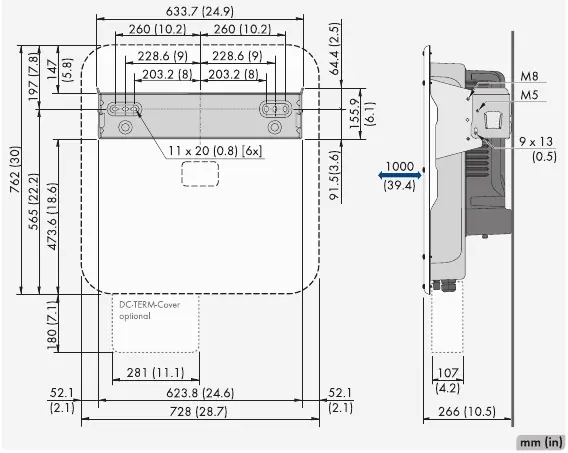
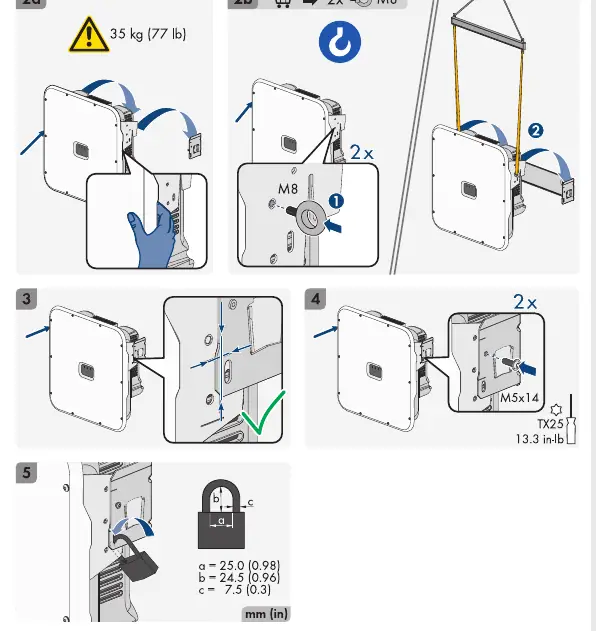
Electrical Connection
Grounding: Connect the equipment grounding conductor to the designated position.
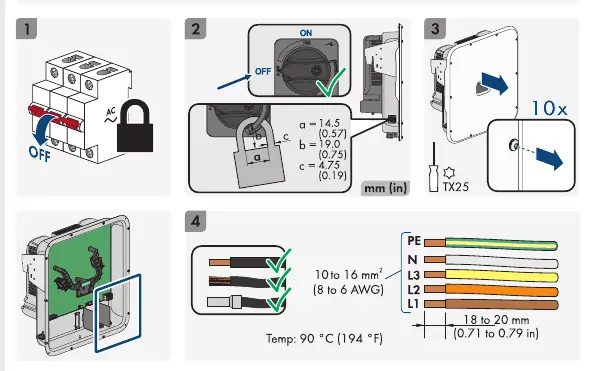
AC Connection: Ensure the grid connection is configured according to local standards. The inverter requires a three-phase connection.
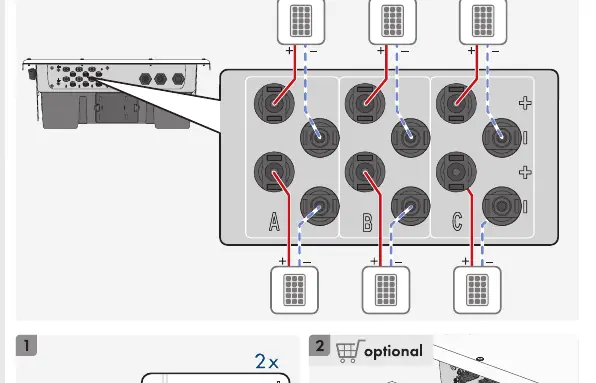
DC Connection: Connect PV strings to the DC inputs. Ensure the DC load-break switch is in the correct position during installation.
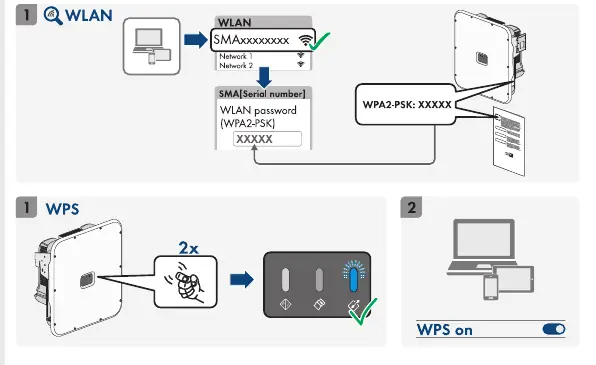
Communication: The inverter supports network connections via LAN or WLAN. DHCP is recommended for network settings.
Commissioning
Access the user interface via WLAN or LAN to configure the inverter. During commissioning, ensure the correct country data set is selected to avoid disturbances in the PV system and grid operator issues.
Technical Data
The Sunny Tripower X features 3 MPP trackers and is transformerless. It converts DC from PV modules to grid-compliant three-phase AC. Refer to the technical data section for specific voltage, current, and power ratings for each model (20-US, 25-US, 30-US).
Practical help
Common problems
Ground fault
Disconnect from voltage sources, ensure no voltage is present, and wait 5 minutes before touching any system components.
Overvoltage/Lightning
Ensure all network devices are integrated into existing surge protection. Use suitable surge protection for outdoor network cables.
Enclosure seal damage in freezing conditions
Only open the product if the ambient temperature is not below -5°C. Remove any ice from the seal before opening.
Before use
- Ensure tasks are performed by qualified personnel.
- Verify ambient temperature is above -5°C.
- Ensure proper surge protection is installed.
- Verify the country data set is configured correctly.
- Use appropriate personal protective equipment (PPE).
Images and diagrams
- Mounting steps show bracket installation and securing the inverter.
- AC connection diagram shows wiring for L1, L2, L3, N, and PE.
- DC connection diagram shows PV string inputs.
Model compatibility
- Compatible with residential and industrial environments.
- Requires DHCP server for network configuration.
- Requires correct country data set configuration.

Manual page author
Michael Turner
Technical manual editor
Reviews PDF manuals for structure, safety notes, and practical product details so readers can find the right information quickly.