Lighting / Stage Lighting
User Manual for Elation Professional Pixel Driver 1000IP
Quick guide for the Elation Professional Pixel Driver 1000IP. Includes installation, rack mounting, daisy-chaining, RDM setup, pixel control modes, and system menu navigation.
Table of contents
Manual images
Click an image to enlargeQuick guide from the manual
The Elation Professional Pixel Driver 1000IP is a professional lighting controller designed for driving various LED fixtures. This guide covers essential installation, configuration, and operation procedures. Always ensure the device is installed by qualified personnel and that all local electrical codes are followed.
Safety Guidelines
- IP65 Rating: The fixture is dust-tight and protected against water projected by a nozzle from any direction. It is not protected against immersion in liquid.
- Grounding: Protection Class 1 - the fixture must be properly grounded.
- Maintenance: There are no user-serviceable parts inside. Do not attempt repairs yourself, as this will void the warranty.
- Ventilation: Never block ventilation holes. Maintain at least 6 inches (15cm) of clearance between the device and any wall.
- Connections: Disconnect power before performing any maintenance or making connections. Never plug the unit into a dimmer pack.
Installation
The device can be installed in several ways:

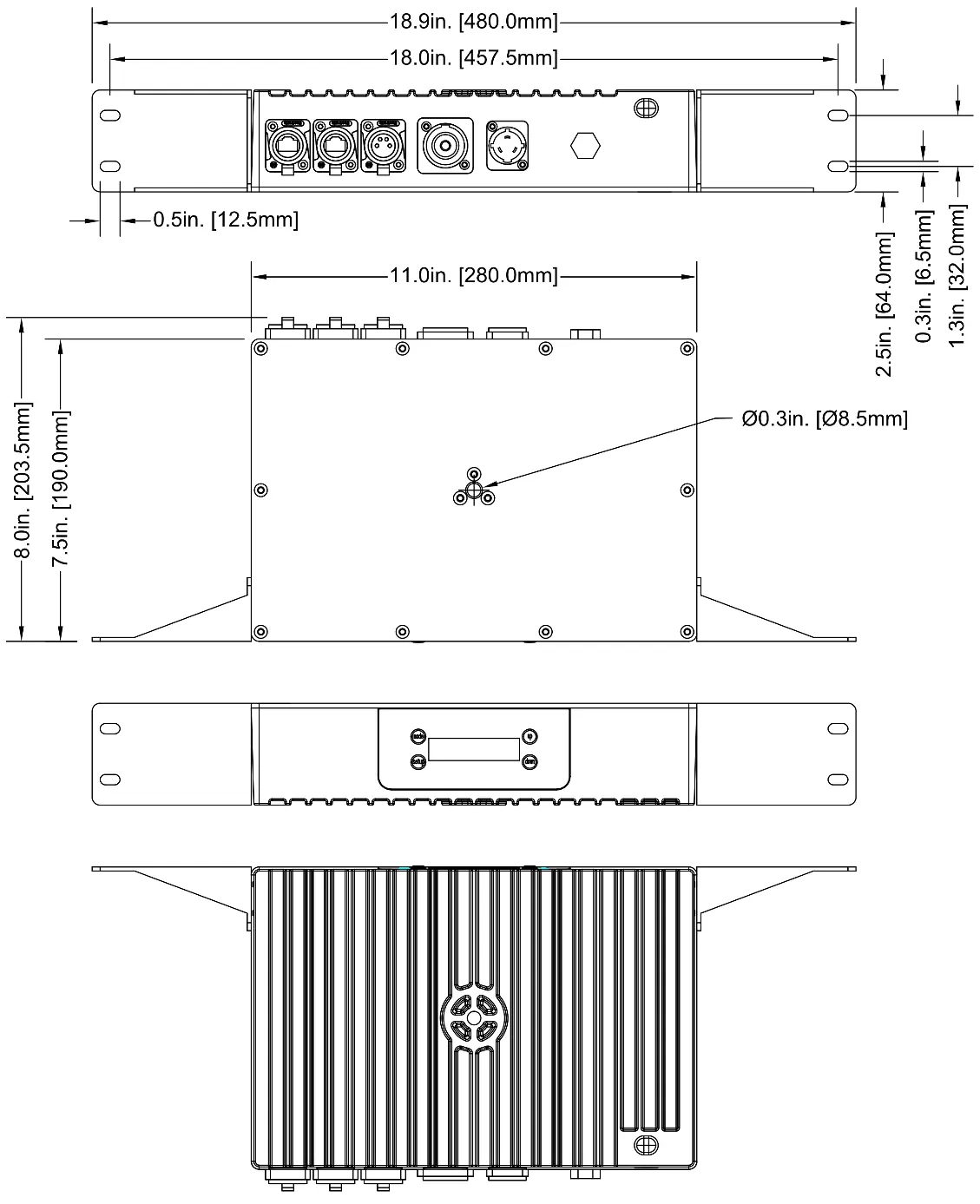
- Rack Mounting: Use the removable mounting brackets on the sides of the device. Secure the unit using all four mounting points on the brackets.
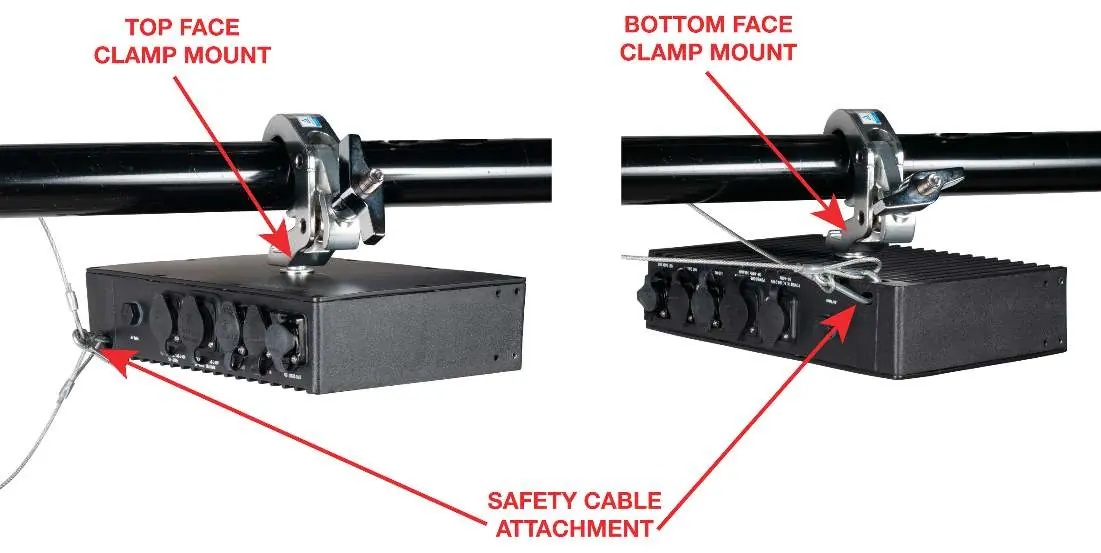
- Clamp Mounting: Use the mounting clamp attachment points on the top or bottom face. Always attach a safety cable to the designated safety cable rigging point when installing in a suspended environment.
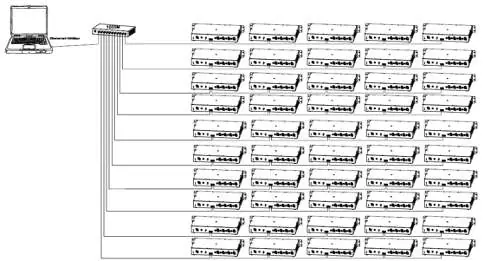
- Daisy-Chaining: Up to five (5) Pixel Driver 1000IP devices may be daisy-chained directly together. Do not exceed five devices in a single chain. For larger networks, use a one-gigabit ethernet switch to expand the network, with a maximum of ten branches and fifty devices total.
Remote Device Management (RDM)
RDM allows for bi-directional communication between the controller and the fixture. Ensure all equipment in the system, including DMX splitters and wireless systems, is RDM-enabled for proper functionality. RDM allows remote modification of settings like DMX Address, DMX Channel Mode, and Temperature Sensors.
Driver Output Limitations
Each driver unit has a maximum pixel capacity of 1020 pixels (for KlingNet/ArtNet/sACN). The number of fixtures you can connect depends on the pixel count of each fixture. For example, if using Pixel Bar 120IP (120 pixels each), you can connect up to 8 units per driver (960 pixels total).
RGB Pixel Control Modes
You can adjust the RGB pixel control mode to balance resolution and control channel usage. In each mode, the first number denotes the number of control groups, and the second number denotes the number of individual LEDs per group. Each control group occupies 3 DMX channels (Red, Green, Blue).
Control Panel and System Menu
The control panel features four buttons for navigation:
- MODE: Cycle through main menu options or return to the previous menu.
- SETUP: Select an option or cycle through sub-menu options.
- UP/DOWN: Adjust values of sub-menu options.
The system menu allows configuration of Dimmer Mode, KlingNet Mode, ArtNet Mode, sACN Control Mode, Built-in Program Mode, and various Setup Options (LCD Backlight, Display Reverse, HiPower Mode, System Reset).
Specifications
- AC Input: 100-240V, 50/60Hz, 2.2A
- DC Output: 24V, 8.4A
- Max Power Consumption: 200W
- Operating Temperature: -4°F to 113°F (-20°C to 45°C)
- Connections: 2 RJ45 Ethernet Ports, 1 4-pin Power/Data Output
Practical help
Common problems
Device not responding to RDM commands
Ensure all equipment in the signal chain, including DMX splitters and wireless systems, is RDM-enabled.
Daisy-chain limit exceeded
Do not connect more than 5 devices directly together. Use a one-gigabit ethernet switch for larger configurations.
Pixel control resolution is too low
Adjust the RGB Pixel Control Mode in the system menu to a setting with more control groups (e.g., 15x2 instead of 10x3).
Before use
- Verify the local power outlet matches the required voltage (100-240V).
- Ensure the mounting surface is certified to support the weight of the device.
- Check that all necessary cables (Twist-Lock Power, 4-pin Data) are included.
- Ensure the device is installed in a well-ventilated area with 6 inches (15cm) of clearance.
- Confirm all connected fixtures are compatible with the driver.
Specs in practice
- Max Pixels per Driver
- 1020 pixels total capacity for KlingNet/ArtNet/sACN protocols.
- Power Consumption
- 200W maximum power draw.
Images and diagrams
- The overview diagram identifies the Mode, Setup, Up, and Down buttons, as well as Power In/Out, LED Out, and Net Data ports.
- Installation diagrams illustrate both rack mounting and clamp mounting procedures, including safety cable attachment points.
Model compatibility
- Compatible with Pixel Bar 30IP, 60IP, 120IP, LED Tape, and Pixel Wash 40IP.

Manual page author
Michael Turner
Technical manual editor
Reviews PDF manuals for structure, safety notes, and practical product details so readers can find the right information quickly.