Furniture / Home Furnishing
Elgato Cold Shoe Adjustable Mount User Guide
Comprehensive guide for the Elgato Cold Shoe Adjustable Mount, covering setup, adjustment, and safety instructions for optimal use with your lighting equipment.
Table of contents
Product Overview
The Elgato Cold Shoe is a versatile, adjustable mounting solution designed for creators who need precise control over their lighting equipment. This mount features a robust construction that allows for smooth tilting and rotation, ensuring your lights are positioned exactly where you need them for professional-grade content creation. Whether you are setting up a studio or a mobile rig, this mount provides the stability and flexibility required for various lighting configurations.
Key Components
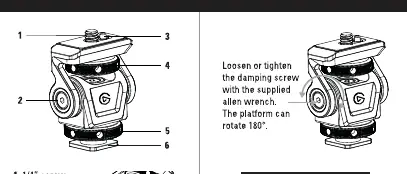
Understanding the anatomy of your mount is essential for proper operation. The device consists of a standard 1/4 inch screw for attaching lights, a damping screw for adjusting resistance, an Arri pin lock for secure positioning, and a locking knob to fix the angle. The base features a standard cold shoe interface, making it compatible with most camera hot shoes and cage systems. Additionally, a 1/4 inch thread is located at the bottom for tripod mounting, and an included Allen wrench allows for precise adjustments to the damping mechanism.
Setup and Adjustment
To begin using your mount, attach your lighting device to the top 1/4 inch screw. Ensure the connection is firm but avoid over-tightening to prevent damage to the threads. The mount offers a 180-degree rotation range, allowing for significant flexibility in light direction. If the platform feels too loose or too stiff, use the provided Allen wrench to adjust the damping screw. By tightening or loosening this screw, you can customize the resistance to match the weight of your equipment, ensuring the light stays in place once positioned.
Safety and Maintenance
Safety is paramount when handling camera and lighting gear. The Elgato Cold Shoe is rated for a maximum load of 3 kg (6.6 lbs). Exceeding this weight limit may cause the mount to fail or damage your equipment. Always ensure that the cold shoe or tripod connection is fully tightened before use. Do not force the rotation beyond its mechanical limits. For maintenance, keep the mount clean and free of debris. If the movement becomes gritty, ensure the damping screw is properly adjusted and the pivot points are clean. Avoid using harsh chemicals for cleaning; a soft, dry cloth is sufficient to maintain the finish of the device.
Manufacturer information
Elgato
Practical help
Common problems
Mount feels too loose or stiff when adjusting angle
Use the provided Allen wrench to tighten or loosen the damping screw until the desired resistance is achieved.
Equipment is not staying in the desired position
Ensure the locking knob is fully tightened and check that the load does not exceed the 3 kg limit.
Before use
- Verify that the lighting equipment weight is under 3 kg.
- Ensure the cold shoe or 1/4 inch thread connection is secure.
- Check that the damping screw is adjusted to your preference.
- Confirm the Arri pin lock is engaged if using compatible gear.
Specs in practice
- Maximum load
- The weight limit of 3 kg (6.6 lbs) that the mount can safely support.
Images and diagrams
- 1/4 inch screw for light attachment.
- Damping screw for adjusting tilt resistance.
- Locking knob to secure the angle.
- Cold shoe base for camera or cage mounting.
- 1/4 inch thread for tripod mounting.
Model compatibility
- Compatible with standard camera cold shoes.
- Compatible with standard 1/4 inch tripod threads.

Manual page author
David Miller
Documentation analyst
Organizes user manual content into clear summaries, with attention to model details, product context, and everyday usability.