Electronics / Cameras
Elgato Solid Arm User Guide
Comprehensive setup and safety guide for the Elgato Solid Arm, an auxiliary holding arm for cameras and accessories, ensuring stable mounting and proper maintenance.
Table of contents
Product Overview
The Elgato Solid Arm is a versatile auxiliary holding arm designed to provide a stable mounting solution for cameras and various accessories. It is part of the Multi Mount system, offering a robust build to support your equipment during recording or streaming sessions. With a maximum load capacity of 2 kg (4.5 lbs), it is engineered to hold your gear securely in place.
Installation and Setup
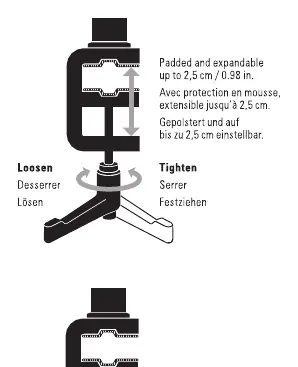
To ensure the safety of your equipment, always mount the Solid Arm to a level, stable surface. Unstable or uneven surfaces can cause the arm to tip over, potentially resulting in damage to your device or personal injury. When attaching the arm, ensure the clamp is securely tightened. The arm features a padded and expandable clamp that can accommodate surfaces up to 2.5 cm (0.98 in) thick. Be careful not to overtighten the clamp, as this may damage the mechanism or the mounting surface.
Operation and Adjustments
The Solid Arm is designed for easy positioning. To adjust the angle or orientation, you can use the integrated ratchet mechanism. Simply push the button to reposition the ratchet after tightening, allowing you to achieve the perfect angle for your camera or accessory. Always ensure that the arm is locked firmly in place before attaching your equipment to prevent accidental drops or shifts during use.
Safety and Maintenance
Proper care will extend the life of your Solid Arm. Keep the pole free from dirt and dust. If the surface becomes dirty, wipe it lightly with a soft cloth moistened with a little water and a mild, neutral detergent. Do not use benzene, thinner, or other volatile agents, as these can cause permanent damage to the finish. Avoid exposing the product to direct sunlight for long periods and do not set it up in areas susceptible to strong air currents, as drafts can cause movement that might lead to instability. Always be especially cautious when setting up the equipment near children. The product is intended for specific uses as outlined in the documentation; do not use it for applications other than those specified.
Manufacturer information
Elgato
Practical help
Common problems
Arm is unstable or tipping
Ensure the arm is mounted on a level, stable surface and that the clamp is fully tightened.
Difficulty adjusting the angle
Push the button on the ratchet mechanism to release the lock and reposition the arm as needed.
Before use
- Verify the mounting surface is level and stable.
- Ensure the load does not exceed 2 kg (4.5 lbs).
- Check that the clamp is securely fastened but not overtightened.
- Confirm the area is free from strong air currents or drafts.
Specs in practice
- Maximum Load
- The maximum weight the arm can safely support is 2 kg (4.5 lbs).
- Clamp Capacity
- The padded clamp can expand to fit surfaces up to 2.5 cm (0.98 in) thick.
Images and diagrams
- The diagram illustrates the 26 cm length of the arm.
- It highlights the ratchet button used for repositioning.
- It shows the correct method for tightening and loosening the clamp.
Model compatibility
- Designed as an accessory for the Elgato Multi Mount system.

Manual page author
David Miller
Documentation analyst
Organizes user manual content into clear summaries, with attention to model details, product context, and everyday usability.