Electronics / Cameras
Elgato Wall Mount Multi Mount Essential User Guide
Comprehensive setup and safety guide for the Elgato Wall Mount, an articulated arm designed for cameras and lighting equipment.
Table of contents
Product Overview
The Elgato Wall Mount is a versatile, articulated mounting solution designed to provide a stable and adjustable base for cameras, lights, and other compatible equipment. Engineered for durability and precision, this mount allows users to position their gear exactly where it is needed, making it an essential tool for content creators, streamers, and professionals looking to optimize their workspace setup.
Safety and Installation
Proper installation is critical for the safety and longevity of your equipment. Before beginning the installation process, ensure that you have selected appropriate mounting materials suitable for your specific wall type. Different wall materials, such as drywall, brick, or concrete, require different hardware to ensure a secure hold. Always be particularly cautious when installing the mount in areas where children are present to prevent accidental injury or equipment damage.
The mount is designed for indoor use. Avoid exposing the product to direct sunlight for extended periods, as this can degrade the materials over time. Ensure the mount is securely fastened to the wall surface before attaching any cameras or lighting equipment. The maximum load capacity for this mount is 1.5 kg (3.5 lbs). Exceeding this weight limit can cause the mount to fail, potentially damaging your equipment or causing injury.
Maintenance and Care
To keep your Elgato Wall Mount in optimal condition, it is important to keep the product free from dirt and dust. Regular cleaning will prevent the buildup of debris that could affect the articulation of the arm. If the mount becomes dirty, wipe it down gently with a soft cloth that has been lightly moistened with a mixture of water and a mild, neutral detergent.
Do not use harsh chemicals for cleaning. Specifically, avoid using benzene, thinner, or other volatile agents, as these substances can cause permanent damage to the finish and structural integrity of the mount. Always ensure the mount is completely dry before re-attaching your equipment. By following these simple maintenance steps, you can ensure that your Wall Mount remains a reliable part of your setup for years to come. Do not use the product for any applications other than those specified in the official documentation.
Manufacturer information
Elgato
Practical help
Common problems
Mount feels unstable or loose
Verify that the mounting hardware used is appropriate for your specific wall type and that all screws are tightened securely.
Surface finish is damaged
Ensure you are only using water and mild neutral detergent for cleaning; never use benzene or thinners.
Before use
- Verify wall material suitability
- Ensure mounting hardware matches wall type
- Check that the installation area is safe for children
- Confirm equipment weight is under 1.5 kg
- Clean the mounting surface of dust and debris
Specs in practice
- Maximum Load
- The maximum weight the arm can safely support is 1.5 kg (3.5 lbs).
- Mounting Screw
- Standard 1/4 inch thread for camera and accessory compatibility.
Images and diagrams
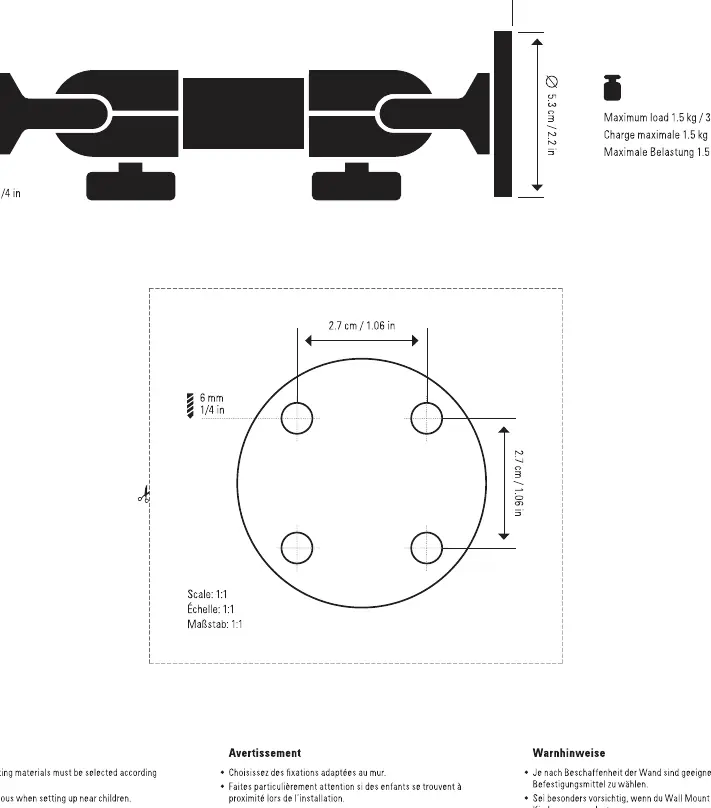
- The diagram illustrates the articulated arm dimensions and the 1/4 inch mounting thread.
- The base plate layout shows the 2.7 cm spacing between mounting holes for secure wall attachment.
Model compatibility
- Designed for use with cameras and lighting equipment weighing up to 1.5 kg.
- Requires wall-specific mounting hardware not included in the package.

Manual page author
Michael Turner
Technical manual editor
Reviews PDF manuals for structure, safety notes, and practical product details so readers can find the right information quickly.