HVAC / Thermostats & Controls
Sensi Smart Thermostat Humidity Control Guide
A comprehensive guide for configuring humidity control on Sensi Smart Thermostats. Includes wiring diagrams, terminal compatibility, menu settings, and app integration steps for models 1F87U-42WF, ST55, NH-AWIFI, and OH-AWIFI.
Quick answers from the manual
Quick answer
- To enable humidity control, wire your humidifier to the Y2/* terminal or dehumidifier to the W2/* terminal, then enable the accessory in the thermostat's configuration menu (H AA for humidification, dH AA for dehumidification). p. 2, 3, 5
Key actions
- Enable humidification in menu p. 5
- Enable dehumidification in menu p. 5
Problems and fixes
Humidity options not in menu
Ensure HVAC is set to single-stage.
p. 5Technical specifications
| Parameter | Value | Meaning | Pages |
|---|---|---|---|
| Humidification Terminal | Y2/* | Terminal for humidification control | p. 2, 7 |
| Dehumidification Terminal | W2/* | Terminal for dehumidification control | p. 2, 7 |
Where to find it in the PDF
- Wiring and Compatibility p. 2, 3
- Configuration Menu p. 4, 5
Table of contents
Manual images
Click an image to enlargeQuick Guide
This guide provides instructions for enabling and configuring humidity control features on your Sensi Smart Thermostat. Before proceeding, ensure your thermostat is connected to Wi-Fi and registered to your account to receive the latest firmware updates. Note that humidity control requires your HVAC system to be configured for single-stage operation.
Installation and Wiring
Humidity control requires specific terminal connections on the thermostat backplate:
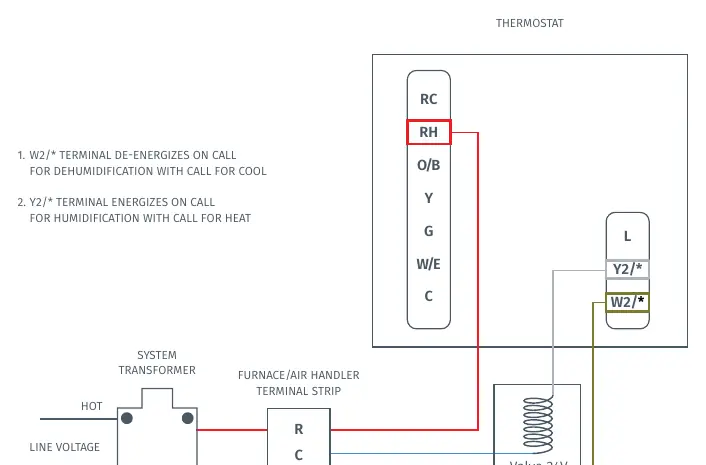
- Humidification: Use the Y2/* terminal.
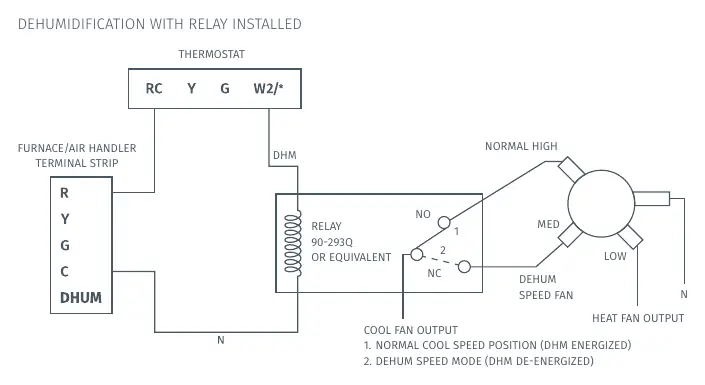
- Dehumidification: Use the W2/* terminal.
Refer to the wiring diagrams in the manual for specific connections to your furnace or air handler terminal strip. Ensure your system is compatible with 24VAC accessories.
Configuration Menu
To enable humidity control, you must access the configuration menu on the thermostat:
- H AA: Humidification Add accessory (Set to On).
- H SP: Humidification Setpoint (Adjust percentage).
- dH AA: Dehumidification Add accessory (Set to Od for optimal dehumidification or Oc for optimal comfort).
- dH SP: Dehumidification Setpoint (Adjust percentage).
Setting Up Wired Humidification
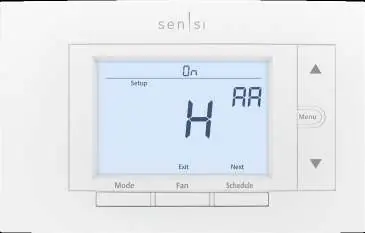
- With the thermostat showing room temperature, press Menu.
- Press Next 7 times to reach the humidity menu.
- Use the Up Arrow to toggle Humidity to On.
- Press Next.
- Use the Up Arrow to set your desired humidity percentage (SP).
- Press Exit.
Setting Up Wired Dehumidification
- With the thermostat showing room temperature, press Menu.
- Press Next 8 times (or until you find the dH AA menu).
- Use the Up Arrow to toggle Dehumidity to On.
- Press Next.
- Use the Up Arrow to set your desired humidity percentage (SP).
- Press Exit.
App Control
After enabling the features on the thermostat, you can adjust settings via the Sensi app:
- Open the Sensi app and select your thermostat.
- Tap the Settings Gear icon.
- Select System Settings.
- Scroll to the Humidity Control section to toggle features and adjust setpoints.
If you do not have wired dehumidification configured, the app offers an 'overcooling' option, which uses your cooling system to remove moisture by overcooling the space by up to 3 degrees.
Frequently Asked Questions
If your system is unable to reach the humidity setpoint, it may be due to extreme outdoor temperatures or equipment size limitations. The ideal indoor humidity level is generally between 30-50% RH. If condensation appears on windows in cold weather, lower the humidity setpoint.
Practical help
Common problems
System unable to reach humidity setpoint
In extremely cold/dry or hot/humid climates, the equipment may not be sized to reach the setpoint. Adjust expectations based on equipment capacity.
Condensation on windows
Lower the humidity setpoint during cold weather.
Humidity options missing from menu
Ensure your HVAC settings are configured for single-stage operation. Multi-stage configurations do not support these humidity options.
Before use
- Ensure thermostat is connected to Wi-Fi.
- Register thermostat to customer account for firmware updates.
- Verify HVAC system is configured for single-stage operation.
- Confirm 24VAC accessory compatibility.
Images and diagrams
- Wiring diagram shows connection of 24V humidifier valve to Y2/* terminal.
- Wiring diagram shows relay installation for dehumidification using W2/* terminal.
Model compatibility
- Compatible with Sensi Touch (1F95U) and Sensi (1F87U).
- 1F86U and UP500W models are not compatible.
- Sensi does not support independent (call for heat) humidification or (call for cool) dehumidification.

Manual page author
Michael Turner
Technical manual editor
Reviews PDF manuals for structure, safety notes, and practical product details so readers can find the right information quickly.