HVAC / Thermostats & Controls
User and Installation Guide for Drayton Digistat 22902 Programmable 2-Channel Room Thermostat
Comprehensive user and installation guide for the Drayton Digistat 22902 programmable 2-channel room thermostat. Includes detailed wiring instructions, installer settings, programming schedules, and technical specifications.
Quick answers from the manual
Quick answer
- The Drayton Digistat 22902 is a programmable 2-channel room thermostat. It allows for 24-hour, 5-2 day, or 7-day programming with up to 8 time/temperature events per day. p. 3, 4
Key actions
- Access Installer Options p. 2
- Set Clock p. 3
- Manual Override p. 3
First start
- Installation sequence p. 1
Problems and fixes
Sensor fault
Central heating output is reduced to 30% by turning heating ON for 3 minutes, then OFF for 7 minutes.
p. 2Maintenance and reset
- Factory Reset p. 2
Technical specifications
| Parameter | Value | Meaning | Pages |
|---|---|---|---|
| Power supply | 230VAC +/-10%, 50Hz | Operating voltage | p. 3 |
| Temperature range | 5°C to 30°C | Adjustable temperature range | p. 3 |
Where to find it in the PDF
- Installation Guide p. 1
- Installer Options p. 2, 3
- User Guide p. 3, 4
Table of contents
Manual images
Click an image to enlargeQuick Guide from the Manual
The Drayton Digistat 22902 is a programmable 2-channel room thermostat designed for fixed wiring. It supports 24-hour, 5-2 day, or 7-day programming with up to 8 time/temperature events per day. Before installation, ensure the mains supply is switched off. The device requires professional installation if you are not qualified. It is compatible with OpenTherm boilers, which requires specific wiring.
Installation
Before Installation: Ensure the mains supply is switched off. Wiring must conform to current IEE regulations. If you lack the knowledge to install the thermostat safely, arrange for a competent electrician.
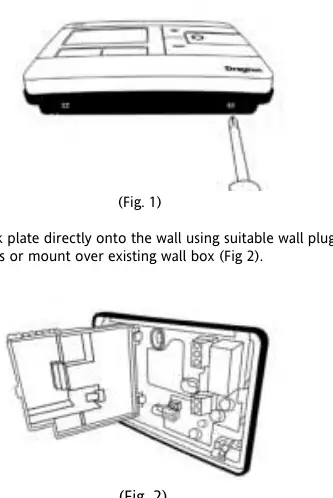
- Remove Cover: Release the 2 screws at the bottom to remove the front cover. Mounting holes and electrical connections are located underneath the hinged black cover.
- Mounting: Fix the back plate directly onto the wall using suitable wall plugs and screws, or mount it over an existing wall box.
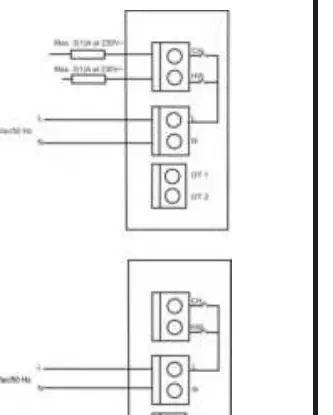
- Wiring: Complete the wiring according to the connections shown in the wiring diagram (Fig 3). If your boiler supports OpenTherm, connect cables to terminals OT1 and OT2 (polarity is not important). Wire L and N from a separate supply with a 3A fuse.
- Final Assembly: Close the black hinged terminal cover and replace the front cover by locating the two latches at the top, then fasten the 2 screws at the bottom.
Installer Options
To access the Installer Options menu, press the settings button for 3 seconds. This allows access to User Menu 01, Advanced User Settings Menu 02, Installer Settings 03, and Service Interval Settings 04. Use the + and - buttons to scroll and the O button to select.
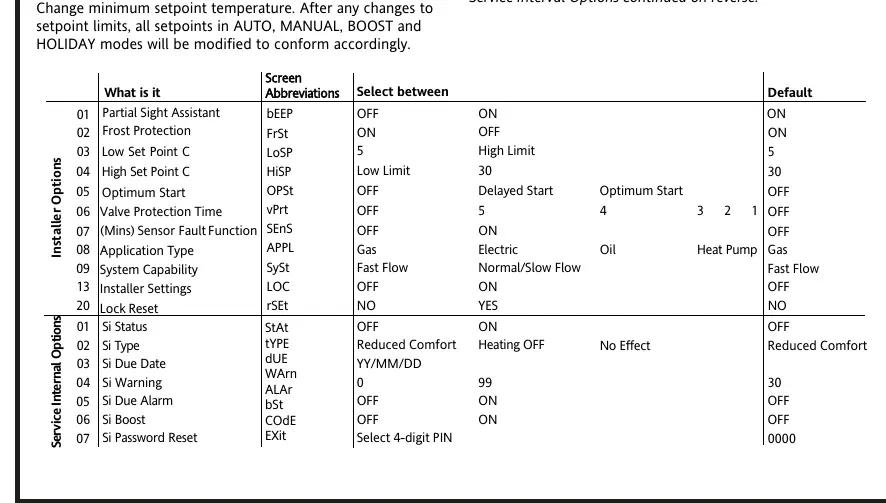
- Frost Protection (Option 02): Switches on heating if temperature falls to 5°C.
- Optimum Start (Option 05): Adjusts the thermostat setpoint early so the ambient temperature is at the required level when the next event starts.
- Valve Protection (Option 06): Operates relay output for at least one minute each week.
- Installer Settings Lock (Option 13): Allows locking of installer settings with a 3-digit code.
User Guide and Programming
Clock Setting: Hold the cog button until User 01 appears, select Advanced 02, then enter Time settings. Adjust using + and - buttons and press O to save.
General Operation: In "Auto Mode" (calendar icon visible), temperature can be changed temporarily using + and - buttons. The unit will revert to the programmed temperature at the next event.
Programming: The device comes with pre-set programs for 5-2 day or 7-day schedules. You can manually add up to 8 time periods per day by selecting the "Add" option when the SAVE option is on the screen.
Technical Data
- Power supply: 230VAC +/-10%, 50Hz
- Temperature range: 5°C to 30°C
- Protection level: IP30
- Operating Frequency: 2402-2480 MHz
- Max RF Power: +10dBm
Practical help
Common problems
Thermostat not heating
Check if the unit is in 'OFF' mode or if the temperature is set below the current room temperature.
Heating not turning on
Ensure the wiring is correct and the mains supply is switched on.
Settings locked
Use the Installer Settings Lock (Option 13) to check if a code is required to modify settings.
Before use
- Ensure mains supply is switched off before installation.
- Verify wiring conforms to current IEE regulations.
- Ensure the thermostat is not covered by curtains or furniture.
- Check if your boiler supports OpenTherm for specific wiring instructions.
Specs in practice
- Power supply
- 230VAC +/-10%, 50Hz
- Temperature range
- 5°C to 30°C
- Protection level
- IP30 (Protected against solid objects over 2.5mm)
- Operating Frequency
- 2402-2480 MHz (Bluetooth)
Images and diagrams
- Fig 1: Removing the front cover to access mounting holes.
- Fig 2: Mounting the back plate to the wall.
- Fig 3: Wiring diagram for standard and OpenTherm connections.
- Fig 4: Closing the terminal cover and replacing the front cover.
Model compatibility
- Designed for fixed wiring only.
- Compatible with OpenTherm boilers (requires specific wiring to OT1/OT2 terminals).

Manual page author
Emily Carter
User documentation editor
Prepares concise manual descriptions and highlights the most useful setup, operation, and maintenance information for readers.