Electronics / Surveillance Monitors
User Manual for Ernitec 27 Inch Surveillance Monitor 0070-24127-F-W
Quick guide for the Ernitec 27-inch surveillance monitor. Learn how to connect, configure OSD settings, troubleshoot common issues, and perform maintenance.
Table of contents
Manual images
Click an image to enlargeQuick guide from the manual
This monitor is designed for 24/7 surveillance use. To get started, ensure the monitor is placed on a stable surface away from heat sources and moisture. Connect the power supply to the DC 12V input and your video source to either the HDMI or DP port. Use the control panel buttons on the monitor to navigate the On-Screen Display (OSD) menu for adjustments.
Safety instructions
- Do not expose the apparatus to rain or moisture.
- Keep the monitor away from heat sources like radiators or stoves.
- Clean only with a soft, dry, lint-free cloth.
- Do not block ventilation openings.
- Unplug the monitor during lightning storms or when unused for long periods.
- Use only attachments and accessories specified by the manufacturer.
- Refer all servicing to qualified service personnel.
Controls
The monitor features a simplified control panel with five buttons:
- 1 (AUTO): Selects the input source and makes menu selections.
- 2 (-): Lowers audio volume.
- 3 (+): Increases audio volume.
- 4 (MENU): Enters and exits the monitor's configuration menu.
- 5 (POWER): Turns the monitor on and off.
Connection options
The rear panel provides the following connection ports:
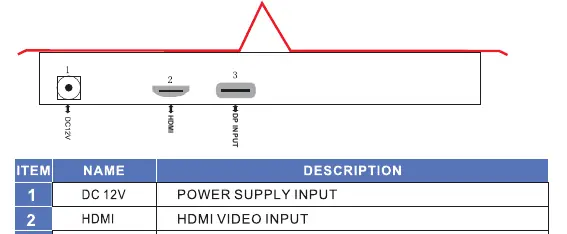
- DC 12V: Power supply input.
- HDMI: HDMI video input.
- DP: DisplayPort video input.
Basic OSD setup
The OSD menu allows you to customize your viewing experience:
- Color Settings Menu: Adjust Gamma, Temperature, Color Effect, and Demo modes.
- Advance Menu: Configure Auto Adjust, H Position, DDCCI, and DCR.
- Input Menu: Select between Auto Select, DP, and HDMI inputs.
- Audio Menu: Adjust Volume and Mute settings.
- Other Menu: Reset settings, adjust Menu Time, and OSD H/V Position.
- Information Menu: View monitor status information.
Troubleshooting
If you encounter issues, check the following before contacting support:
- No sound/picture: Check all cable connections, ensure the power button is pressed, and verify brightness/contrast settings.
- Normal picture but no sound: Check the volume settings and ensure the broadcast channel is working.
- Remote control not working: Check for obstructions, verify battery polarity, or install new batteries.
- Power turns off suddenly: Check if the sleep timer is active or if there is a power interruption.
- No output from one speaker: Adjust the balance in the menu.
Maintenance
To extend the lifetime of your monitor:
- Always turn off the power and unplug the cord before cleaning.
- Wipe the screen and cabinet with a soft, dry, lint-free cloth.
- Do not use abrasive cleaners or wet cloths.
- If storing for an extended period, disconnect the power cable.
Manufacturer information
Ernitec
Practical help
Common problems
No sound or picture
Check all cable connections, ensure the power button is pressed, and verify brightness/contrast settings.
Remote control does not work
Check for obstructions between the remote and monitor, verify battery polarity, or install new batteries.
Power turns off suddenly
Check if the sleep timer is enabled or if there is a power interruption.
No output from one speaker
Adjust the balance settings in the OSD menu.
Before use
- Ensure the monitor is placed on a stable surface.
- Check that all cables (power, video) are connected correctly.
- Ensure the power outlet is not overloaded.
- Verify the monitor is not near heat sources or water.
- Ensure ventilation openings are not blocked.
Images and diagrams
- The control panel is located on the monitor, featuring 5 buttons: Auto, -, +, Menu, and Power.
- The rear connection panel includes ports for DC 12V power, HDMI, and DP input.
Model compatibility
- Use only attachments/accessories specified by the manufacturer.
- Ensure the power source is a dedicated circuit to avoid interference.

Manual page author
Michael Turner
Technical manual editor
Reviews PDF manuals for structure, safety notes, and practical product details so readers can find the right information quickly.