Lighting / Stage Lighting
User Manual for Event Lighting NITROBALL 5x 12W LED RGBW Spherical Light
Quick guide for the Event Lighting NITROBALL. Learn about installation, DMX control, menu settings, fuse replacement, and technical specifications for this 5x 12W RGBW spherical light.
Table of contents
Manual images
Click an image to enlargeQuick Guide
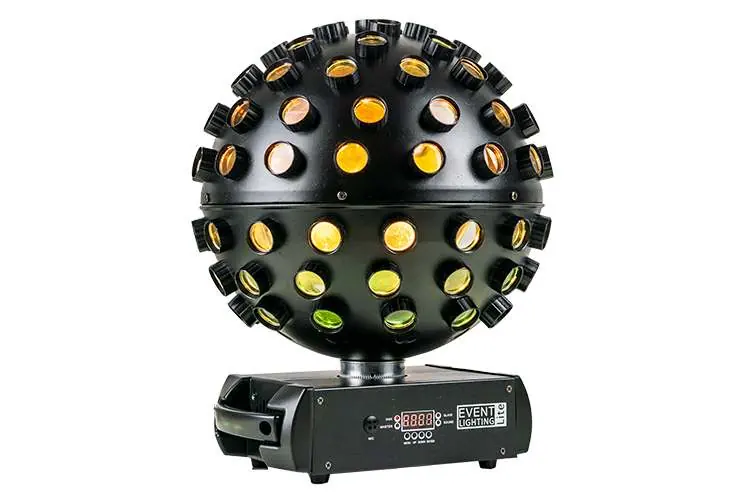
The Event Lighting NITROBALL is a 5x 12W LED RGBW spherical light designed for stage lighting. This manual provides essential information for safe operation, installation, and configuration. Always ensure the device is connected to a grounded and protected circuit and never connect it to a dimmer or rheostat.
Safety Instructions
- Ventilation: Install in a location with adequate ventilation, at least 50cm from adjacent surfaces.
- Mounting: Always use a safety chain when mounting the device overhead. Only use the hanging bracket to carry the device.
- Operation: Do not operate outdoors where dust, heat, water, or humidity may affect the unit. Do not operate at temperatures higher than 40°C (104°F).
- Handling: The housing may become hot during operation. Allow the fixture to cool for at least 15 minutes before touching.
- Damage: Do not operate if the housing, lenses, or cables appear damaged.
Product Installation
The NITROBALL can be mounted in various orientations. Ensure each individual device is securely fastened using the correct mounting bracket. Always secure the unit with a safety chain when mounting overhead.
Control Panel and Operation
The control panel features a 4-button interface and an LED display. The display will switch off after 10 seconds of inactivity; press any button to wake it. The fixture automatically saves settings after a few seconds.
- MENU: Select an operation mode or return to the previous screen.
- ENTER: Confirm the selected function.
- UP: Increase parameters.
- DOWN: Decrease parameters.
The unit includes four LED indicators: DMX signal, Slave Mode, Master Mode, and Sound Active Mode.
Menu Navigation
Use the MENU button to cycle through the following options:
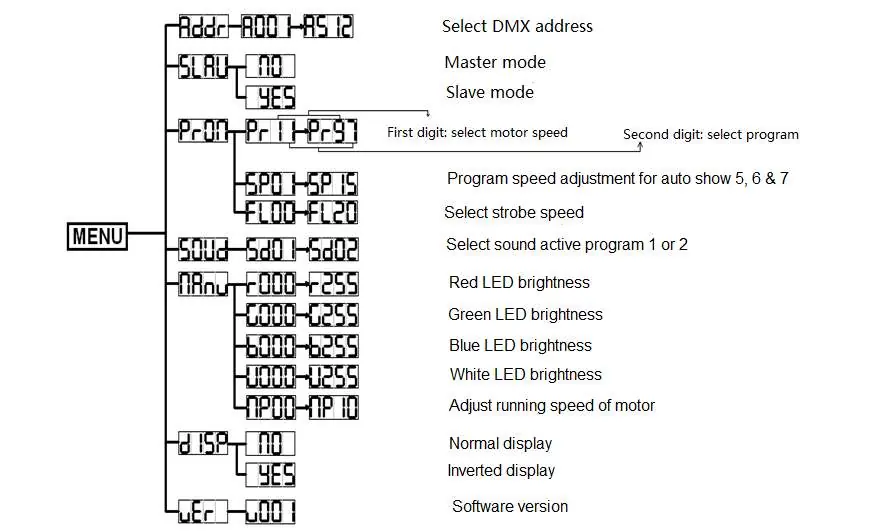
- Addr: Set DMX Address.
- SLAU: Master/Slave mode selection.
- PrOn: Program selection (Motor speed and Program number).
- SP: Program speed adjustment for auto programs 5, 6, and 7.
- FL: Strobe speed adjustment.
- SOUd: Sound active program selection (1 or 2).
- MAnu: Manual LED brightness control (Red, Green, Blue, White) and Motor speed.
- dISP: Display orientation (Normal or Inverted).
- UEr: Software version.
DMX Control
The device uses 8 DMX channels. When channel 1 is set between 59-255, the device enters auto/sound modes. When channel 1 is set between 000-058, it enables color dimmer DMX mode. Channels 2-8 control master dimmer, strobe speed, motor speed, and individual RGBW color intensities.
Fuse Replacement
If the fine-wire fuse blows, replace it with one of the same rating:
- Unplug the device from the power source.
- Unscrew the fuse holder located on the rear panel.
- Remove the old fuse and install a new one.
- Replace the fuse holder and secure it tightly.
Technical Specifications
- Light Source: 5x 12W RGBW 4-in-1 LEDs.
- Coverage Angle: 360°.
- Power Input: 100-240V AC, 50/60Hz.
- Power Consumption: 72W.
- Control: DMX512, 8 channels, 3-pin DMX in/out.
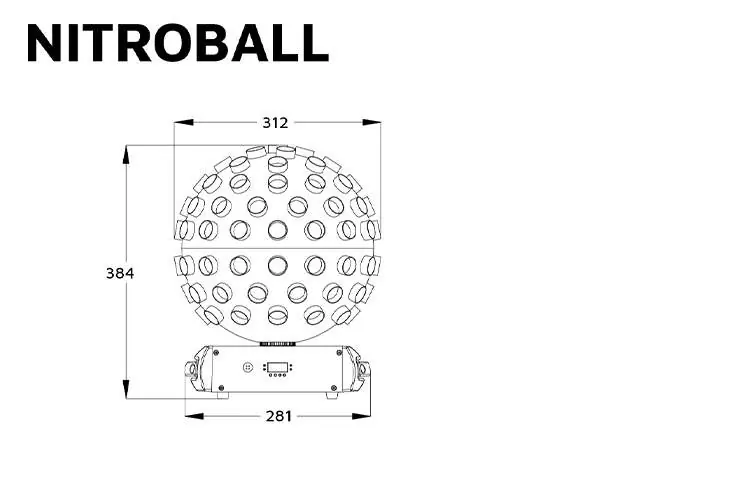
- Dimensions: 312 x 312 x 383 mm.
- Weight: 3.6kg.
Practical help
Common problems
Display turns off
The LED display is designed to switch off after 10 seconds. Press any button to turn it back on.
Device not responding to DMX
Ensure the DMX signal is connected. The device automatically activates DMX mode when a signal is detected.
Fuse failure
Unplug the device, unscrew the fuse holder on the rear panel, and replace the fuse with one of the same rating.
Before use
- Ensure the installation location has adequate ventilation (at least 50cm from surfaces).
- Use a safety chain when mounting the device overhead.
- Verify the power source is 100-240V AC, 50/60Hz.
- Do not connect to a dimmer or rheostat.
- Allow the fixture to cool for 15 minutes before touching after operation.
Specs in practice
- Light Source
- 5x 12W RGBW 4-in-1 LEDs.
- Coverage angle
- 360° light dispersion.
- DMX Channels
- 8 channels for full control over colors, motor, and strobe.
- Power Consumption
- 72W total power draw.
Images and diagrams
- Control Panel: Features 4 buttons (MENU, ENTER, UP, DOWN) and 4 LED indicators (DMX, Slave, Master, Sound).
- Menu Structure: Use the MENU button to cycle through modes like DMX address, Master/Slave, Program, and LED brightness.
Model compatibility
- Protocol: DMX512.
- Interface: 3-pin DMX in/out.

Manual page author
Emily Carter
User documentation editor
Prepares concise manual descriptions and highlights the most useful setup, operation, and maintenance information for readers.