Electronics / Audio
Eventide H90 Harmonizer User Guide
Quick guide for the Eventide H90 Harmonizer, covering hardware controls, setup configurations, play modes, routing, and system settings.
Table of contents
Manual images
Jump to the sectionQuick guide from the manual
The Eventide H90 Harmonizer is a powerful multi-effects pedal. This guide provides essential information for setting up your rig, understanding play modes, and configuring routing. For advanced algorithm details and full system customization, refer to the complete user manual.
Hardware Overview
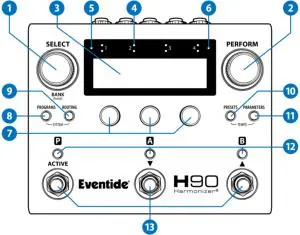
The H90 features a top panel with a high-resolution OLED display, five push-turn encoders, and three footswitches. The rear panel includes four analog inputs and outputs, EXP/CTL jacks for expression pedals or auxiliary switches, a power input, and USB-C for computer connectivity. MIDI DIN In and Out/Thru ports are located on the side.
Setup Configurations
The H90 supports various routing configurations to integrate into your rig:
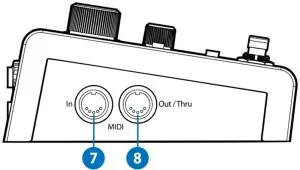
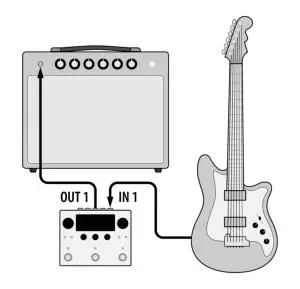
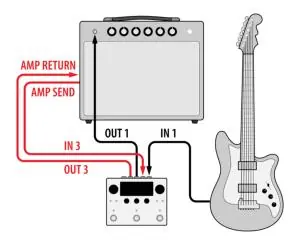
- Simple Guitar Setup: Connect guitar to Input 1 and Output 1 to your amplifier.
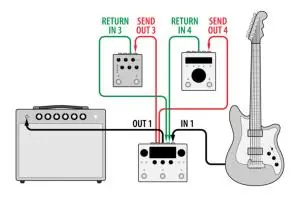
- Two Mono Inserts: Allows external stompboxes to be placed anywhere in the signal chain.
- Wet/Dry Amplifier: Uses two amplifiers to separate dry and wet signals.
- Pre/Post Amplifier (4-Cable Method): Places effects before the preamp and in the amp's effects loop.
- Dual Inserts with DAW/Mixer: Uses the H90 as an outboard processor for two separate signal paths.
Play Modes
The H90 operates in two primary modes:
- Select Mode: Used for browsing and loading Programs from your Playlist.
- Perform Mode: Allows for custom footswitch and HotSwitch mappings, providing expressive control over parameters during live performance.
Routing and System Settings
Routing Edit Mode allows you to adjust the signal path for the currently loaded Program, supporting series or parallel processing. The System Menu provides access to global settings, including I/O levels, Bluetooth pairing, MIDI configuration, and preferences like LED brightness and screensaver settings.
Software Updates
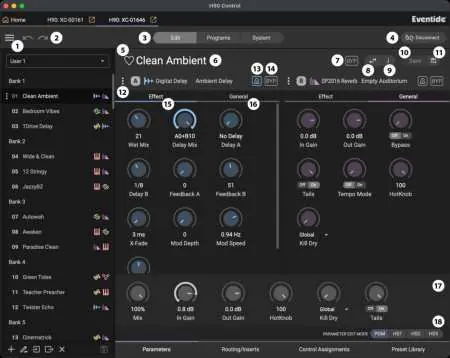
Keep your H90 updated using the H90 Control application on your computer. Connect via USB-C to manage Programs, Presets, and firmware updates.
Practical help
Common problems
Signal clipping at inputs
Adjust the output level of your connected device or adjust the H90's input levels in the I/O menu.
Bluetooth connection issues
Ensure H90 software version 1.7.5+ is installed. If pairing fails, 'forget' the device on both the H90 and the host device, then re-pair.
Latency issues with external digital devices
Configure the Insert Latency in the Routing menu to match the specifications of the inserted digital device.
Before use
- Ensure you are using the supplied 12V 1A power adapter.
- Check that your guitar or line-level device is connected to the correct input.
- Verify that your input/output levels are set correctly in the I/O menu.
- If using external pedals, ensure they are connected to the appropriate Insert jacks.
- Update your H90 firmware using H90 Control for the latest features.
Specs in practice
- Input Impedance
- > 600 kOhm for instrument level, 80 kOhm for line level.
Images and diagrams
- Top Panel: Shows the layout of Select/Perform knobs, OLED display, and footswitches.
- Rear Panel: Illustrates the four analog I/O jacks, power input, and USB-C port.
- Setup Diagrams: Visual guides for mono, stereo, wet/dry, and 4-cable method configurations.
Model compatibility
- Supports 10-25 K expression pedals.
- Accepts 1-3 button auxiliary switches (momentary normally open).
- Accepts 0-5 V control voltages (tip positive).
- H90 Control app requires macOS 10.13+, Windows 10+, or iPadOS 15+.

Manual page author
Emily Carter
User documentation editor
Prepares concise manual descriptions and highlights the most useful setup, operation, and maintenance information for readers.