Garden / Fencing & Gates
Installation Guide for Everbilt Welded Wire Fencing
Step-by-step installation instructions for Everbilt Welded Wire fencing. This guide covers both U-Post and T-Post installation methods, including tool requirements, post spacing, and wire attachment techniques.
Table of contents
Manual images
Click an image to enlargeQuick Guide from the Manual
This document provides installation instructions for Everbilt Welded Wire fencing. The system is designed for property delineation, pet confinement, and plant protection. You can install this fencing using either U-Posts or T-Posts depending on your project requirements.
- Safety First: Before digging, always check for underground wires or pipes.
- Post Selection: Ensure your chosen posts are at least 1 foot taller than the height of the welded wire.
- Post Spacing: For a neat appearance, install posts at 5 to 7-foot intervals.
- Anchor Depth: Posts should be installed approximately 12 inches into the ground to ensure stability.
Tools Required
Depending on your chosen post type, you will need the following tools:
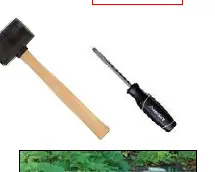
- Common Tools: Protective gloves, side cutters, and a flathead screwdriver.
- For U-Posts: Rubber mallet.
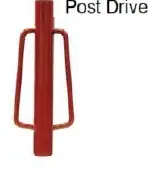
- For T-Posts: Post driver and T-Post clips.
Installation with U-Posts
- Measure your fence perimeter and ensure it is less than or equal to the total length of your wire.
- Install the first U-Post at one end of the perimeter. Use a rubber mallet to pound it into the ground.
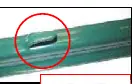
- Ensure the tabs on the U-Post face outward from the perimeter area.
- Install a second post at the opposite end. If creating an enclosed area, place a post at every corner or bend.
- Install additional posts at 5 to 7-foot intervals.
- Unwind the welded wire on the ground.
- Starting at the first post, hook the wire onto the U-Post tabs. Use a flathead screwdriver to slightly bend the tabs if necessary.
- Continue along the perimeter, hooking the wire to each consecutive post.
Installation with T-Posts
- Measure your fence perimeter.
- Install the first T-Post at one end using a post driver. Ensure the tabs face inward from the perimeter area.
- Install additional posts at corners, bends, and at 5 to 7-foot intervals along the perimeter.
- Unwind the welded wire.
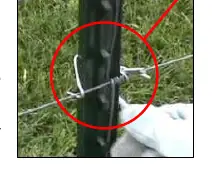
- Secure the wire to the first T-Post using T-Post clips. You may use a screwdriver to assist in securing the clips.
- Continue along the perimeter, securing the wire to each consecutive post using approximately 4 to 5 clips per post.
General Tips and Finishing
If your final fence design is shorter than the length of your wire, use side cutters to trim the fence to size. Be cautious of sharp ends created by cutting; bending these ends over can help prevent injury. Ensure the bottom of the welded wire touches the grass for the best results.
Practical help
Common problems
Sharp wire ends after cutting
Carefully bend the cut ends over to mitigate the risk of injury.
Post movement or instability
Ensure the anchor plate is installed below the dirt or grass line.
Difficulty attaching wire to U-Posts
Use a flathead screwdriver to slightly bend the U-Post tabs outward.
Difficulty securing T-Post clips
Use a screwdriver to assist in securing the T-Post clips to the post.
Before use
- Check for underground wires or pipes in the installation area.
- Measure the fence perimeter.
- Verify that the total length of the wire is sufficient for the perimeter.
- Ensure posts are at least 1 foot taller than the wire.
- Wear protective gloves during installation.
Specs in practice
- Post Spacing
- 5 to 7 feet intervals are recommended for a neater looking fence.
- Anchor Depth
- Posts should be installed about 12 inches into the ground.
- T-Post Clip Usage
- Use approximately 4 to 5 clips per post to secure the wire.
Images and diagrams
- U-Post tabs should face outward from the perimeter area.
- T-Post clips are used to secure the wire to the T-Post.
Model compatibility
- U-Posts are recommended for light duty or temporary projects.
- T-Posts are recommended for projects 4 feet tall or above.

Manual page author
Emily Carter
User documentation editor
Prepares concise manual descriptions and highlights the most useful setup, operation, and maintenance information for readers.