Electronics / Paper Shredders
User Manual for Fellowes 120C-2 Paper Shredder
Comprehensive user guide for the Fellowes 120C-2 paper shredder. Includes setup instructions, operation procedures, maintenance tips, troubleshooting steps, and technical specifications for the 120-2 and 120C-2 models.
Table of contents
Manual images
Click an image to enlargeImportant Information
This manual covers the operation and maintenance of the Fellowes 120C-2 and 120-2 paper shredders. Always ensure the shredder is unplugged before performing maintenance or emptying the basket. Do not open the shredder head, as this poses a risk of electric shock and voids the warranty. Keep hands, jewelry, ties, and long hair away from the paper entry.
Product Overview
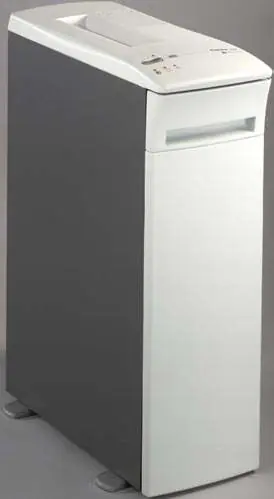
The Fellowes 120C-2 is a confetti-cut shredder designed for paper, staples, small paper clips, and credit cards. It is not intended for adhesive labels, transparencies, newspaper, cardboard, large paper clips, or plastic other than credit cards.
Safety Instructions
- Setup: Check for damage before use. Plug into an easily accessible outlet. Ensure the electrical rating on the serial label matches your power source. Do not place near heat or water sources.
- Operation: Keep children and pets away. Always turn off and unplug when not in use.
- Maintenance: Do not use flammable synthetic oil, petroleum-based products, or aerosols on or near the shredder.
Setup
- Turn the retractable feet to the outward position for stability.
- Pull the waste basket drawer completely out of the cabinet.
- Insert a waste bag into the basket, allowing edges to overhang.
- Slide the waste basket drawer back into the cabinet. The shredder will not operate if the drawer is not fully closed.
- Plug the power cord into a convenient outlet.
Operation
The shredder features an automatic-start sensor. When the control switch is in the Automatic [I] position, the shredder starts automatically when paper is inserted.
Control Switches
- I (Automatic): Turns on the automatic-start sensor and the green Ready light.
- O (Off): Turns off the automatic-start sensor and the green Ready light.
- R (Reverse): Runs the shredder in reverse mode. Press and hold to activate.
- Manual Forward Button: Runs the shredder while the button is held down.
Troubleshooting Lights
- Ready Light (Green): Shredder is in automatic start mode.
- Basket Ajar: Waste basket drawer is open.
- Basket Full: Waste basket is full or paper has collected under the cutting cylinders.
- Paper Jam: Shredder is jammed due to too much paper.
Maintenance
Emptying the Waste Basket
- Press the manual forward button to clear remaining paper.
- Switch to Off [O].
- Open the drawer, remove the full bag, and replace it with a new one.
- If paper shreds are stuck under the cylinders, use the Reverse [R] and Manual Forward buttons to clear them.
Oiling the Cutting Cylinders
Regular oiling is essential for the confetti-cut model (120C-2). Apply oil across the full width of the cutting cylinders through the paper entry. Press and hold the manual forward button for at least 3 seconds, then press and hold the reverse button for at least 3 seconds. Repeat this sequence 3 or more times.
Troubleshooting
- Shredder does not start: Ensure it is plugged in, the switch is in the Automatic [I] position, and the basket is fully closed.
- Paper Jam: Use the Reverse [R] position to back the paper out. Alternate between forward and reverse if necessary.
- Reduced capacity/Noise: Oil the cutting cylinders.
Technical Specifications
The 120C-2 confetti-cut model has a sheet capacity of 12-14 sheets and a shred size of 3.9 x 25 mm. The 120-2 strip-cut model has a sheet capacity of 16-20 sheets and a shred size of 3.9 mm or 5.8 mm. Both models have a maximum paper width of 241 mm.
Manufacturer information
Fellowes
Practical help
Common problems
Shredder does not start
Ensure the unit is plugged in, the control switch is set to Automatic [I], and the waste basket drawer is pushed all the way into the cabinet.
Paper Jam
Press and hold the control switch in the Reverse [R] position to back the paper out. If needed, alternate between Manual Forward and Reverse to clear the jam.
Basket Full light is on
Empty the waste basket. The shredder will not operate until the basket is emptied.
Reduced sheet capacity or squeaking noise (120C-2)
Oil the cutting cylinders using a non-aerosol vegetable-based oil.
Before use
- Check the shredder for any damage or defects.
- Ensure the retractable feet are turned to the outward position for stability.
- Verify that the waste basket drawer is fully inserted into the cabinet.
- Confirm the electrical rating on the serial label matches your power source.
- Plug the power cord into an easily accessible outlet.
Specs in practice
- Sheet Capacity
- The maximum number of sheets (A4 70g) that can be shredded at once (12-14 for 120C-2; 16-20 for 120-2).
- Paper Shred Size
- The dimensions of the shredded paper particles (3.9 x 25 mm for confetti-cut; 3.9 mm or 5.8 mm for strip-cut).
- Maximum Paper Width
- The widest paper size the shredder can accept (241 mm).
Images and diagrams
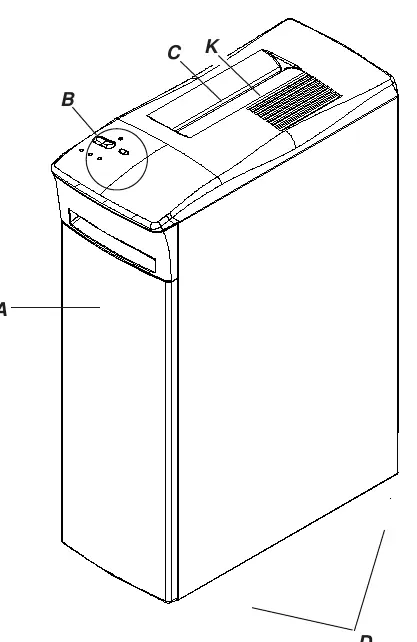
- A: Waste basket drawer
- B: Control switches (E, F, G, H, I, J)
- C: Paper entry
- D: Retractable feet
- E: Control switch (Automatic, Off, Reverse)
Model compatibility
- 120C-2 is a confetti-cut model and requires regular oiling.
- 120-2 is a strip-cut model.
- Do not shred adhesive labels, transparencies, newspaper, cardboard, or large paper clips.

Manual page author
Emily Carter
User documentation editor
Prepares concise manual descriptions and highlights the most useful setup, operation, and maintenance information for readers.