Electronics / Paper Shredders
User Manual for Fellowes AutoMax 200C/200M/150C Shredder
Quick guide and user manual for Fellowes AutoMax 200C, 200M, and 150C shredders. Includes setup, operation, maintenance, and troubleshooting steps.
Quick answers from the manual
Quick answer
- The Fellowes AutoMax 200C/200M/150C is an automatic feed paper shredder. To use it, plug it in, set the power switch to ON (I), open the lid, add paper, close the lid, and press Start. p. 3
Key actions
- Oiling the shredder p. 4
- Cleaning sensors p. 4
First start
- Plug in, set power switch to ON (I), open lid, add paper, close lid, press start. p. 3
Problems and fixes
Overheat
Wait for the shredder to cool down.
p. 4
Bin Full
Empty the bin.
p. 4Technical specifications
| Parameter | Value | Meaning | Pages |
|---|---|---|---|
| Auto Feed Capacity | 200 (200C/200M), 150 (150C) | Max sheets | p. 3 |
Where to find it in the PDF
- Product Overview p. 2
- Operation p. 3
- Maintenance p. 4
Table of contents
Manual images
Click an image to enlargeQuick guide from the manual
The Fellowes AutoMax 200C/200M/150C is an automatic feed paper shredder designed for office use. Before using, ensure the shredder is plugged into a grounded outlet and the power switch is in the ON (I) position. The shredder features an automatic feed tray for bulk shredding and a manual feed slot for credit cards, CDs, or single sheets.
Product Overview
The shredder consists of the following main components:
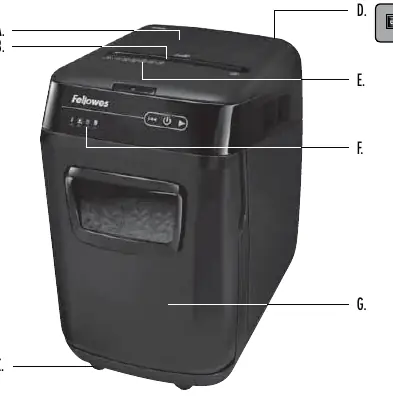
- Shredder Lid: Must be closed for operation.
- Manual Feed Slot: For individual sheets, credit cards, or CDs.
- Auto Feed Tray: For bulk paper shredding.
- Control Panel: Contains indicators for Overheat, Remove Paper, Bin Full, and Bin Open, along with Start, Reverse, and On/Off buttons.
- Pull-Out Bin: Collects shredded material.
Operation
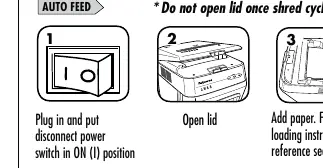
Auto Feed
- Plug in the shredder and set the power switch to the ON (I) position.
- Open the lid and place paper in the tray.
- Close the lid and press the Start button to begin shredding.
Manual Feed
- Plug in the shredder and set the power switch to the ON (I) position.
- Feed paper or credit cards/CDs straight into the manual feed slot.
Maintenance
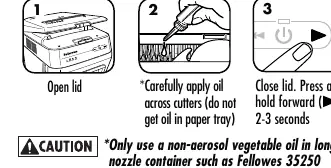
To maintain peak performance, oil the shredder cutters every time you empty the waste bin. Use a non-aerosol vegetable oil in a long-nozzle container (e.g., Fellowes 35250). Apply oil across the cutters, then press and hold the Forward button for 2-3 seconds.
The auto-start infrared sensors may occasionally become blocked by paper dust. To clean, turn off and unplug the shredder, open the lid, locate the sensor in the center of the paper entry, and wipe it with a cotton swab dipped in rubbing alcohol.
Troubleshooting
- Overheat: The shredder has exceeded its maximum operating temperature. Wait for the recovery time to pass.
- Remove Paper: Press the Reverse button, open the lid, and remove the jammed paper.
- Bin Full: Empty the waste bin.
- Bin Open: Ensure the bin is properly inserted and closed.
Manufacturer information
Fellowes
Practical help
Common problems
Shredder won't start
Ensure the lid is closed, the power switch is in the ON (I) position, and the bin is properly inserted.
Paper jam
Use the Reverse button to clear the jam.
Overheat indicator is on
Wait for the shredder to cool down (recovery time).
Bin full indicator is on
Empty the waste bin.
Before use
- Ensure the shredder is plugged into a grounded outlet.
- Check that the power switch is in the ON (I) position.
- Ensure the lid is closed.
- Make sure the bin is properly inserted.
Specs in practice
- Auto Feed Capacity
- Maximum number of sheets that can be shredded automatically (200 for 200C/200M, 150 for 150C).
- Manual Feed Capacity
- Maximum number of sheets for manual shredding (10 for 200C/200M, 8 for 150C).
- Continuous Operation
- Maximum time the shredder can run before needing a cool-down period.
Images and diagrams
- A: Shredder Lid
- B: Manual Feed Slot
- C: Casters (200C/200M)
- D: Disconnect Power Switch
- F: Control Panel
Model compatibility
- Do not shred adhesive labels, continuous form paper, bound documents, magazines, transparencies, newspaper, cardboard, binder clips, industrial staples, large paper clips, or plastic other than credit cards.

Manual page author
Emily Carter
User documentation editor
Prepares concise manual descriptions and highlights the most useful setup, operation, and maintenance information for readers.