Electronics / Paper Shredders
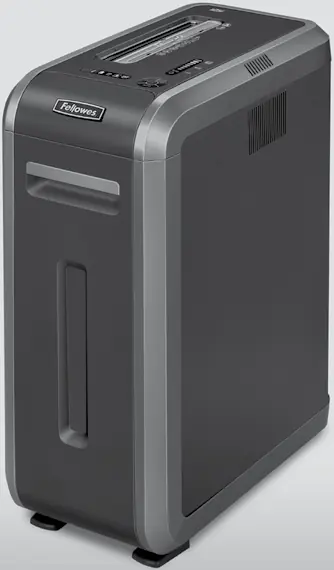
User Manual for Fellowes Powershred 125Ci/125i Paper Shredder
Quick guide for the Fellowes Powershred 125Ci/125i paper shredder. Learn how to operate, maintain, and troubleshoot your device safely with this comprehensive manual summary.
Table of contents
Quick guide from the manual
To begin using your Fellowes Powershred 125Ci/125i, ensure the disconnect power switch on the back is in the ON (I) position. Press the ON button to activate the shredder. Feed paper straight into the paper entry. For CDs or credit cards, rotate the safety flap into place and feed the item into the center of the entry. The shredder will automatically stop after shredding is complete and enter sleep mode after 2 minutes of inactivity.
Safety Instructions
- Read before use: Keep the shredder away from children and pets.
- Avoid contact: Keep hands, jewelry, clothing, and hair away from the paper entry.
- Blades: Do not touch the exposed cutting blades under the shredder head.
- Maintenance: Unplug the shredder before cleaning or servicing.
- Prohibited items: Do not use aerosol products, petroleum-based lubricants, or other flammable products on or near the shredder. Do not use canned air.
- Power: Ensure the shredder is plugged into a properly grounded wall outlet. Do not use energy converters, transformers, or extension cords.
Capabilities
The shredder can process paper, credit cards, CD/DVDs, staples, small paper clips, and junk mail.
- Maximum sheets per pass (125Ci): 20 sheets (Cross-Cut).
- Maximum sheets per pass (125i): 18 sheets (Strip Cut).
- CDs/Cards per pass: 1.
- Paper entry width: 9 inches (230mm).
Device Overview
The control panel includes indicators for:
- Reverse: To back out objects.
- ON/OFF: Power control.
- Forward: Manual feed.
- Auto: Standard operation mode.
- Overheat (red): Indicates the unit needs to cool down.
- Door open (red): Indicates the door is not closed properly.
- Bin full (red): Indicates the basket needs emptying.
- Remove paper (red): Indicates a paper jam.
- SafeSense indicator (yellow): Indicates active safety technology.
Basic Shredding Operation
- Plug in and set the disconnect power switch to the ON (I) position.
- Press the ON button to activate.
- Feed paper or cards straight into the entry.
- For CDs/Credit cards, rotate the safety flap into place before feeding.
- When finished, set the shredder to OFF.
Manufacturer information
Fellowes
Practical help
Common problems
Shredder will not start
Ensure the disconnect power switch on the back is in the ON (I) position and the door is fully closed.
Overheat indicator is red
The shredder has exceeded its maximum operating temperature and needs to cool down. Wait until the indicator turns off.
Bin full indicator is red
The waste basket is full and needs to be emptied.
Remove paper indicator is red
There is a paper jam. Use the Reverse function to back out the paper and reduce the number of sheets.
Before use
- Ensure the disconnect power switch is in the ON (I) position.
- Check that the basket is properly inserted and the door is closed.
- Verify the shredder is plugged into a properly grounded outlet.
- Ensure the safety flap is in place when shredding CDs or credit cards.
Specs in practice
- Paper shred size (125Ci)
- 5/32 inches x 1-1/2 inches (4mm x 38mm) Cross-Cut.
- Paper shred size (125i)
- 7/32 inches (5.8mm) Strip Cut.
- Paper entry width
- 9 inches (230mm).
- Maximum sheets per pass
- 20 sheets for 125Ci; 18 sheets for 125i.
Images and diagrams
- A. SafeSense Technology
- B. Paper entry
- C. CD/Credit card safety flap
- F. Disconnect power switch
- G. See safety instructions
Model compatibility
- For indoor use only.
- Do not shred greeting cards with sound chips or batteries.
- Do not use energy converters, transformers, or extension cords.

Manual page author
Michael Turner
Technical manual editor
Reviews PDF manuals for structure, safety notes, and practical product details so readers can find the right information quickly.