Automotive / RV Caravan Accessories
Installation and User Guide for Fiamma Aqua 8 Water Pump
Comprehensive installation and user guide for the Fiamma Aqua 8 self-priming water pump. Includes wiring diagrams, filter cleaning procedures, maintenance tips, and technical specifications for 7L and 10L models.
Table of contents
Manual images
Click an image to enlargeQuick Guide
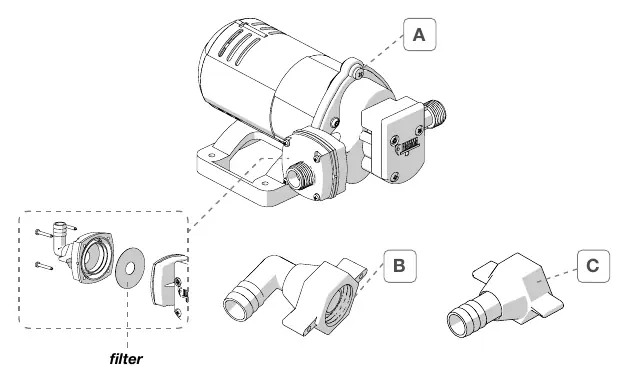
The Fiamma Aqua 8 is a self-priming water pump designed for intermittent use with drinking water in vehicles. Before installation, ensure the product is undamaged. The pump should be installed on a solid surface near the water tank. For optimal performance and noise reduction, use flexible pipes (min. 0.5m length, 13mm diameter) for connections. Always disconnect the negative battery terminal before starting electrical work.
Installation
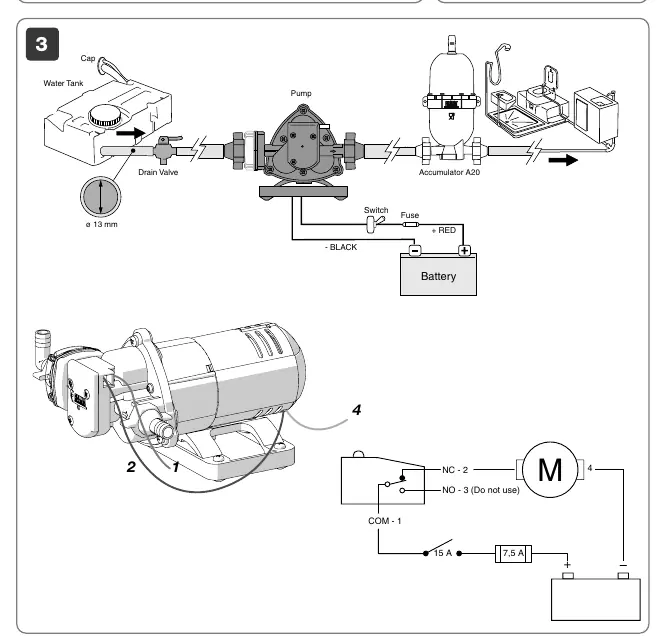
Mount the pump on a solid surface in a position that allows easy access for filter cleaning and maintenance. The pump can be installed in any position; however, if installed vertically, ensure the motor is positioned above the hydraulic part. For best performance, install the pump as close to the water tank as possible. It is highly recommended to install the Fiamma A20 expansion tank within the first meter of the system to stabilize performance.
Electrical Connection
For safety, always disconnect the negative terminal from the vehicle battery before installation. It is recommended to connect the power cable to a fuse box or terminal board rather than directly to the battery. Prepare a dedicated circuit with a 16AWG (1.5mm²) cable, protected by a 7.5A fuse and a 15A switch located on the positive cable. Avoid using oversized fuses, as this can cause overheating and electrical malfunctions.
Filter Cleaning
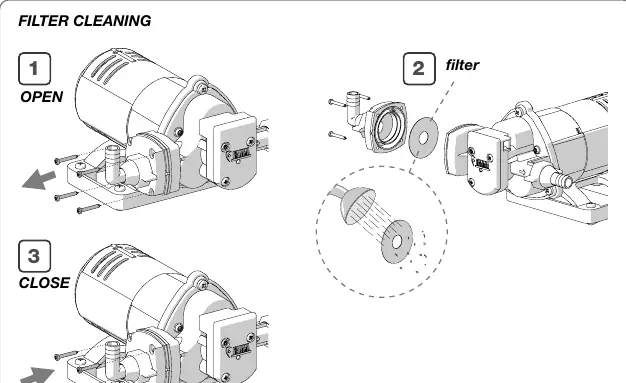
Regularly check the inlet filter for cleanliness, especially if you notice low water flow. Clean the filter at the start and end of each season. To clean: 1. Open the filter housing. 2. Remove and clean the filter element. 3. Reassemble and close the housing securely.
Maintenance and Winterization
To ensure the longevity of the pump and plumbing system, perform a sanitization at least once a year or after long periods of non-use. Periodically check the tightness of all hydraulic components, as vibrations may cause them to loosen over time. During winter storage, if temperatures are expected to drop below 0°C, it is essential to drain the entire plumbing system. Disconnect the vacuum hose and run the pump dry for a few minutes until no water exits from any taps.
Technical Specifications
The Aqua 8 is available in different configurations (01216C01-, 01216B01-, 01216C01A). Power supply is 12V or 24V depending on the model. The pump features a pressure switch intervention at 1.5 Bar (21.7 Psi). The operating water temperature range is +4°C to +40°C. The unit has an IP20 protection rating.
Manufacturer information
Fiamma SpA
Practical help
Common problems
Low water flow
Check the inlet filter for debris and clean it if necessary.
Excessive noise or vibration
Ensure flexible pipes of at least 0.5m length and 13mm diameter are used for pump connections to attenuate vibrations.
Overheating or electrical malfunction
Verify that the fuse is not oversized and that the wiring is correct. Ensure the cable gauge is at least 16AWG (1.5mm²).
Before use
- Inspect the product for any damage or deformation caused during transport.
- Ensure the mounting surface is solid and accessible.
- Verify the power supply voltage (12V or 24V) matches your model.
- Sanitize the system before the first use to remove processing waste.
- Ensure the negative battery terminal is disconnected during installation.
Specs in practice
- Pressure switch interv.
- The pressure level (1.5 Bar) at which the pump automatically turns on or off.
Images and diagrams
- The wiring diagram illustrates the connection of the pump to the battery, including the required fuse and switch on the positive line.
- The filter cleaning diagram shows the step-by-step process of opening the pump head to access and clean the filter.
Model compatibility
- Designed for intermittent use and contact with drinking water only.
- Compatible with the Fiamma A20 expansion tank (02478-02-) for stabilized performance.

Manual page author
Emily Carter
User documentation editor
Prepares concise manual descriptions and highlights the most useful setup, operation, and maintenance information for readers.