Electronics / Video Lighting
User Manual for Fiilex RPU Remote Patcher
Quick guide for the Fiilex RPU Remote Patcher. Learn how to use the remote control, patch DMX fixtures, update firmware, and utilize diagnostic tools like the DMX tester and fixture diagnostics.
Table of contents
Manual images
Click an image to enlargeQuick Guide
The Fiilex RPU (Remote Patcher Unit) is a versatile tool designed to streamline the operation of Fiilex lighting fixtures. It allows for remote control, DMX patching, firmware updates, and system diagnostics. The device features a navigation pad, OLED display, and multiple connectivity options including F-Link, USB-C, WiFi, and CRMX.
Parts and Controls
The RPU consists of several key components:
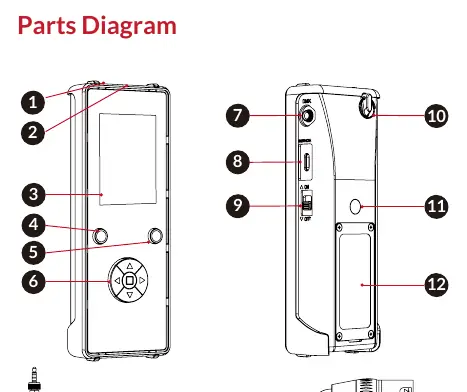
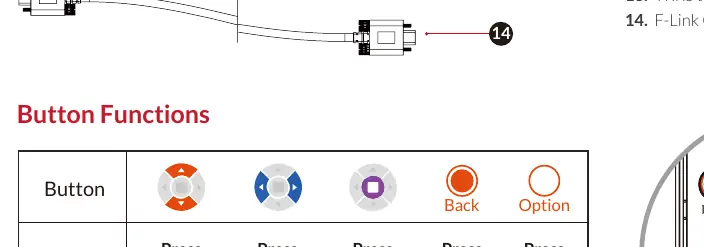
- Navigation Pad: Used to navigate menus and settings.
- Buttons: Includes Back and Option buttons for menu navigation.
- Ports: Features an F-Link port (5V/1A power), DMX port (TRRS), and a USB-C port for firmware updates.
- Indicators: Power LED indicator and OLED display for status monitoring.
- Battery: Preinstalled LiPo rechargeable battery.
Button Functions:
- Up/Down: Navigate through available settings in a menu.
- Left/Right: Navigate through options within a setting or increment values.
- Center Button: Confirms a selection.
- Back Button: Returns to the previous screen.
Battery and Power
The RPU uses a preinstalled LiPo rechargeable battery. Do not attempt to substitute this with any other battery type. The battery can be recharged in two ways:
- Via F-Link wired connection to any Fiilex fixture.
- Via a USB-C connection to any standard wall outlet.
Using RPU Tools
The RPU Tools suite includes three main functions:
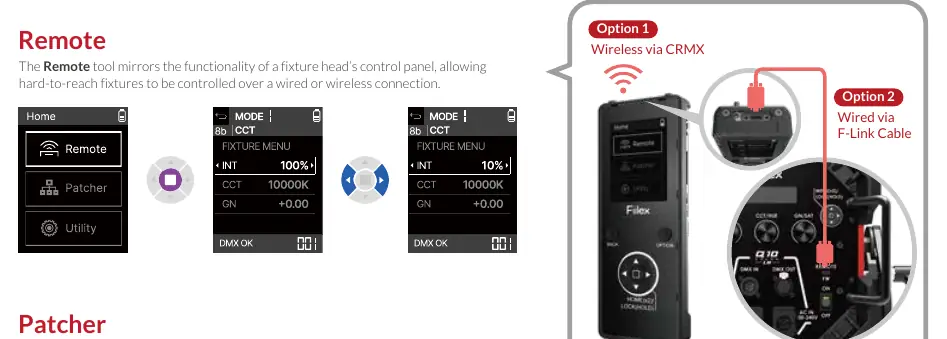
- Remote: Mirrors the functionality of a fixture head's control panel, allowing control over wired or wireless connections.
- Patcher: Used to rapidly patch a batch of fixtures to a DMX universe.
- Utility: A collection of tools for testing, viewing, and controlling fixture behavior.
Connectivity and Updates
The RPU supports firmware updates and network configuration:

- Download Updates: Packages can be downloaded to the RPU via a USB-C drive or wirelessly via WiFi.
- Install Updates: Firmware downloaded locally can be installed to the RPU or a connected fixture head.
- WiFi Setup: Follow the on-screen instructions in the WiFi Setup menu to connect to a network.
Diagnostics and Testing
The Utility menu provides several diagnostic tools:
- DMX Tester: Used to set or view DMX levels in a universe.
- DMX Recorder: Records, stores, and plays back up to eight DMX sequences.
- RDM Controller: Displays and modifies basic information about connected fixtures.
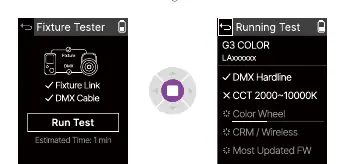
- Fixture Tester: Runs a diagnostics test on a connected fixture to assist with troubleshooting.
- CRMX Tester: Sets or views CRMX levels in a universe.
- ETH Viewer: Views incoming Ethernet signals.
- Logs: Displays the history of a connected fixture's error logs.
Practical help
Common problems
Battery not charging
Ensure the F-Link connection is secure or verify the USB-C wall outlet is providing power.
Cannot connect via WiFi
Navigate to the WiFi Setup menu and follow the on-screen instructions to scan for and join a network.
Fixture not responding
Check the DMX or CRMX connection settings and ensure the fixture is compatible with the RPU.
Before use
- Ensure the RPU battery is fully charged.
- Verify the correct cable (F-Link or TRRS to XLR5) is used for wired connections.
- Check if the fixture is compatible with the RPU.
- Ensure the RPU is powered on using the ON/OFF switch.
Specs in practice
- TRRS to XLR5 Cable
- Required for DMX signal transmission between the RPU and fixtures.
Images and diagrams
- The Parts Diagram identifies the location of the navigation pad, ports, and power switch.
- The Button Functions table clarifies the specific action for each button press.
Model compatibility
- Compatible with Fiilex fixtures supporting F-Link or DMX.
- Do not substitute the preinstalled LiPo battery with any other type.

Manual page author
David Miller
Documentation analyst
Organizes user manual content into clear summaries, with attention to model details, product context, and everyday usability.