Lighting / Fixtures
User Manual for LED2 Zigbee RF Control + Push
Quick guide for the LED2 Zigbee RF Control + Push. Learn how to pair with Zigbee transmitters, reset the device, and connect external push buttons for dimming control.
Table of contents
Manual images
Click an image to enlargeQuick Guide
This document provides instructions for the LED2 Zigbee RF Control + Push and Zigbee NFC ballast. Key operations include:
- Erasing Memory: Power cycle the luminaire 5 times. The luminaire will flash 3 times, and the converter/receiver will enter pairing mode for 180 seconds.
- TouchLink Pairing: Power cycle the luminaire 4 times. The luminaire will flash 3 times, and the converter/receiver will enter pairing mode for 180 seconds. Place the transmitter 10 cm from the device to complete pairing.
- Control: Use the transmitter for switching and dimming. Avoid using the wall switch to power off, as this may erase the receiver's memory.
Product Overview
The luminaire features an internal Zigbee dimmable ballast/converter. It supports Zigbee 3.0 and can be paired with smart home hubs such as Amazon Alexa, Philips Hue, and Homey. ZBTW models also support CCT (color temperature) adjustment via remote control.
Installation and Wiring
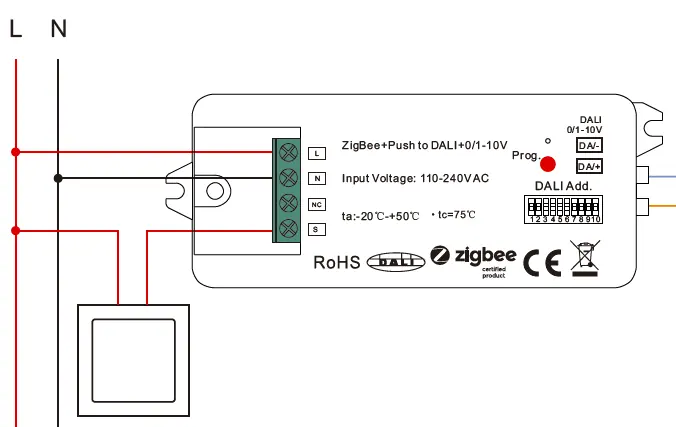
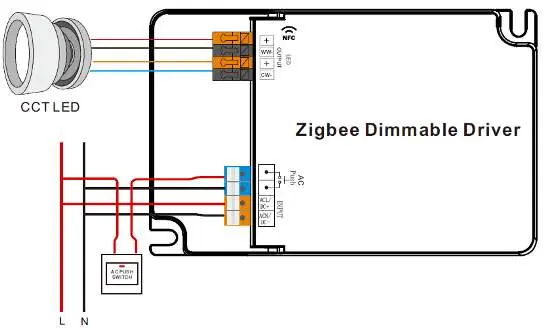
A 2-3 wire installation with a permanent power supply is required. Do not disconnect power via a wall switch, as this risks erasing the receiver's memory. An external 1/0 push button can be connected to the converter or ballast to allow manual dimming control.
Pairing and Resetting
Before pairing, it is recommended to clear the converter memory. Use the power cycle methods described in the Quick Guide section to reset or enter pairing mode. Ensure the transmitter is compatible with your specific Hub/Router if not using direct TouchLink pairing.
Operation
The luminaire can be dimmed using the connected push button or a Zigbee transmitter. Changing color temperature (CCT) is only possible via a remote control. If the luminaire stops responding, check the power supply and the transmitter battery.
Contact Information
For further support or to find Zigbee transmitters, visit www.led2.eu/ovladanie/. You can also contact the manufacturer at [email protected] or call +421918508500.
Official resources from the manual
Practical help
Common problems
Luminaire not responding to transmitter
Check the power supply to the luminaire and ensure the transmitter battery is charged.
Settings or pairing lost after power off
Do not use the wall switch to power off the luminaire. Use the transmitter to switch the light on and off to maintain memory.
Need to pair a new transmitter
Clear the converter memory first (5x power cycle), then use the TouchLink pairing mode (4x power cycle).
Before use
- Ensure a permanent power supply is connected to the luminaire.
- Verify that your Zigbee transmitter is compatible with your Hub/Router.
- Clear the converter memory before starting the pairing process.
- Ensure the external push button is wired correctly if manual control is desired.
Images and diagrams
- The wiring diagram illustrates the connection of L (Live) and N (Neutral) to the converter.
- The external push button connects to the S terminal on the converter.
- The output side connects to the LED driver or DALI/0-10V interface.
Model compatibility
- Compatible with Amazon Alexa, Philips Hue, and Homey.
- Supports up to 16 transmitters per luminaire (SR-ZGP series required for multiple transmitters).
- CCT adjustment is exclusive to ZBTW models.

Manual page author
Michael Turner
Technical manual editor
Reviews PDF manuals for structure, safety notes, and practical product details so readers can find the right information quickly.