Power / Wireless Chargers
User Guide for Belkin BOOST↑CHARGE PRO 2-in-1 Wireless Charger Stand WIZ010
Comprehensive user guide for the Belkin BOOST↑CHARGE PRO 2-in-1 Wireless Charger Stand (WIZ010). Learn about compatibility, power specifications, status light indicators, and proper usage.
Quick answers from the manual
Quick answer
- The Belkin WIZ010 is a 2-in-1 wireless charger stand designed for MagSafe-compatible iPhones (12/13 series) and wireless charging-capable AirPods. It provides up to 15W of power to the iPhone. p. 2
Key actions
- Remove phone using a peeling motion p. 7
Problems and fixes
Charging error (Solid Orange light)
Check device placement and ensure no foreign objects are present.
p. 7Technical specifications
| Parameter | Value | Meaning | Pages |
|---|---|---|---|
| Input | 100V–240V, 1.3A, 50/60 Hz | Power input requirements | p. 4 |
| Output | 15V, 2.67A, 40W | Power output specifications | p. 4 |
Where to find it in the PDF
- Product Information p. 1, 2, 3
- Hardware Information p. 4, 5
- Compatibility and Functionality p. 6, 7, 8
Table of contents
Quick Guide
The Belkin BOOST↑CHARGE PRO 2-in-1 Wireless Charger Stand (WIZ010) is designed to charge MagSafe-compatible iPhones (12 and 13 series) and wireless charging-capable AirPods simultaneously. It supports up to 15W charging for iPhones. The device is for indoor use only and requires the included proprietary power adapter.
Product Overview
The charger features a weighted base for stability and a stainless steel support arm. It allows for both portrait and landscape charging orientations. The package includes the charger, an AC wall power adapter with a 1.2-meter cable, a quick start guide, and regulatory documentation.
Status Indicators
The charger has a single status light located on the base. This light indicates the charging status for AirPods only; iPhone charging status is displayed on the iPhone screen.
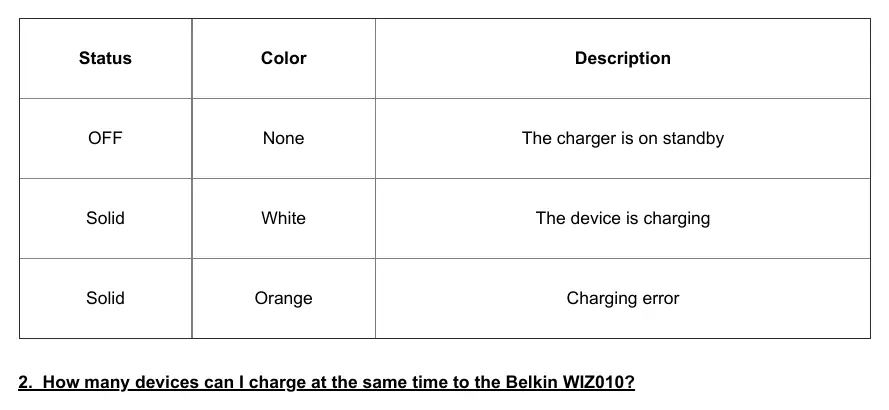
- OFF: Standby mode.
- Solid White: Device is charging.
- Solid Orange: Charging error.
Usage and Compatibility
To remove your phone, use a peeling motion by grasping the top or bottom of the phone rather than pulling it straight off, which may move the base. The charger is compatible with iPhone 12 and 13 series, AirPods Pro, and AirPods with Wireless Charging Case. Note that you cannot charge your iPhone if an Apple Wallet is attached to the phone.
Technical Specifications
- Input: 100V–240V, 1.3A, 50/60 Hz
- Output: 15V, 2.67A, 40W
- Operating Temperature: 0°C to 40°C
- Storage Temperature: -30°C to 70°C
Safety and Maintenance
The device includes overheat protection; if it detects a device overheating, it will throttle down charging power. Do not attempt to use third-party power supplies, as the device uses a proprietary connector. The serial number is printed on the bottom of the device near the power connector port.
Manufacturer information
Belkin
Practical help
Common problems
Charger light is solid orange
This indicates a charging error. Ensure the device is properly placed on the charger.
Cannot remove phone easily
Use a peeling motion to release the magnetic hold rather than pulling straight off.
Phone not charging with wallet
Remove the Apple Wallet before charging; it interferes with the magnetic connection.
Before use
- Ensure you are using the included AC power adapter.
- Check that your phone case is MagSafe-approved and under 3mm thick.
- Verify your device is compatible (iPhone 12/13 series or AirPods).
- Ensure the charger is placed on a stable surface for indoor use.
Specs in practice
- Cable Length
- 1.2 meters.
- Operating Temperature
- 0°C to 40°C with 10% to 90% relative humidity.
Images and diagrams
- The status light on the base is specifically for AirPods charging status.
- The serial number is located on the bottom of the base near the power port.
Model compatibility
- Compatible with iPhone 12 and 13 series.
- Compatible with AirPods Pro and AirPods with Wireless Charging Case.
- Requires MagSafe-approved cases up to 3mm thick.

Manual page author
David Miller
Documentation analyst
Organizes user manual content into clear summaries, with attention to model details, product context, and everyday usability.