Power / Wireless Chargers
User Guide for Belkin BoostCharge Pro 2-in-1 Wireless Charging Pad WIZ019
Quick guide for the Belkin BoostCharge Pro 2-in-1 Wireless Charging Pad (WIZ019). Learn about compatibility, status light meanings, technical specifications, and usage instructions.
Table of contents
Quick Guide
The Belkin WIZ019 is a 2-in-1 wireless charging pad with MagSafe technology. It is designed for indoor use to charge compatible iPhones and AirPods simultaneously. Ensure the device is placed on a solid, stable surface for optimal performance.
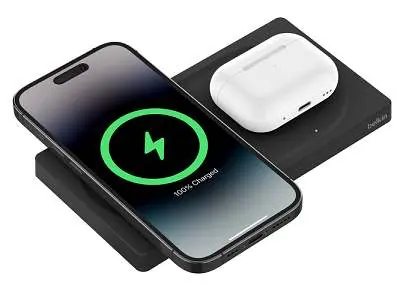
Package Contents
- Belkin WIZ019 charging pad
- 5-ft (1.5m) USB-C to USB-C cable
- 27W Power Delivery 3.0 Power Supply
Compatibility
The device is designed for MagSafe-compatible phones, official MagSafe cases, and wireless charging capable AirPods. It has been tested with the following models:
- iPhone 14, 14 Plus, 14 Pro, 14 Pro Max
- iPhone 13, 13 mini, 13 Pro, 13 Pro Max
- iPhone 12, 12 mini, 12 Pro, 12 Pro Max
- Apple AirPods (3rd generation) with MagSafe Charging Case
- Apple AirPods Pro (2nd generation)
- Apple AirPods Pro
- Apple AirPods
Status Light Indicators
- OFF/None: The device is not charging.
- Solid White: The device is charging.
- Solid Orange: Charging error. The device may not be centered or is obstructed on the charging pad.
Usage Guidelines
- Indoor Use Only: Do not use the device outdoors.
- Surface Requirements: Use only on a solid, stable surface. Do not use in a car.
- Capacity: This charger can charge up to two devices simultaneously.
Technical Specifications
Dimensions: Height: 0.6 in / 15.75 mm; Depth: 3.34 in / 86.35 mm; Width: 6.35 in / 161.35 mm.
Operating Temperature: 0°C to 40°C under normal humidity (10% to 90% relative humidity).
Storage Temperature: -40°C to 85°C with 5% to 95% relative humidity (outdoor); -30°C to 70°C with 40% to 85% relative humidity (indoor).
Manufacturer information
Belkin
Practical help
Common problems
Solid Orange status light
This indicates a charging error. Ensure the device is properly centered on the charging pad and that there are no obstructions.
Device not charging
Ensure the status light is not OFF. Verify the power supply is connected and the device is placed correctly on the pad.
Before use
- Ensure you are using the included 27W Power Delivery 3.0 power supply.
- Verify the device is placed on a solid, stable surface.
- Confirm your device is MagSafe-compatible or a wireless charging capable AirPod.
- Check that the environment is indoors and within the operating temperature range (0°C to 40°C).
Specs in practice
- Operating Temperature
- Safe temperature range for active use: 0°C to 40°C.
- Storage Temperature
- Safe temperature range for storage: -40°C to 85°C (outdoor) or -30°C to 70°C (indoor).
Model compatibility
- Designed for indoor use only.
- Not suitable for use in a car.
- Charges up to two devices simultaneously.

Manual page author
Emily Carter
User documentation editor
Prepares concise manual descriptions and highlights the most useful setup, operation, and maintenance information for readers.