Music / Vocal Effects
User Manual for Flamma FC01 Drum Machine and Phrase Loop Pedal
Quick guide for the Flamma FC01 Drum Machine and Phrase Loop Pedal. Learn how to use looper and drum modes, adjust settings, and understand specifications.
Table of contents
Quick Guide
The Flamma FC01 is a compact pedal combining a looper and a drum machine. Before using the device, ensure you have a 9V DC power supply with at least 210mA current. Connect your instrument to the INPUT and your amplifier to the OUTPUT using 6.35mm mono jack cables. The pedal features three main modes: Looper only, Drum machine only, and a combined Loop & Drum mode.
Device Overview
The top panel contains the following controls:
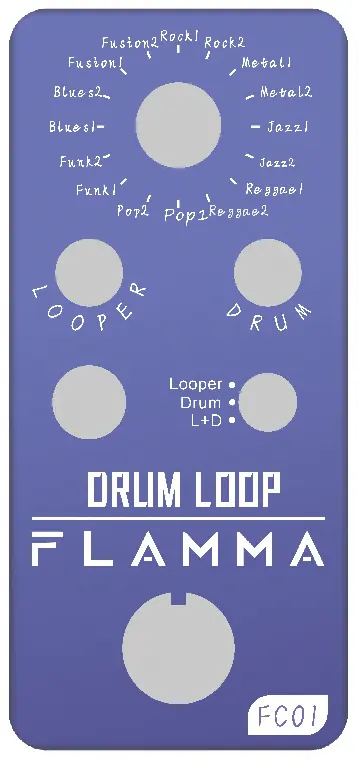
- Footswitch: Used for recording, playback, dubbing, stopping, and deleting loops.
- Tap Tempo: Press repeatedly to set the drum machine tempo.
- Rhythm Style Selector: Selects the drum groove style.
- Looper Level: Adjusts the master volume of the looper playback.
- Drum Level: Adjusts the master volume of the drum machine.
- Mode Switch: Selects between LOOPER, DRUM, and L+D (Loop & Drum) modes.
- Input/Output: 6.35mm mono jacks for instrument and amplifier connection.
- DCIN: Power input for 9V DC 210mA.
Operating Modes
Looper Mode
In this mode, the pedal functions as a standalone looper. The states are:
- Record: Press the footswitch once to start recording. Press again to stop and begin playback.
- Play: The loop plays back continuously.
- Dub: While in playback, press the footswitch once to record an additional layer. Press again to revert to playback.
- Undo/Redo: Press and hold the footswitch to undo the last recorded layer. Press and hold again to redo.
- Stop: Double press the footswitch to stop playback. Press and hold to delete the current loop session.
Drum Mode
In this mode, only the drum machine is active. Select DRUM using the mode switch, choose a rhythm style, set the tempo using the Tap Tempo button, and use the footswitch to toggle the drum machine on/off.
Loop & Drum Mode
This mode allows simultaneous use of the looper and drum machine. Select L+D using the mode switch. The pedal will play a single bar of metronome clicks when you start the loop to ensure you are in time with the rhythm. The drum machine can be changed using the rhythm style control even after recording a loop.
Rhythm Styles
The device includes 8 drum groove styles with 2 variations each (16 total). Available styles include Pop, Funk, Blues, Fusion, Rock, Metal, Jazz, and Reggae, with various time signatures (4/4, 5/8, 7/8) and default tempos ranging from 70 to 160 BPM.
Specifications
- Maximum recording time: 20 minutes
- Maximum number of recordings: Unlimited
- Sampling rate: 44.1kHz
- Sample accuracy: 16bit
- Input impedance: 1M ohm
- Output impedance: 510 ohm
- Power requirements: 9V DC, 210mA (center pin negative)
- Dimensions: 47mm(D) x 83mm(W) x 52mm(H)
- Weight: 153g
Practical help
Common problems
Looper not recording
Ensure the Mode Switch is set to LOOPER or L+D mode and that you have pressed the footswitch to initiate recording.
Drum machine tempo is incorrect
Use the TAP TEMPO button to manually set the desired tempo. The LED will flash to indicate the tempo.
Device does not power on
Verify that you are using a 9V DC power supply with at least 210mA and that the center pin is negative.
Before use
- Ensure power supply is 9V DC, 210mA, center pin negative.
- Connect instrument to INPUT using a 6.35mm mono cable.
- Connect amplifier to OUTPUT using a 6.35mm mono cable.
- Select the desired mode (LOOPER, DRUM, or L+D) using the Mode Switch.
Specs in practice
- Maximum recording time
- The total duration of audio you can record is 20 minutes.
- Sampling rate
- 44.1kHz at 16bit provides CD-quality audio resolution.
- Power requirements
- Requires a 9V DC power adapter with at least 210mA current capacity.
Images and diagrams
- The top panel features a large rhythm selector knob at the top.
- Two smaller knobs control the volume levels for the Looper and Drum machine independently.
- A toggle switch in the center selects the operational mode.
- The footswitch at the bottom controls recording, playback, and stop functions.
Model compatibility
- Requires 9V DC power supply (center pin negative).
- Uses standard 6.35mm (1/4 inch) mono jack cables for input and output.

Manual page author
Michael Turner
Technical manual editor
Reviews PDF manuals for structure, safety notes, and practical product details so readers can find the right information quickly.