Electronics / Audio
Owner's Manual for Flamma FB200 Intelligent Combined Effects Pedal
Quick guide for the Flamma FB200 effects pedal, covering device connections, operation modes, effect modules, drum machine, tuner, and technical specifications.
Table of contents
Manual images
Jump to the sectionQuick guide from the manual
The Flamma FB200 is an intelligent combined effects pedal for bass. This guide provides essential information on device setup, operation modes, and parameter adjustments. Always use a power adapter with manufacturer-specified ratings and avoid charging the device in wet or high-temperature environments.
Panel Description
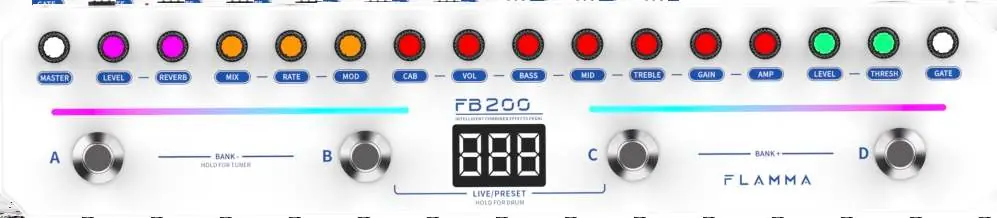
The top panel features module knobs for adjusting effects, a footswitch light bar for status indication, a digital screen for parameter values, and four footswitches (A, B, C, D) for mode control. The rear panel includes the input jack, output jack, headphone output, USB-C port for charging/OTG recording, and the power switch.
Device Connections
Connect your instrument to the INPUT jack. Use the OUTPUT jack to connect to amplifiers or other audio devices. For silent practice, use the PHONES jack. For OTG recording, connect the device to a smartphone or tablet via the USB-C port using an appropriate adapter if necessary.

Operating Modes
The device features two modes: LIVE and PRESET. Switch between them by pressing footswitches B and C simultaneously. In PRESET mode, use A/B/C/D to switch presets. In LIVE mode, each footswitch controls a specific module independently.
Effect Modules
The FB200 includes various modules: GATE, COMP, AMP, CAB, MOD, REVERB, and MASTER. Use the corresponding module knobs to turn effects on/off, select types, and adjust parameters. The screen displays precise values (1-100) for most adjustments.
Additional Functions
- Drum Machine: Press and hold B+C to enter. Use A/B to switch patterns, C to set BPM, and D to toggle on/off.
- Tuner: Press and hold A+B in any mode to activate.
- Bluetooth: Use the Flamma app to enable Bluetooth playback for audio streaming.
Technical Specifications
- Battery: 2000mAh, up to 6 hours life, ~2.5 hours charging time.
- Inputs/Outputs: 6.35mm input/output, 3.5mm headphone output.
- USB: USB-C for charging and OTG recording.
- Dimensions: 311mm x 67.5mm x 49.7mm.
- Weight: 578g.
Practical help
Common problems
Battery charging issues
Stop charging immediately if the battery emits odors or abnormal sounds. Contact after-sales service.
Device not powering on or charging
Ensure the device is not wet. Use only the designated charger and check that the power source is within the specified temperature range.
Poor contact or noise
Regularly inspect the power adapter plug and cable for damage. Clean dust and dirt from the plug.
Before use
- Ensure the power adapter matches manufacturer specifications.
- Check that the device is dry before turning on or charging.
- Verify the power socket is accessible for immediate disconnection.
- Ensure the device is placed away from heat sources and direct sunlight.
- Download the Flamma app or PC software for full functionality.
Specs in practice
- OTG Recording
- Allows direct digital audio recording to a smartphone or tablet via USB-C.
- Charging Standard
- Requires DC 5V/2A; supports USB-C to USB-A cables only.
Images and diagrams
- The top panel diagram shows the layout of module knobs and footswitches A-D.
- The rear panel diagram identifies the input, output, headphone, and USB-C ports.
- Connection diagrams illustrate how to connect a bass, amplifier, and headphones.
Model compatibility
- Compatible with Flamma mobile app and computer software.
- Supports third-party IR loading with 9 slots.
- Bluetooth 5.0 for audio playback.

Manual page author
David Miller
Documentation analyst
Organizes user manual content into clear summaries, with attention to model details, product context, and everyday usability.