Music / Instruments
Flamma FF20 Looper & Drum Pedal Owner's Manual
Quick guide for the Flamma FF20 Looper & Drum Pedal, covering connections, basic loop operations, drum machine settings, and management software usage.
Table of contents
Manual images
Jump to the sectionQuick guide from the manual
The Flamma FF20 is a dual-pedal looper and drum machine. This manual provides instructions for connecting the device, managing loops, utilizing the drum machine, and using the dedicated management software for file import/export and firmware updates.
Device Connections
The FF20 supports various connection scenarios:
- Mono Connection: Connect your instrument to the Left Input and the output to your amplifier via the Left Output.
- Stereo/Balanced Connection: Use both Left and Right inputs/outputs for stereo setups.
- Single Output for Drum Machine and Instrument: Allows routing the guitar and drum machine to separate amplification platforms by setting 'DrumOut' to 'Split' in the menu.
Note: Ensure the 'Input Setting' in the menu matches your connection type (Mono/Stereo) to avoid audio issues.
Basic Operations
The device features two footswitches for control:
- Left Footswitch: Controls record, play, and overdub. Long press to cancel, undo, or redo.
- Right Footswitch: Controls stop, tap tempo, and clearing data.
- Storage Selection: Press both footswitches simultaneously to enter storage location switching mode.
Drum Machine Operations
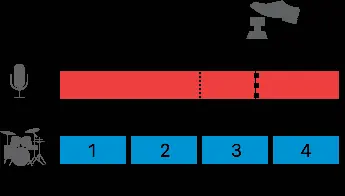
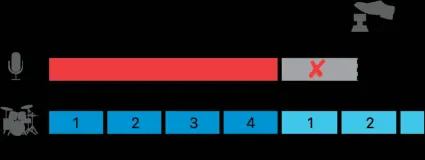
The drum machine includes 11 styles with 20 rhythm patterns each. You can adjust volume, tempo, and patterns via the drum machine interface (long press the DRUM button). The drum machine can be synced with the looper for synchronized playback.
Management Software
The dedicated software allows for:
- Importing and exporting audio files (wav, flac, ape, mp3, m4a, aac, ogg, mp4, mov, wma, avi, mpeg).
- Firmware updates.
- Data management and factory resets.
Connect the device to a computer using the included USB-C cable to access these features.
Safety and Precautions
- Use a 9V 300mA center-negative power adapter.
- Avoid placing the device in direct sunlight, high humidity, or dusty environments.
- Turn off other devices before connecting or disconnecting cables.
- Clean only with a dry or slightly dampened soft cloth.
Practical help
Common problems
Sound only in one channel
Go to the 'Menu' and change 'Input Setting' to 'Mixed'.
Drum machine and looper not in sync
Ensure the performance matches the time signature of the selected drum rhythm; otherwise, they may not align.
Cannot export or preview audio
Only manually saved audio data can be exported or previewed; temporarily stored data cannot.
Before use
- Use a 9V 300mA center-negative power adapter.
- Ensure all cables are disconnected before moving the device.
- Check that the 'Input Setting' in the menu matches your connection (Mono/Stereo).
- For firmware updates, ensure both power and data cables are securely connected.
Specs in practice
- Total Recording Duration
- 300 minutes of stereo audio recording capacity.
- Sampling Rate/Depth
- 44.1kHz/24bit high-quality audio processing.
- Power Requirements
- 9V DC, 300mA, center-negative, outer-positive.
Images and diagrams
- The manual provides diagrams for Mono, Stereo/Balanced, and Split output connections.
- Visual flowcharts illustrate the 'Record-Play-Dub' and 'Record-Dub-Play' operation sequences.
- Diagrams show how to use the footswitches to select storage locations and perform undo/redo operations.
Model compatibility
- Software requires Windows 10 or higher, or macOS 10.15 or higher.
- Supports importing various audio and video formats, but exports only in wav stereo.

Manual page author
Emily Carter
User documentation editor
Prepares concise manual descriptions and highlights the most useful setup, operation, and maintenance information for readers.