Lighting / Work Lights
User Manual for FlinQ Leaf Blower 18V
Quick guide for the FlinQ Leaf Blower 18V. Learn how to assemble, operate, maintain, and troubleshoot your cordless leaf blower safely.
Quick answers from the manual
Quick answer
- The FlinQ Leaf Blower 18V is a cordless tool designed for clearing light debris and leaves from hard surfaces. It features a 270° rotating handle and variable speed settings. p. 2, 6
Key actions
- Attach the extension tube and desired nozzle to the blower unit. p. 6
- Insert the battery pack into the handle until it clicks. p. 6
First start
- Ensure the battery is charged, insert it into the handle, and press the on/off switch to start. p. 6
Problems and fixes
Battery defective
Green and red LED flashing on charger.
p. 6
Battery too cold or warm
Red LED flashing on charger.
p. 6Maintenance and reset
- Clean air vents after every use with a cloth and soft brush. p. 7
Technical specifications
| Parameter | Value | Meaning | Pages |
|---|---|---|---|
| Motor voltage | 20V | Operating voltage | p. 3 |
| Max. Blow speed | 160 mph | Maximum air speed | p. 3 |
Where to find it in the PDF
- Parts description p. 3
- Safety instructions p. 4, 5
- Operation p. 6, 7
Table of contents
Manual images
Click an image to enlargeImportant Information
The FlinQ Leaf Blower 18V is designed for clearing light debris and leaves from hard surfaces. It is not intended for use on grassed areas. Always wear eye and ear protection during operation. Ensure the battery is removed before performing any maintenance or cleaning.
Parts Description
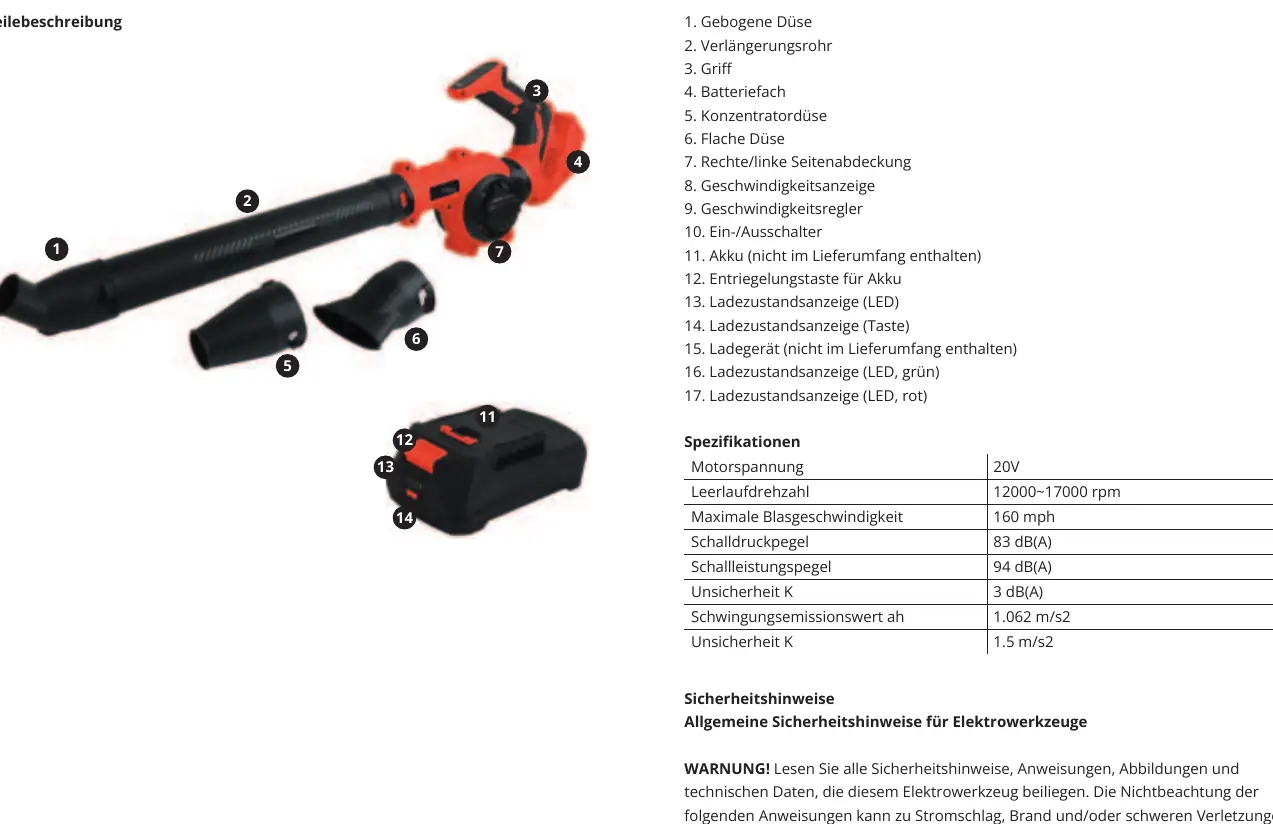
- 1. Bent nozzle
- 2. Extension tube
- 3. Handle
- 4. Battery holder
- 5. Concentrating nozzle
- 6. Flat nozzle
- 7. Right/left side cover
- 8. Speed indicators
- 9. Speed adjustment button
- 10. On/off switch
- 11. Battery pack
- 12. Release button for battery pack
- 13. Charging level LEDs
- 14. Button (charging level)
- 15. Charger
Assembly
To assemble the product, attach the extension tube [2] and your preferred nozzle to the blower unit. Ensure all parts are securely connected.
Battery Operation
Checking Charge Level: Press the button [14] on the battery pack. The LEDs [13] will indicate the charge level (4 LEDs = Maximum, 1 LED = Low).
Charging: Insert the battery pack [11] into the charger [15] and connect to a power socket. The charger LEDs indicate the status:
- Red LED: Battery charging
- Green LED: Fully charged
- Green and red flashing: Battery defective
- Red flashing: Battery too cold or too warm
Operation
Angle Adjustment: The device features a rotation function allowing the handle and body to be adjusted at 270° to suit different working environments.
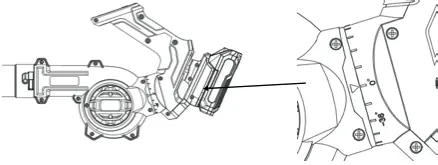
Using the Blower: Hold the product firmly, press the on/off switch [10], and adjust the speed using the speed adjustment button [9]. Sweep from side to side while moving slowly forward.
Cleaning and Maintenance
Always switch the product off and remove the battery pack before cleaning. Do not use chemical, alkaline, or abrasive detergents. Clean the product with a dry cloth and use a soft brush for hard-to-reach areas. Ensure air vents are kept clear after every use. Store in a dark, dry, frost-free, and well-ventilated place.
Technical Specifications
- Motor voltage: 20V
- No Load Speed: 12000~17000 rpm
- Max. Blow speed: 160 mph
- Sound pressure level: 83 dB(A)
- Sound power level: 94 dB(A)
Manufacturer information
FlinQ
Practical help
Common problems
Battery not charging
Check if the battery is too hot or too cold (Red LED flashing on charger). Ensure the charger is properly connected.
Product does not start
Ensure the battery is fully inserted and charged. Check if the switch is in the ON position.
Before use
- Check for any damage to the tool or battery.
- Ensure the battery is charged.
- Wear safety glasses and ear protection.
- Ensure the work area is clear of bystanders.
- Check that the switch is in the OFF position before inserting the battery.
Specs in practice
- Motor voltage
- 20V (Nominal operating voltage).
- No Load Speed
- 12000~17000 rpm (Speed range without debris).
- Max. Blow speed
- 160 mph (Maximum air velocity).
Images and diagrams
- The device features a 270° rotation function for the handle and body to suit different environments.
- Battery charging status is indicated by LEDs on the charger.
Model compatibility
- Compatible with FlinQ battery packs FQC8516 (2.0 Ah) and FQC8517 (4.0 Ah).

Manual page author
David Miller
Documentation analyst
Organizes user manual content into clear summaries, with attention to model details, product context, and everyday usability.