Lighting / Outdoor Lighting
User Manual for FlinQ Rechargeable Motion Sensor Light MagniGlow 2-pack
Quick guide for the FlinQ Rechargeable Motion Sensor Light MagniGlow 2-pack. Learn how to install, operate, adjust brightness, and use sensor modes.
Quick answers from the manual
Quick answer
- The FlinQ MagniGlow is a rechargeable motion sensor light with three modes (ON, OFF, AUTO), adjustable brightness (20-100% or stepless), and adjustable color temperature. p. 2
Key actions
- Adjust brightness p. 2
- Change color temperature p. 2
First start
- Charge the device p. 2
Problems and fixes
Light not activating
Ensure it is dark or low light condition for the sensor to work, or switch to ON mode.
p. 2Technical specifications
| Parameter | Value | Meaning | Pages |
|---|---|---|---|
| Sensor Range | 3m / 10ft | Maximum distance for motion detection | p. 2 |
| Sensor Angle | 120 degrees | Detection field of view | p. 2 |
Where to find it in the PDF
- Installation p. 2
- Operation p. 2
Table of contents
Manual images
Click an image to enlargeQuick guide from the manual
The FlinQ MagniGlow is a rechargeable motion sensor light designed for indoor use. It features a PIR motion detector that activates the light in low-light conditions. The device offers three operation modes and adjustable brightness/color temperature settings.
Installation
There are two methods to install the light:
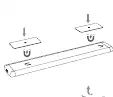
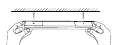
- Method 1 (Adhesive): Attach the two adhesive patches to the magnetic area on the back of the light. Peel off the protective film from the 3M double-sided adhesive on the metal piece. Install it in the desired location, pressing gently to ensure the metal piece sticks securely.
- Method 2 (Magnetic): The light features built-in magnets and can be attached directly to any iron surface.
Operation Modes
The light is controlled via a dial switch:
- ON: Steady Light Mode. The light stays on continuously, day or night.
- OFF: The LED light is turned off.
- AUTO: Sensor Mode. The light does not turn on during the day. In the dark, it activates when motion is detected and stays on for approximately 15-20 seconds. It turns off when no motion is detected.
Brightness and Color Adjustment
You can customize the light output:
- Brightness: Short press the button to cycle through 20%, 40%, 60%, 80%, and 100% brightness. Long press the button for stepless dimming.
- Color Temperature: Double-click the button to adjust the color temperature.
Usage Notes
The motion sensor uses advanced PIR (Passive Infrared) technology. It activates instantly when human motion is detected within a range of 3 meters (10 feet) and a 120-degree area. Please ensure the lights are fully charged before the first use.
Manufacturer information
FlinQ
Practical help
Common problems
Light does not turn on
Ensure the light is fully charged. If in AUTO mode, verify that the environment is dark enough, as the sensor only activates in low light.
Light turns off too quickly
In AUTO mode, the light stays on for 15-20 seconds after motion is detected. This is normal operation.
Before use
- Fully charge the lights before first use.
- Ensure the mounting surface is clean and dry for adhesive patches.
- Verify the mode switch is set to the desired setting (ON/OFF/AUTO).
Specs in practice
- Stepless Dimming
- Allows smooth adjustment of brightness by long-pressing the button, rather than using fixed presets.
Images and diagrams
- Method 1: Use adhesive patches on the back of the light and attach to the desired location.
- Method 2: Use built-in magnets to attach the light directly to iron surfaces.
Model compatibility
- The light is designed for indoor use.
- The sensor only activates at night or in low light conditions.

Manual page author
Emily Carter
User documentation editor
Prepares concise manual descriptions and highlights the most useful setup, operation, and maintenance information for readers.