Furniture / Bedroom Furniture
Assembly Instructions for Furinno 2-Tier Open Shelf Bookcase 22131
A comprehensive assembly guide for the Furinno 2-Tier Open Shelf Bookcase (Model 22131). This guide includes a complete hardware and parts list, step-by-step assembly instructions, and important safety weight limits.
Quick answers from the manual
Quick answer
- This document provides assembly instructions for the Furinno 2-Tier Open Shelf Bookcase (Model 22131), including a parts list, step-by-step assembly guide, and safety weight limits. p. 1, 2
Key actions
- Assemble the unit on packaging cardboard to prevent scratches or damage. p. 2
First start
- Identify, sort, and count all parts before beginning assembly. p. 2
Maintenance and reset
- Clean the product with a mild cleanser using a soft, damp cloth. Do not use harsh or abrasive cleaners. p. 2
Technical specifications
| Parameter | Value | Meaning | Pages |
|---|---|---|---|
| Weight Limit | 10-20 lbs | Top: 10lbs, Middle: 15lbs, Bottom: 20lbs | p. 1 |
Where to find it in the PDF
- Hardware & Parts List p. 2
- Assembly Instructions p. 2
Table of contents
Manual images
Click an image to enlargeImportant Information
This document provides assembly instructions for the Furinno 2-Tier Open Shelf Bookcase (Model 22131). Assembly is estimated to take approximately 20 minutes and is recommended for 1 person. Please ensure you have the necessary tools (screwdriver and hammer) before beginning.
Hardware and Parts List
Before starting, identify and count all parts to ensure nothing is missing:
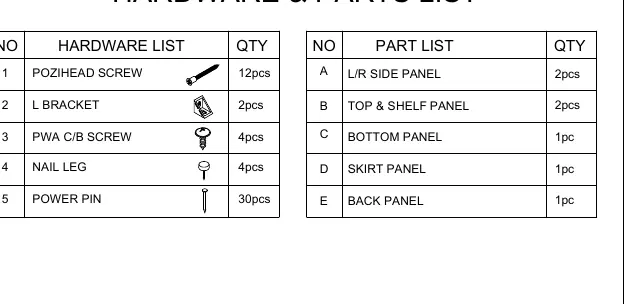
- Hardware: 12x Pozihead Screws, 2x L Brackets, 4x PWA C/B Screws, 4x Nail Legs, 30x Power Pins.
- Parts: 2x L/R Side Panels, 2x Top & Shelf Panels, 1x Bottom Panel, 1x Skirt Panel, 1x Back Panel.
Assembly Instructions
Follow these steps carefully to assemble your bookcase:
Step 1
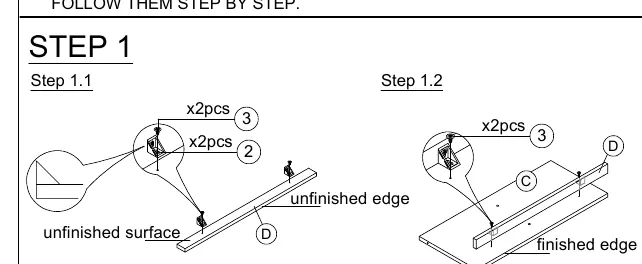
Attach the L-brackets to the panels using the provided screws. Ensure you distinguish between finished and unfinished edges as indicated in the diagram.
Step 2
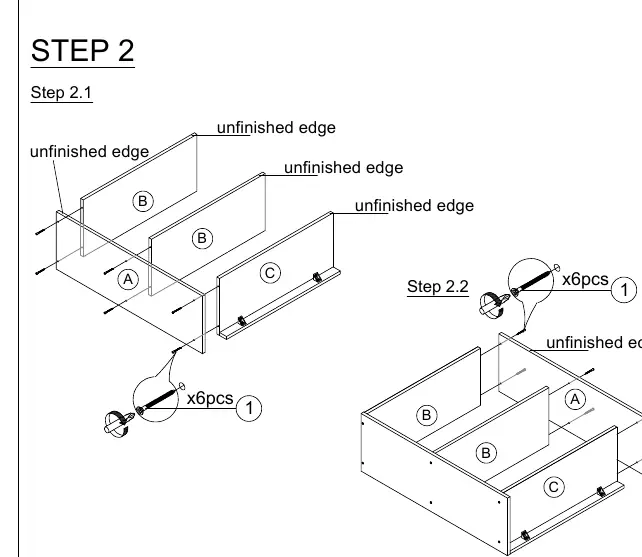
Assemble the side panels with the shelves. Ensure all panels are aligned correctly before securing them with the screws.
Step 3
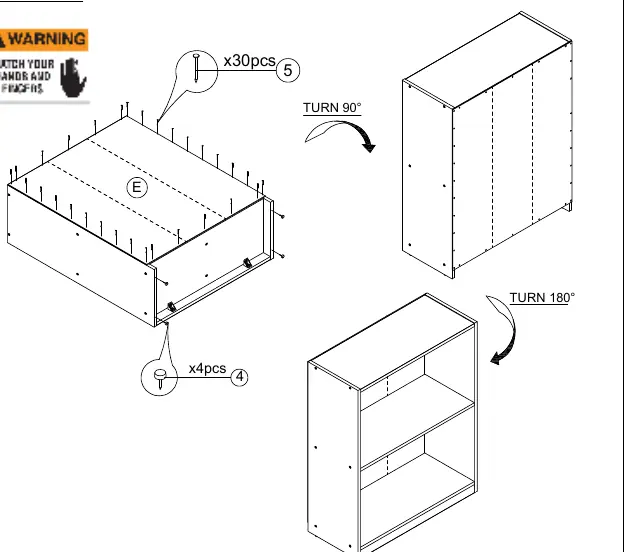
Attach the back panel to the assembled frame. Use the power pins to secure the back panel in place. Turn the unit as indicated to complete the assembly.
Safety and Maintenance
To ensure the longevity and safety of your furniture, please adhere to the following guidelines:
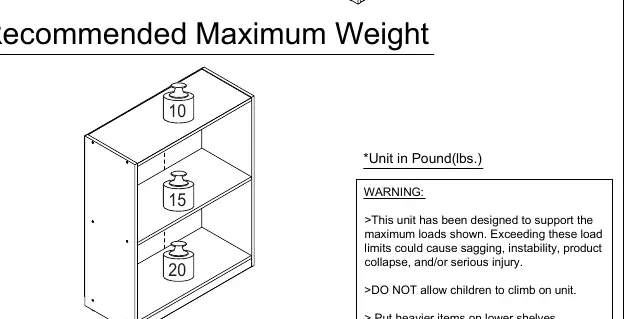
- Weight Limits: Do not exceed the recommended maximum weight: Top shelf (10 lbs), Middle shelf (15 lbs), Bottom shelf (20 lbs).
- Safety: Do not allow children to climb on the unit. Place heavier items on lower shelves to prevent instability.
- Cleaning: Clean the product with a mild cleanser using a soft, damp cloth. Do not use harsh or abrasive cleaners.
- Maintenance: Periodically check that all screws are tightened.
Practical help
Common problems
Unit instability
Ensure all screws are fully tightened and the unit is placed on a level surface.
Missing hardware or parts
Contact the Furinno Customer Service Team at [email protected] for replacement requests.
Before use
- Identify, sort, and count all parts before assembly.
- Read each step carefully before starting.
- Assemble the furniture on packaging cardboard to prevent scratches or damage.
- Ensure you have the required tools (screwdriver and hammer).
Specs in practice
- Top Shelf Weight Limit
- 10 lbs
- Middle Shelf Weight Limit
- 15 lbs
- Bottom Shelf Weight Limit
- 20 lbs
Images and diagrams
- Step 1: Shows attachment of L-brackets to panels.
- Step 2: Shows connection of side panels to shelves.
- Step 3: Shows attachment of the back panel and final orientation.
Model compatibility
- Designed for indoor use only.
- Do not allow children to climb on the unit.

Manual page author
Emily Carter
User documentation editor
Prepares concise manual descriptions and highlights the most useful setup, operation, and maintenance information for readers.