Electronics / Marine Navigation
Complete Operator's Guide to Furuno Marine Radar Systems
A comprehensive operator's guide for Furuno marine radar systems. This manual covers radar principles, system controls, display interpretation, bird targeting techniques, and essential maintenance procedures to ensure optimal performance.
Quick answers from the manual
Quick answer
- This guide provides operational instructions for Furuno marine radar systems, covering basic principles, control adjustments, display interpretation, and maintenance. p. 1, 2, 8, 13
Key actions
- Adjusting Gain: Increase until noise is visible, then back off slightly. p. 16
- Suppressing Sea Clutter: Use A/C SEA control; keep some clutter to ensure weak targets aren't erased. p. 10, 12
First start
- Wait 2-3 minutes after turning on the power for the magnetron to warm up. p. 20
Problems and fixes
HD/BP error message
Display is not getting heading or bearing pulse signals. Check antenna rotation.
p. 16
Targets in wrong place
Perform heading alignment.
p. 16Maintenance and reset
- Check scanner drive motor brushes every 6 months to 1 year. Replace if less than 6mm. p. 22
Technical specifications
| Parameter | Value | Meaning | Pages |
|---|---|---|---|
| Magnetron output power | 1kW to 60kW | Power range for small to large radars. | p. 5 |
Where to find it in the PDF
- Radar Controls p. 8, 9, 10
- Maintenance p. 22
Table of contents
Manual images
Click an image to enlargeQuick guide from the manual
This guide provides essential information for operating Furuno marine radar systems. It covers the fundamental principles of radar, how to interpret the display, how to adjust controls for various sea conditions, and how to perform routine maintenance. Always ensure the radar is in transmit mode before attempting to adjust settings.
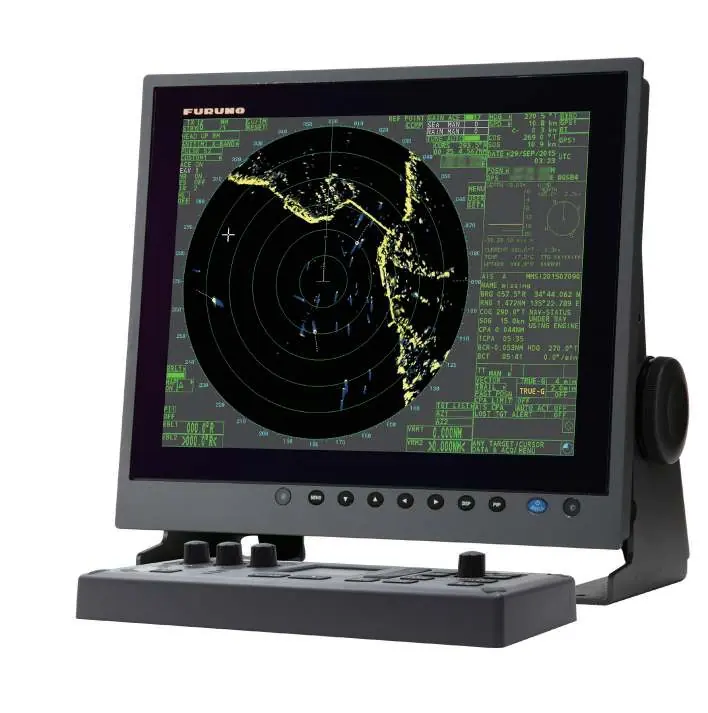
Radar Principles
Radar (Radio Detecting And Ranging) measures the time it takes for a pulsed signal to reflect off an object and return to the scanner. It provides critical information for navigation, collision avoidance, and identifying targets like vessels, landmasses, or buoys. Furuno radars are designed to provide high-quality, reliable data for various vessel types.
Radar Controls
Effective radar operation requires mastering the following controls:
- Power: Turns the system on/off. Wait for the magnetron to warm up (typically 2-3 minutes).
- Gain: Adjusts receiver sensitivity. Increase until background noise is just visible, then adjust for the desired range.
- A/C Sea (STC): Suppresses sea clutter caused by waves. Adjust until clutter is reduced but weak echoes remain visible.
- A/C Rain (FTC): Suppresses rain clutter. Use to break up echoes from precipitation.
- Range: Adjusts the detection range. Changing range automatically updates range rings and pulselength.
- VRM & EBL: Variable Range Marker (VRM) and Electronic Bearing Line (EBL) are used to measure distance and bearing to targets.
Interpreting the Display
The radar display (PPI - Plan Position Indicator) shows your vessel at the center. Understanding the display involves recognizing:
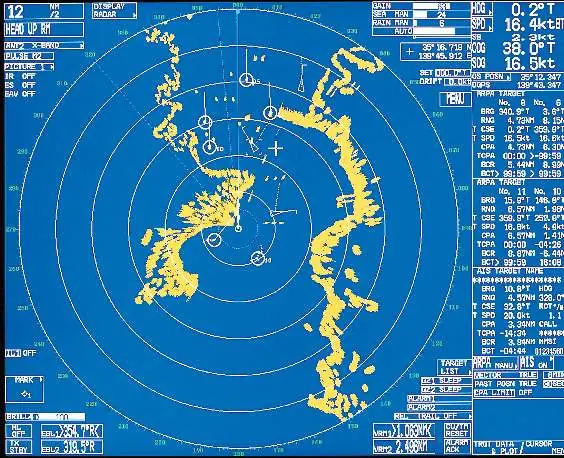
- ARPA (Automatic Radar Plotting Aid): Tracks targets and calculates course, speed, and closest point of approach (CPA).
- AIS (Automatic Identification System): Provides real-time vessel data via VHF signal, even if targets are obscured from radar.
- False Echoes: Be aware of indirect echoes (from reflections on your own ship) and side lobe echoes, which can appear as false targets.
Targeting Birds
Some Furuno radars include a Bird Mode. To target birds:
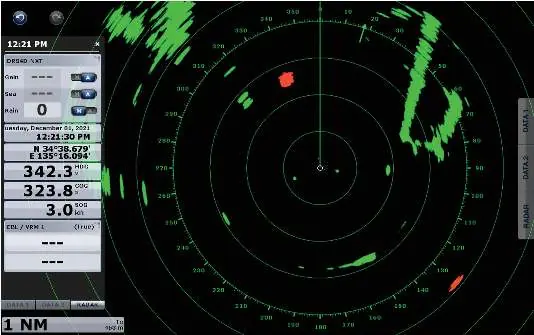
- Set the radar to a mid- or long-range.
- Increase the Gain control until noise (a blanket of small specks) appears on the display.
- Keep the Gain high to maintain maximum sensitivity.
- Avoid turning up A/C Sea or A/C Rain, as this may filter out the bird flocks.
Maintenance
Regular maintenance is crucial for radar longevity:
- Safety: High voltage exists inside the unit. Always wait 2-3 minutes after turning off power before opening the unit.
- Cleaning: Wipe the radiator (antenna) with a freshwater-moistened cloth. Do not use gasoline or commercial cleaners.
- Inspection: Check fixing bolts for corrosion, inspect waterproofing gaskets, and check scanner drive motor brushes (replace if less than 6mm).
Practical help
Common problems
Targets appearing in the wrong place
Perform a heading alignment upon installation of the radar antenna.
Radar will not go into transmit (HD/BP error)
This indicates a lack of heading or bearing pulse signals. Check if the antenna is rotating and contact an authorized Furuno representative.
Radar interference (streaks/spiral lines)
Use the Interference Rejection (IR) setting in the menu.
Excessive sea clutter
Adjust the A/C SEA control. Ensure some clutter remains to avoid erasing weak targets.
Before use
- Ensure no one is near the scanner unit before turning it on.
- Verify the radar is in transmit mode.
- Wait 2-3 minutes for the magnetron to warm up.
- Check that the display is configured correctly for your navigation needs.
- Ensure heading input (gyro or flux gate compass) is connected for advanced features like ARPA.
Images and diagrams
- Figure 2: Basic Radar system configuration showing scanner and display units.
- Figure 9: Sample Radar display showing ARPA and AIS targets.
- Figure 10: How to measure range using range rings, cursor, and VRM.
- Figure 12: Example of indirect echoes caused by obstructions.
Model compatibility
- ARPA requires Furuno AD10S heading input at 25 milliseconds.
- Radar overlay requires NMEA or Furuno AD10S heading input.
- UHD Radars require high-speed NMEA for ARPA support.

Manual page author
David Miller
Documentation analyst
Organizes user manual content into clear summaries, with attention to model details, product context, and everyday usability.