Power / Power Banks
Gadnic 2-in-1 Carrier Fan User Manual
Quick guide for the Gadnic 2-in-1 Carrier Fan. Learn how to operate the fan, adjust speed and LED lighting, check battery levels, and follow safety precautions.
Quick answers from the manual
Quick answer
- The Gadnic 2-in-1 Carrier Fan features stepless speed control, three LED light modes, and a rechargeable 18650 battery. It can be operated while charging. p. 10
Key actions
- Adjust wind speed p. 10
- Adjust LED brightness p. 10
First start
- Unpack and inspect the product. p. 10
Maintenance and reset
- Charge every 3 months if not in use. p. 11
Technical specifications
| Parameter | Value | Meaning | Pages |
|---|---|---|---|
| Input Voltage | 5V | Charging voltage | p. 11 |
| Weight | 450g | Product weight | p. 11 |
Where to find it in the PDF
- Product Structure and Operation (English) p. 10
- Technical Parameters (English) p. 11
Table of contents
Important information
The Gadnic 2-in-1 Carrier Fan is a portable device featuring a brushless motor for quiet operation and a rechargeable 18650 battery. It supports stepless wind speed adjustment and three LED lighting modes. The device can be operated while charging.
Product structure
The fan consists of the following main components:
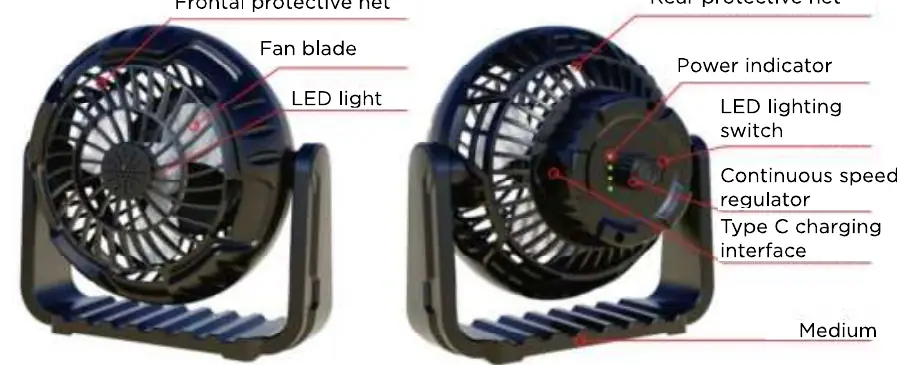
- Frontal protective net
- Fan blade
- LED light
- Rear protective net
- Power indicator
- LED lighting switch
- Continuous speed regulator
- Type C charging interface
Operation
Follow these steps to use the fan:
- Unpacking: Ensure all accessories are present and the product is intact.
- Speed adjustment: Use the knob switch located on the back of the fan. Turn it to the right to adjust the wind speed steplessly.
- LED lighting: Press the lighting switch gently to cycle between weak, medium, and strong brightness levels.
- Battery status: The device indicates remaining battery via 1-4 lamps, representing 20%, 50%, 75%, and 100% charge respectively.
- Charging: The product supports operation while charging.
Technical specifications
- Input Voltage: 5V
- Input Current: 200mAh-1200mAh
- Output Power: 1W-6W
- LED Power: 0.5W-2W
- Dimensions: 196mm x 193mm x 125mm
- Weight: 450g
- Duration: 6 hours (High Speed) to 25 hours (Low Speed)
Safety precautions
- If the product is not used for a long time, charge it every 3 months to maintain battery life.
- Do not insert fingers into the net while the fan is running.
- Children under 3 years old must use the product under adult supervision.
- Do not remove the front or rear protective nets.
- Do not use the product near fire or in damp areas.
- Always use the original charging cable.
Manufacturer information
Gadnic
Practical help
Common problems
Fan does not start
Ensure the battery is charged or the device is connected to a power source.
Battery indicator not displaying
Check the charging connection; the indicator lights (1-4) show the current charge level.
Before use
- Unpack the device and verify all accessories are included.
- Inspect the product for any physical damage.
- Charge the device fully before the first use.
Specs in practice
- Input Voltage
- 5V standard input for charging.
- Battery Indicator
- 1-4 lights indicate 20%, 50%, 75%, and 100% charge.
Images and diagrams
- The back of the fan houses the speed control knob and the LED light switch.
- The Type C charging port is located on the rear of the unit.
Model compatibility
- Supports operation while charging.

Manual page author
Emily Carter
User documentation editor
Prepares concise manual descriptions and highlights the most useful setup, operation, and maintenance information for readers.