Home Appliances / Fans
User Manual for Utilitech 20-Inch Outdoor Pedestal Fan
Quick guide for the Utilitech 20-Inch Outdoor Pedestal Fan. Includes assembly instructions, GFCI plug testing, speed settings, maintenance, and troubleshooting steps.
Quick answers from the manual
Quick answer
- The Utilitech 20-Inch Outdoor Pedestal Fan (Model SFSDE-500B-A) is a floor-standing fan. Assembly requires a Phillips screwdriver and a wrench. Always test the GFCI plug before each use. p. 1
Key actions
- Test the GFCI plug before each use. p. 5
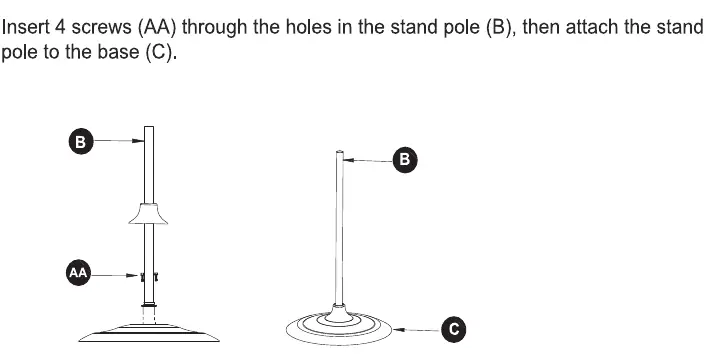
- Assemble the stand pole to the base using 4 screws. p. 4
First start
- Plug the GFCI into a power outlet, press RESET (indicator turns red), press TEST (indicator turns off), then press RESET again to use. p. 5
Problems and fixes
Fan fails to operate
Check power connection and ensure the outlet is working. Check for obstructions in the fan blades.
p. 5Maintenance and reset
- Unplug before cleaning. Do not use water on metal surfaces. Use a vacuum or remove the front screen to clean dust. p. 5
Where to find it in the PDF
- Assembly Instructions p. 4
- Operating Instructions p. 5
Table of contents
Manual images
Click an image to enlargeQuick guide from the manual
This manual provides instructions for the Utilitech 20-Inch Outdoor Pedestal Fan (Model SFSDE-500B-A). Before using the fan, you must test the GFCI plug to ensure safety. Assembly requires a Phillips screwdriver and a wrench. The fan features three speed settings controlled by a pull chain.
Package contents
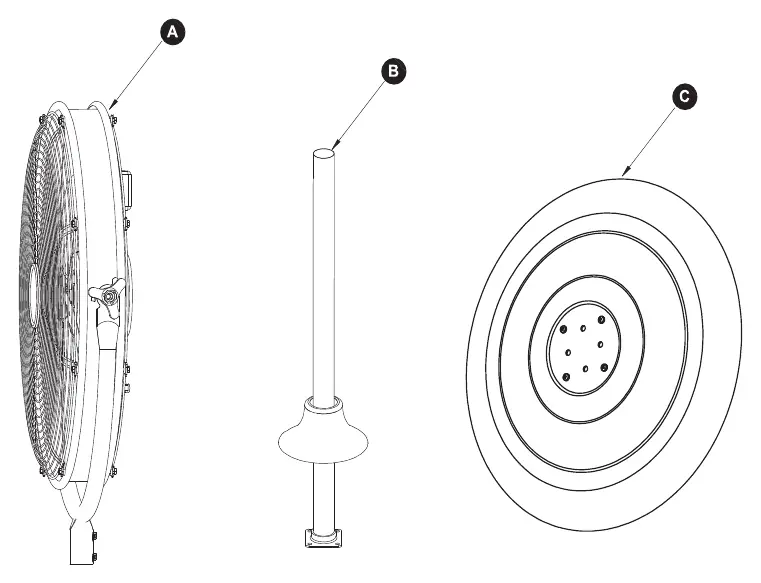
- Fan Body
- Stand Pole
- Base
- Hardware: 6 Screws (AA)
Assembly instructions
Step 1: Insert 4 screws (AA) through the holes in the stand pole (B), then attach the stand pole to the base (C).
Step 2: Insert the U-bracket on the fan body (A) into the standing pole (B), then secure with 2 screws (AA).
Operating instructions
GFCI Plug Test: Perform this test before each use:
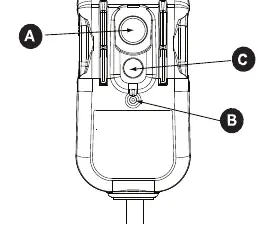
- Plug the GFCI into a power outlet and press the RESET button (A). The indicator (B) should turn red.
- Press the TEST button (C). The indicator (B) should turn off, indicating the GFCI plug is tripped.
- Press the RESET button (A) again to use the fan.
- Do not use the fan if the test fails.
Adjusting air speed: The fan has three speeds: LOW, MEDIUM, and HIGH. Pull the chain on the unit to adjust the airflow to the desired speed.
Care and maintenance
- Always unplug the appliance before cleaning.
- Do not use water to clean metal surfaces.
- To remove dust from the protective screen, use a vacuum cleaner or remove the front protective screen by unscrewing the securing screw on the edge.
- After cleaning, remount the safety screen and fasten the securing screw.
Troubleshooting
If the fan fails to operate:
- Ensure the fan is plugged in and the electrical outlet is working properly.
- Check for any obstructions in the fan. If an obstruction is found, turn the fan to 0, unplug it, carefully remove the obstruction, plug it back in, and turn it on again.
Manufacturer information
Utilitech
Practical help
Common problems
Fan fails to operate
Ensure the fan is plugged in and the outlet is functional. Check for obstructions in the fan blades.
Before use
- Verify all parts are present (Fan Body, Stand Pole, Base, Screws)
- Test the GFCI plug before each use
- Ensure the fan is not used with an extension cord
- Do not touch the fan with wet hands
Specs in practice
- Speed Settings
- Three levels (Low, Medium, High) adjustable via the pull chain.
Images and diagrams
- Assembly requires attaching the stand pole to the base using 4 screws.
- The fan body attaches to the stand pole using 2 screws.
Model compatibility
- Designed for outdoor use.
- Do not use with an extension cord.

Manual page author
David Miller
Documentation analyst
Organizes user manual content into clear summaries, with attention to model details, product context, and everyday usability.