Power / Batteries & Chargers
Operator's Manual for GARDENA Battery Charger AL 1810 CV P4A / AL 18V-20 P4A
Quick guide for the GARDENA AL 1810 CV P4A and AL 18V-20 P4A battery chargers. Includes charging instructions, safety warnings, troubleshooting, and technical specifications.
Quick answers from the manual
Quick answer
- To charge your battery, connect the GARDENA charger to a mains socket and slide the charger onto the battery. The indicator light will flash during charging and remain continuously lit when fully charged or if the temperature is out of range. p. 5, 6
Key actions
- Charging the battery p. 5
- Cleaning the charger p. 6
Problems and fixes
Battery indicator continuously lit
Battery is fully charged or temperature is out of range. Wait for temperature to normalize.
p. 6, 7Technical specifications
| Parameter | Value | Meaning | Pages |
|---|---|---|---|
| Mains voltage | 220-240 V | Input voltage | p. 8 |
| Battery charging voltage | 18 V | Output voltage | p. 8 |
Where to find it in the PDF
- Safety Instructions p. 3, 4
- Operation p. 5
- Troubleshooting p. 7
- Technical Data p. 8
Table of contents
Quick guide from the manual
This manual provides instructions for the GARDENA AL 1810 CV P4A and AL 18V-20 P4A battery chargers. These chargers are designed for the POWER FOR ALL 18V system batteries and are intended for private house and hobby garden use. Always ensure the charger is used in a dry, indoor environment.
Operation
To charge your battery:
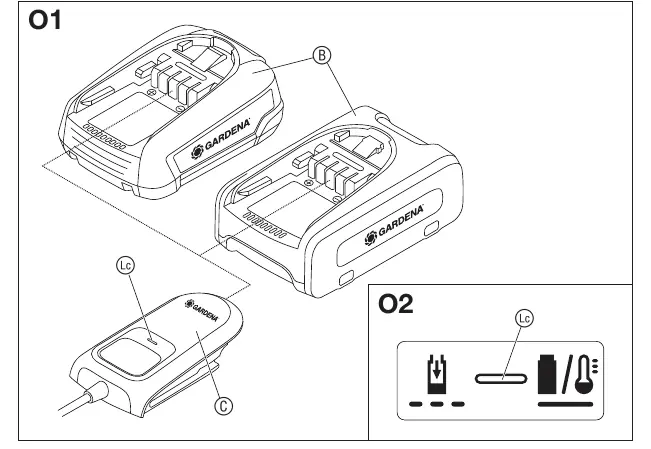
- Connect the battery charger to a mains socket.
- Slide the battery charger onto the battery.
The charging process is intelligent; the charger automatically detects the battery's charge state and charges it with the optimal current based on temperature and voltage.
Meaning of the indication elements
- Flashing Battery Charge Indicator: Indicates that the charging procedure is in progress.
- Continuous lighting of the Battery Charge Indicator: Indicates that the battery is fully charged OR that the battery temperature is outside the allowable charging range. Charging will resume automatically once the temperature is within the permissible range.
- Continuous lighting (no battery inserted): Indicates that the charger is connected to the mains and ready for operation.
Maintenance
To clean the battery charger:
- Ensure the surface and contacts of the battery and charger are clean and dry before connection.
- Do not use running water.
- Clean contacts and plastic parts with a soft, dry cloth.
Troubleshooting
If charging is not possible:
- Indicator continuously lit: Check if the battery is connected correctly, clean the battery contacts, or wait for the battery temperature to return to the 0°C to +45°C range. If the battery is defective, it must be replaced.
- Indicator not illuminated: Ensure the mains plug is fully inserted into the socket. If the issue persists, check the mains voltage or have the charger inspected by an authorized dealer or GARDENA service.
Safety
- Keep the charger away from moisture and do not use it in flammable environments.
- Always check the charger, cable, and plug for damage before use.
- Do not open the charger yourself; repairs must be performed by qualified specialists using original parts.
- Keep children away during use, cleaning, and maintenance.
Manufacturer information
GARDENA
Practical help
Common problems
Battery indicator is continuously lit, but charging is not possible.
The battery may be fully charged or the temperature is outside the 0°C to +45°C range. Wait for the temperature to normalize or check for dirty contacts.
Battery indicator is not illuminated.
Ensure the mains plug is fully inserted. If it still does not light up, the charger or socket may be defective; contact GARDENA service.
Before use
- Check the charger, cable, and plug for any visible damage.
- Ensure the mains voltage matches the voltage specified on the charger's rating plate.
- Use the charger only in closed, dry rooms.
- Ensure the battery temperature is between 0°C and +45°C.
- Keep the charger and battery contacts clean and dry.
Specs in practice
- Mains voltage
- The charger requires a 220-240V AC power source.
- Permissible battery temperature
- Charging is only possible when the battery temperature is between 0°C and 45°C.
- Protection class
- The device is classified as Protection Class II (double insulated).
Images and diagrams
- O1: Shows the connection of the charger to the battery.
- O2: Illustrates the battery charge indicator light states.
Model compatibility
- Compatible with POWER FOR ALL system batteries (PBA 18V).
- Not intended for non-rechargeable batteries.

Manual page author
Emily Carter
User documentation editor
Prepares concise manual descriptions and highlights the most useful setup, operation, and maintenance information for readers.