Tools / Laser Engraving Accessories
User Manual for Genmitsu 710W Compact Router
Quick guide for the Genmitsu 710W Compact Router. Includes installation steps, collet replacement, carbon brush maintenance, safety warnings, and technical specifications.
Table of contents
Manual images
Click an image to enlargeQuick guide from the manual
This document provides essential instructions for the Genmitsu 710W Compact Router. For technical support, contact [email protected]. Always read the full manual before operation to ensure safety and proper handling of the spindle.
Safety Guidelines
- Operation: Remain alert and sober while operating. Do not use if fatigued or under the influence of drugs/alcohol.
- Personal Protective Equipment: Always wear safety goggles. Use noise protection (ear muffs) for long periods. Do not wear gloves or loose clothing that could get caught in moving parts.
- Handling: Be careful when loading/unloading cutters as they are very sharp.
- Environment: Keep the workspace clean, bright, and free of children or bystanders. Do not operate in explosive environments (flammable liquids, gases, or dust).
- Power: Ensure the power cord is not in the spindle's range of motion. The socket must be compatible with the spindle plug; do not modify the plug.
Technical Specifications
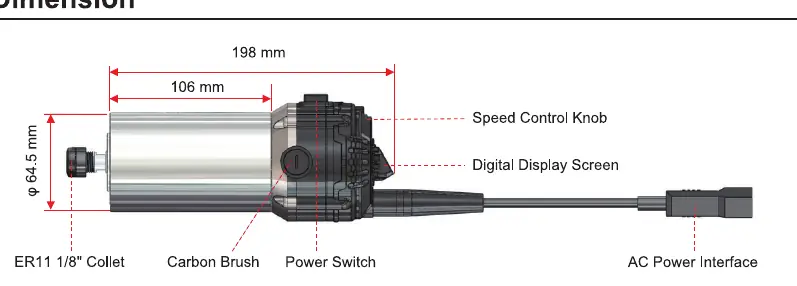
- Power: 710 W
- Rotation Speed: 7000 - 30000 RPM (adjustable, 1-6 speeds). Features constant torque control and soft start.
- Input Voltage: 100 - 130V (US/JP) or 230V (EU/UK/AU).
- Collet Compatibility: ER11, supports shank diameters from 1mm to 8mm (1/4", 1/8").
Collet Replacement
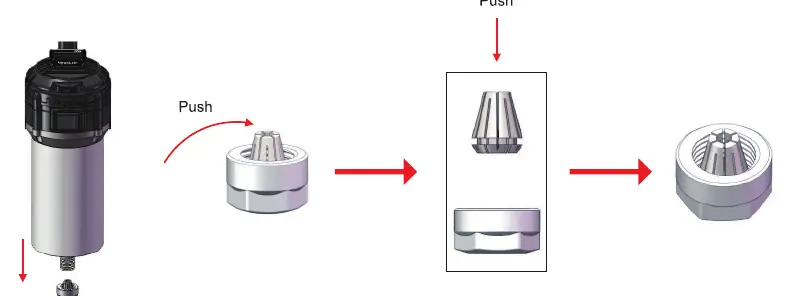
- Remove the collet nut from the spindle.
- Press the collet in the direction of the arrow to separate it from the nut.
- Place the new collet into the nut and push until you hear a click, indicating it is properly seated.
Tool Disassembly and Installation

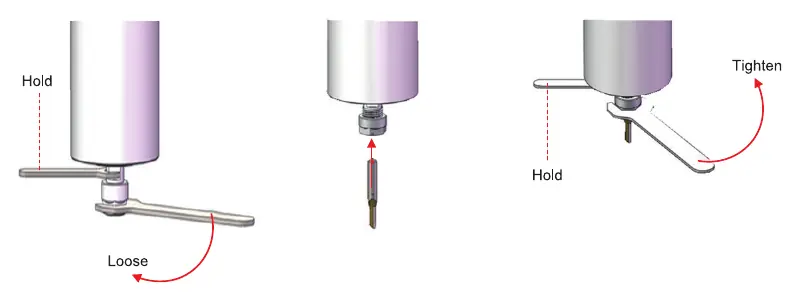
- Use a wrench to hold the spindle shaft and another wrench to loosen the collet nut.
- Insert the tool into the spindle chuck.
- Use the wrenches to tighten the collet nut securely.
Carbon Brush Replacement
When brushes are worn, replace both left and right brushes simultaneously with the same specifications.
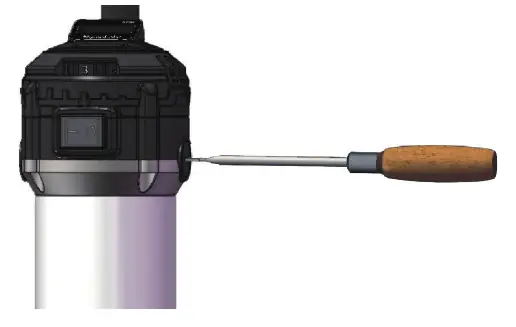
- Use a slotted screwdriver or the provided carbon brush wrench to remove the clip covers on both sides.
- Remove the worn brushes, install the new ones, and replace the holder covers.
Practical help
Common problems
Spindle vibration or wobbling
This may indicate improper tool installation. Ensure the tool is correctly seated in the collet and the nut is tightened.
Spindle does not start
Check the power connection and ensure the power switch is in the ON position.
Tool slips during operation
Ensure the collet nut is tightened securely using the provided wrenches.
Before use
- Ensure the power cord is clear of the spindle's range of motion.
- Verify the power socket matches the spindle plug requirements.
- Check that the collet nut is tightened securely.
- Wear safety goggles and hearing protection.
- Ensure the workspace is clean and free of flammable materials.
Specs in practice
- Rotation Speed
- 7000-30000 RPM, adjustable via 6 speed settings with soft start.
Images and diagrams
- The dimension diagram identifies the Speed Control Knob, Digital Display Screen, Power Switch, and AC Power Interface.
- The installation diagrams illustrate the correct use of wrenches to hold the spindle and tighten/loosen the collet nut.
Model compatibility
- Input Voltage: 100-130V (US/JP) or 230V (EU/UK/AU).
- Supports shank diameters: 1mm - 8mm (including 1/4" and 1/8").

Manual page author
David Miller
Documentation analyst
Organizes user manual content into clear summaries, with attention to model details, product context, and everyday usability.