Computers / Laptops
Dongerdi AC Adapter
A comprehensive guide for the Dongerdi AC Adapter, covering safety precautions, installation steps, troubleshooting procedures, and technical specifications.
Table of contents
Quick guide from the manual
This guide provides essential instructions for the safe operation and installation of the Dongerdi AC Adapter. Always ensure the adapter is well-ventilated during use and never attempt to disassemble the unit. If the adapter shuts down due to a fault, it must be disconnected from the power source for at least 10 seconds to reset.
Safety precautions
- Power Cords: Never wrap cords around the adapter to prevent fraying or crimping. Route cords to avoid tripping or pinching.
- Liquids: Keep the adapter away from liquids to prevent short circuits and corrosion.
- Ventilation: The adapter generates heat during operation. Ensure it is exposed to air and not covered by papers or other materials.
- Damage: Do not use the adapter if the case is cracked, the cord is damaged, or if there are signs of overheating (e.g., deformed plastic).
Installation
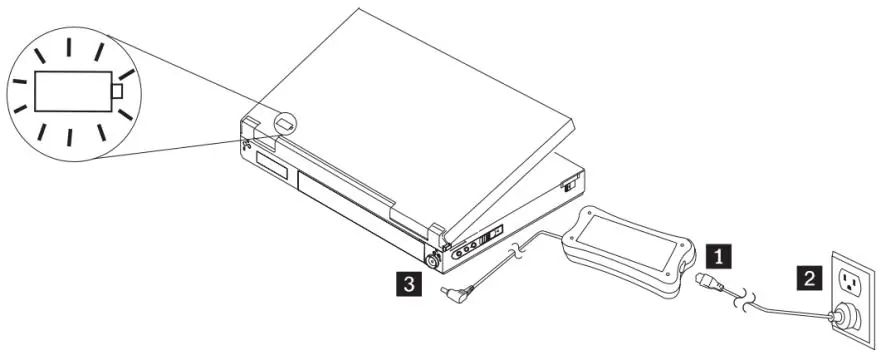
- Plug the smaller end of the AC power cord into the adapter.
- Insert the large end of the cord into a standard AC electrical outlet.
- Insert the tipped connector into the power port of your notebook computer.
- Verify the connection by checking the power icon on your computer's system tray.
Troubleshooting
If the adapter shuts down, it has detected a fault such as a short circuit or high temperature. To resolve:
- Ensure the adapter has adequate ventilation.
- Check the AC receptacle by plugging in another device (e.g., a lamp) to verify power.
- Disconnect the adapter from the power source for at least 10 seconds to reset the internal protection.
- Inspect the case and cables for physical damage. If damage is found, discontinue use immediately.
Technical specifications
- Input: 100-240V, 3.5A, 50-60Hz
- Output: 19.5V, 11.8A
- Maximum Power: 230W
- Connector: 5.5x2.5mm tip
- Warranty: 1 year
Manufacturer information
Gigabyte Technology Co., Ltd.
Practical help
Common problems
Adapter shuts off immediately
Check for faults, ensure proper ventilation, and disconnect from power for 10 seconds to reset.
Adapter is warm to the touch
This is normal during operation; ensure it is not covered and has adequate ventilation.
Cracked case or damaged cord
Stop using the adapter immediately as it is unsafe. Contact support for a replacement.
Before use
- Inspect the case for cracks, deformations, or water exposure.
- Check cables for cuts, exposed wiring, or cracks.
- Ensure the AC outlet is functional and properly wired.
- Verify the notebook requires a 5.5x2.5mm tip connector.
- Ensure the adapter will be placed in a well-ventilated area.
Specs in practice
- Input 100-240V
- Universal voltage support for worldwide use.
- Output 19.5V 11.8A
- The electrical output provided to the laptop; must match your device requirements.
- 5.5x2.5mm tip
- The physical size of the connector plug.
Images and diagrams
- 1: Connect the AC power cord to the adapter.
- 2: Connect the AC power cord to the wall outlet.
- 3: Connect the adapter tip to the notebook computer.
Model compatibility
- Compatible with notebooks requiring a 5.5x2.5mm tip connector.

Manual page author
Emily Carter
User documentation editor
Prepares concise manual descriptions and highlights the most useful setup, operation, and maintenance information for readers.