Power / Transformers & Supplies
User Manual for Lluria Slim FLF 150-DALI-24 LED Power Supply
Quick guide for the Lluria Slim FLF 150-DALI-24 constant voltage LED power supply. Includes wiring diagrams, technical specifications, and dimming control instructions.
Table of contents
Manual images
Click an image to enlargeQuick guide from the manual
The Lluria Slim FLF 150-DALI-24 is a constant voltage power supply designed for 24V LED strips or bulbs. It features dimming capabilities via DALI-2 protocol or a push button. The device uses a high-frequency PWM output (2KHz) to prevent flickering and ensure consistent color rendering.
Product Description
This power supply is designed for easy integration into various applications due to its elongated and flat format. It provides a stable 24V DC output and supports dimming down to a minimum level of 1%.
Wiring and Installation
The device requires connection to the AC mains (220-240V) and the LED load. It also features specific terminals for control inputs.
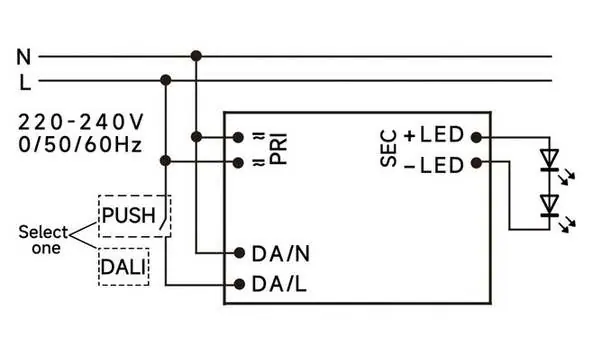
- PRI (Primary): Connect to 220-240V AC mains (50/60Hz).
- SEC (Secondary): Connect to the LED load, observing correct polarity (+LED and -LED).
- Control Inputs: Connect either a DALI-2 controller or a push button to the designated terminals (DA/N, DA/L). Note that you must select one control method.
Technical Specifications
Key operational parameters for the FL150-DA2-24 model:
- Output Voltage: 24V DC
- Output Current: 6.25A
- Input Voltage Range: 198-264V AC
- Efficiency: 91%
- Power Factor: 0.95
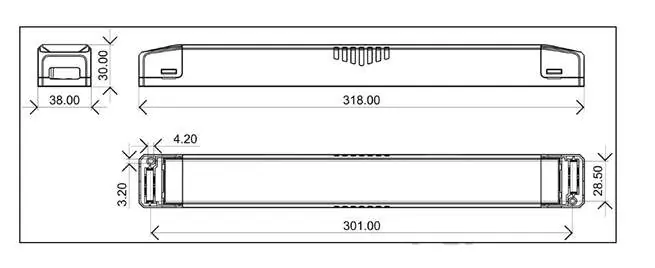
- Dimensions: 318 x 38 x 30 mm
- Operating Temperature: -20°C to 45°C
Safety and Protections
The power supply includes built-in protection mechanisms that are self-recovering:
- Overload Protection: 105%-150%
- Short Circuit Protection: Self-recovery
- Excess Temperature Protection: Self-recovery
Practical help
Common problems
LEDs are flickering
Ensure the power supply is correctly connected and that the load is within the 24V specification. The device operates at 2KHz to minimize flicker; if flickering persists, check for loose wiring.
Dimming is not working
Verify that you have selected only one control method (either DALI or Push button) and that the wiring to the control terminals is secure.
Before use
- Verify that your LED strips or bulbs are rated for 24V DC constant voltage.
- Ensure the input voltage is within the 198-264V AC range.
- Check that the total load does not exceed the 6.25A output current capacity.
- Confirm correct polarity when connecting the LED load (+LED and -LED).
- Ensure the installation environment temperature is between -20°C and 45°C.
Specs in practice
- Self-recovery
- The device will automatically resume operation after a fault (overload, short circuit, or overheating) is resolved.
Images and diagrams
- PRI terminals are for AC mains input (220-240V).
- SEC terminals are for the LED load output (+ and -).
- PUSH/DALI terminals are for the dimming control interface.
Model compatibility
- Compatible with DALI-2 protocol controllers.
- Compatible with standard push-button switches for dimming.
- Designed for 24V constant voltage LED loads only.

Manual page author
Emily Carter
User documentation editor
Prepares concise manual descriptions and highlights the most useful setup, operation, and maintenance information for readers.