Automotive / Jump Starters
User Manual for Strex Car Stereo 1-DIN SP18
Quick guide for the Strex Car Stereo 1-DIN (SP18). Includes installation wiring diagrams, control button functions, Bluetooth pairing instructions, and technical specifications.
Table of contents
Manual images
Click an image to enlargeQuick guide from the manual
This manual provides instructions for the Strex Car Stereo 1-DIN (Model SP18). The device features FM radio, USB/SD playback, AUX input, and Bluetooth connectivity. For any questions or issues, you can contact the manufacturer via email at [email protected].
Installation and Connections
The unit requires a 12V DC power supply with a negative ground. Ensure all wiring is connected correctly before powering on the device. The wiring harness includes connections for:
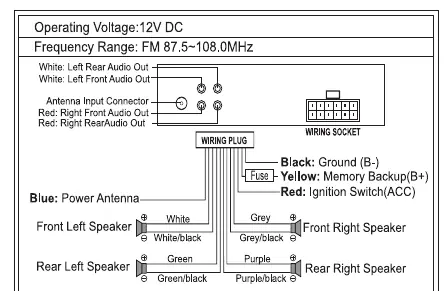
- Black: Ground (B-)
- Yellow: Memory Backup (B+)
- Red: Ignition Switch (ACC)
- Blue: Power Antenna
- Speaker Wires: Color-coded pairs for Front Left, Front Right, Rear Left, and Rear Right speakers.
Location of Controls
The front panel features 20 controls, including:
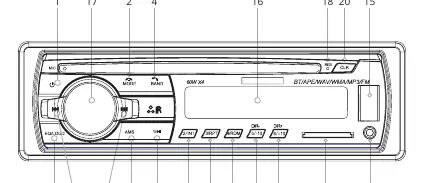
- 1: Power ON/OFF
- 2: Function Selector (Radio/USB/SD/AUX/BT) & End Call
- 3: Auto Seek Search Tuning (AMS)
- 4: Band Button (FM1-FM2-FM3) & Answer Call
- 13: SD Card Slot
- 14: Aux In Jack
- 15: USB Port
- 17: Volume / Select Control
- 18: Reset Button
- 19: EQ Button
Operating Instructions
Power: Short press to turn on, long press for three seconds to turn off.
Bluetooth: Search for Bluetooth devices on your phone. Pair to the device using the password 0000. Some phones connect automatically after searching.
Mode Selection: Press the MODE button repeatedly to cycle through: RADIO -> USB -> SD -> AUX-IN -> BT.
Tuning: In Radio mode, use the AMS button to auto-seek and save stations. Use the Band button to toggle between FM1, FM2, and FM3.
Playback: Use the 1-6 buttons to control playback (Play/Pause, Intro, Repeat, Random, and folder navigation).
Technical Specifications
- Power Supply: 12V DC, Negative Ground
- Max Output Power: 4x60W
- Frequency Range: 87.5~108.0 MHz
- Supported Formats: MP3, WMA
- Max Current Consumption: 15A
Practical help
Common problems
Bluetooth pairing fails
Ensure you are using the correct pairing password '0000'.
Settings/Radio stations not saved
Verify that the Yellow wire (Memory Backup) is connected to a constant 12V power source.
Device does not turn on
Check that the Red wire (ACC) is connected to the ignition switch and the Black wire (Ground) is properly grounded.
Before use
- Verify vehicle power is 12V DC.
- Ensure negative ground system.
- Check all wiring connections against the provided diagram.
- Connect the antenna.
- Insert SD card or USB drive if using external media.
Specs in practice
- Max Output Power
- 4x60W, the maximum power the unit can deliver to four speakers.
- Frequency Range
- 87.5~108.0 MHz, the FM radio tuning range.
- Power Supply
- 12V DC, standard automotive voltage.
Images and diagrams
- The wiring diagram illustrates the color-coded connections for power, speakers, and antenna.
- The front panel diagram identifies the location and function of all 20 buttons and ports.
Model compatibility
- Supports MP3 and WMA file formats.
- Requires 12V DC power supply.
- Bluetooth pairing password is 0000.

Manual page author
Emily Carter
User documentation editor
Prepares concise manual descriptions and highlights the most useful setup, operation, and maintenance information for readers.