Power / Solar Inverters
Growatt MID 10-25KTL3-X Grid Inverter
Quick installation and setup guide for the Growatt MID 10-25KTL3-X grid inverter. Includes wiring diagrams, mounting instructions, and system commissioning steps.
Table of contents
Manual images
Click an image to enlargeQuick guide from the manual
This document provides essential instructions for installing and commissioning the Growatt MID 10-25KTL3-X grid inverter. It covers mounting, electrical connections (DC, AC, Signal, and DRM), and initial system setup. Before starting, ensure all package contents are present and the device is undamaged.
Overview
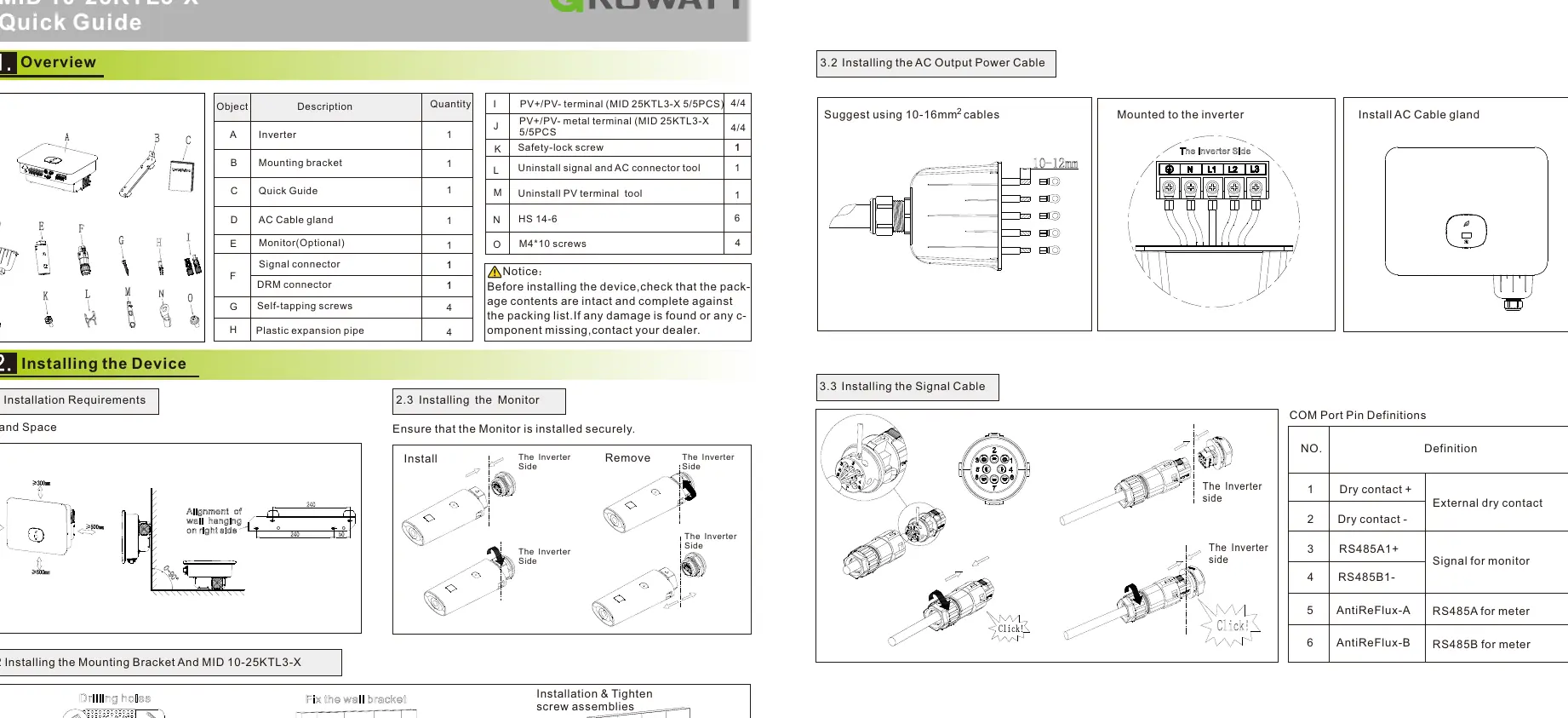
The package includes the inverter, mounting bracket, quick guide, AC cable gland, signal connector, DRM connector, self-tapping screws, and plastic expansion pipes. Optional items like the monitor may also be included.
Installation
Mounting the Device
Ensure proper tilt and space for the inverter. Use the mounting bracket to secure the device to the wall. Follow the drilling and wall bracket installation steps provided in the manual to ensure a secure fit.
Connecting Cables
- DC Input Power Cable: Use 4-6mm² cables. Ensure positive and negative terminals are connected securely to the inverter.
- AC Output Power Cable: It is suggested to use 10-16mm² cables. Install the AC cable gland and mount the cable to the inverter.
- Signal and DRM Cables: Follow the pin definitions for the COM and DRM ports. When laying out signal cables, keep them separate from power cables to avoid signal interference. Do not mix the DRM COM port connector with the SYS port connector.
System Commissioning
Follow these steps to power on the system:
- Turn on the AC switch between the inverter and the power grid.
- Turn on the DC switch at the bottom of the inverter.
- When the OLED displays "Country/Area", set the country according to the local requirements.
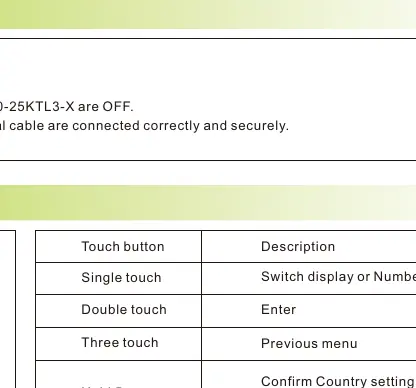
- Use the touch button to switch the country/area.
- Press the touch key for 5 seconds to confirm the setting.
Verifying the Installation
Before finalizing, verify the following:
- The inverter and monitor are installed correctly and securely.
- The ground cable is connected correctly.
- The DC switch and all connecting switches are OFF.
- All cables (AC, DC, signal) are connected correctly.
- Unused terminals and ports are locked with watertight caps.
If the LED light is green, the system is operating normally.
Manufacturer information
Growatt New Energy
Practical help
Common problems
System not operating normally
Check if the LED light is green.
Signal interference
Separate signal cables from power cables during installation.
Incorrect connector usage
Do not mix the connector to the DRM COM port and the connector to the SYS port.
Before use
- Check package contents against the packing list.
- Ensure the mounting bracket is installed securely.
- Verify that the DC switch and all connecting switches are OFF.
- Ensure AC output, DC input, and signal cables are connected correctly.
- Lock unused terminals and ports with watertight caps.
Specs in practice
- DC Input Cable
- Recommended cable size is 4-6mm².
- AC Output Cable
- Recommended cable size is 10-16mm².
Images and diagrams
- Touch button operations: Single touch to switch display or increment number, double touch to Enter, three touches for previous menu, hold 5s to confirm country setting or reset to default.
Model compatibility
- Ensure the correct Country/Area is set during initial startup; otherwise, skip all steps.

Manual page author
Michael Turner
Technical manual editor
Reviews PDF manuals for structure, safety notes, and practical product details so readers can find the right information quickly.