Power / Car Chargers
User Manual for GYBB 15W Wireless Charging Car Holder
Quick guide for the GYBB 15W Wireless Charging Car Holder. Learn how to install, operate the infrared sensor, and understand safety features and device compatibility.
Table of contents
Quick guide from the manual
This document provides instructions for the GYBB 15W Wireless Charging Car Holder. It features an infrared sensor for automatic clamping and supports Qi wireless charging. Ensure you use a QC3.0 car charger to achieve the maximum 15W output.
Packing Detail
- Wireless charging holder
- Car air vent pedestal
- Type-C charging cable
- Suction cup (optional)
- Car charger (optional)
Installation
Air Vent Mounting: Connect the wireless charger to the vent pedestal and secure it using the rotary locking mechanism. Attach the assembly to your vehicle's air vent.
Fixed Products: Assemble the bracket and base. Use the adjustable fitting and two adjusting knobs to secure the holder in your preferred position.
Operation
Infrared Sensor Mode: Hold your phone near the infrared sensor on the front of the charger. The clamp will open automatically and then close to secure the phone. To remove the phone, grab it with your hand and press the function button on the side; the holder will open automatically.
Touch Button Mode: Place the phone on the charger while it is powered on. Hold the phone against the surface; the clamp will automatically close. To remove the phone, press the push-button on the side of the holder to open the clamps.
LED Status Indicator
- Standby: Red light
- Charging / Charging Completed: Blue light
- Foreign Object Detected: Red and Blue light
Safety and Maintenance
- Do not use damaged cables or incompatible power supplies.
- Keep the device away from water and moisture.
- Do not disassemble the product.
- Operate within the temperature range of -10°C to +55°C.
- If a foreign object is detected (indicated by flashing red and blue lights), remove the object to avoid overheating.
Manufacturer information
Shenzhen Gybb Technology Co., Ltd.
Practical help
Common problems
Red and Blue light flashing
A foreign object has been detected. Remove the object immediately to prevent overheating.
Charging stops or does not start
Ensure the input voltage is correct. If the input voltage is too low or exceeds the rated voltage, the device will stop charging.
Before use
- Verify your smartphone supports Qi wireless charging.
- Use a QC3.0 car charger to ensure 15W fast charging capability.
- Ensure the mounting surface (vent or dashboard) is clean and stable.
- Check that the phone case is not thicker than 6mm.
Specs in practice
- Charging distance
- 6mm Max. The phone case must be within this thickness for charging to work.
Images and diagrams
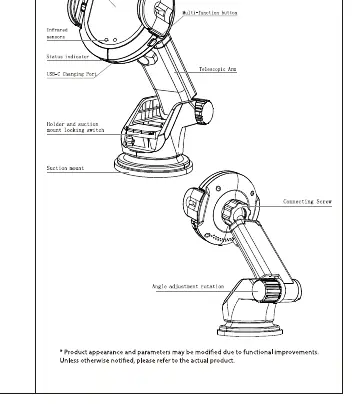
- Infrared sensor: Located on the front face to detect phone proximity.
- Function button: Located on the side to manually release the phone.
- Telescopic arm: Adjustable part for positioning the holder.
Model compatibility
- Compatible with Qi-enabled devices including iPhone, Samsung Galaxy Note/S series, Huawei Mate series, and MI phones.

Manual page author
Emily Carter
User documentation editor
Prepares concise manual descriptions and highlights the most useful setup, operation, and maintenance information for readers.