Tools / Welding Equipment
User Manual for GYS PROTIG 201 AC/DC and 201L AC/DC Welding Machine
Comprehensive user guide for the GYS PROTIG 201 AC/DC and 201L AC/DC welding machines. Includes installation, operation, HMI settings, maintenance, and safety instructions.
Quick answers from the manual
Quick answer
- The PROTIG 201 AC/DC and 201L AC/DC are inverter welding machines for TIG (AC/DC) and MMA welding. The 201L model includes an integrated cooling unit. p. 5, 20
Key actions
- Activate VRD function p. 7, 22
First start
- Connect to a single-phase electrical installation (50-60 Hz) with earth. p. 5, 20
Problems and fixes
Display shows U51
Voltage is over 265V. Unplug and reconnect to correct voltage.
p. 5, 20Maintenance and reset
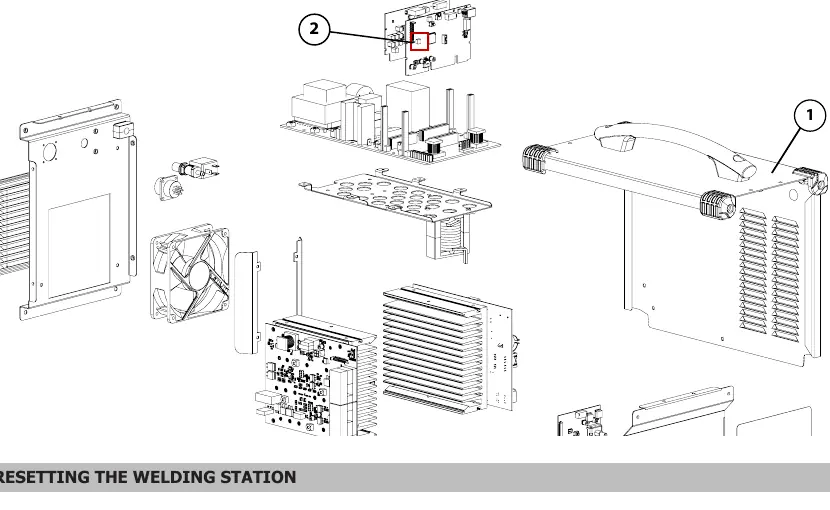
- Restore factory settings: When in sleep mode, press the sleep exit button for 3 seconds. p. 7, 22
Technical specifications
| Parameter | Value | Meaning | Pages |
|---|---|---|---|
| Operating temperature | -10 to +40°C | Ambient temperature range | p. 2, 17 |
Where to find it in the PDF
- Safety Rules p. 2, 3, 17, 18
- HMI Interface p. 8, 23
- Technical Specifications p. 111, 112
Table of contents
Manual images
Click an image to enlargeQuick guide from the manual
The GYS PROTIG 201 AC/DC and 201L AC/DC are inverter welding machines designed for TIG (AC/DC) and MMA welding. The 201L model features an integrated cooling unit. Before operating, ensure the machine is connected to a properly grounded electrical supply and that all safety precautions are followed.
Safety instructions
- Electrical Safety: The machine must be connected to a grounded electrical network. Never touch live parts inside or outside the machine when it is plugged in.
- Environment: Operate in a well-ventilated area free from dust, acid, and flammable gases.
- Personal Protection: Wear insulating, dry, fireproof clothing and protective gloves. Use a welding helmet with appropriate protection levels.
- Fumes and Gas: Ensure adequate ventilation or extraction to keep fumes away from the work area.
Installation
- Place the machine on a surface with a maximum incline of 10°.
- Ensure the machine is protected from rain and direct sunlight.
- The machine has an IP21 protection rating, meaning it is protected against solid bodies larger than 12.5mm and vertically falling water drops.
- Fully uncoil all power, extension, and welding cables to prevent overheating.
HMI and Operation
The Human-Machine Interface (HMI) allows for precise control of welding parameters:
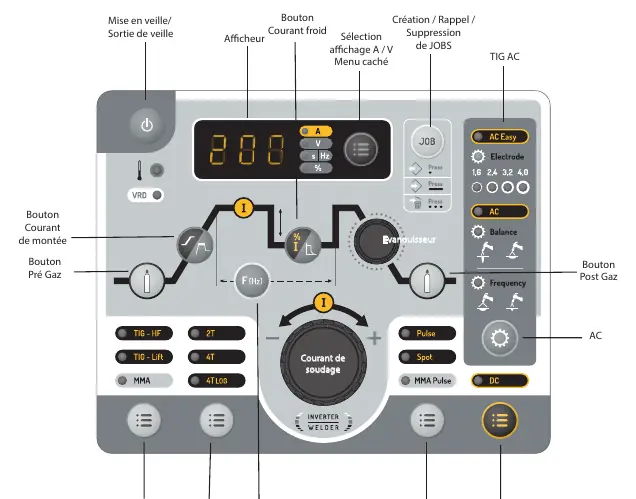
- Main Encoder: Used to adjust welding current and other selected parameters.
- Welding Modes: Select between TIG HF, TIG LIFT, and MMA.
- Trigger Modes: Configure trigger behavior (2T, 4T, 4T LOG).
- Sub-processes: Access Pulse, Spot (TIG), or MMA Pulse modes.
- Hidden Menu: Access advanced settings by pressing the A/V button for 3 seconds.
Welding Modes
- MMA: Features Hot Start (prevents sticking), Arc Force (prevents sticking in the weld pool), and Anti-Sticking (easy electrode release).
- TIG DC: Suitable for ferrous metals like steel, stainless steel, copper, and titanium.
- TIG AC: Dedicated to welding aluminum and its alloys.
Maintenance
- Perform yearly maintenance by a qualified person.
- Regularly remove the casing and dust the interior with compressed air.
- Check the power supply cable condition regularly.
- Cooling Unit (201L): Change the cooling liquid every 12 months to prevent deposits. Never run the cooling unit without liquid.
Manufacturer information
GYS
Practical help
Common problems
Machine in protection mode (Display shows U51)
The supply voltage is over 265V. Unplug the machine and reconnect to an outlet with the correct voltage.
Cooling unit pump damage
Never operate the cooling unit without coolant when the pump is running.
Before use
- Check electrical supply and grounding
- Ensure adequate ventilation
- Check coolant level (for 201L model)
- Check torch and cable condition
- Ensure gas supply is connected
Images and diagrams
- HMI interface layout showing buttons and display
- Torch trigger modes (2T, 4T, 4T LOG) timing diagrams
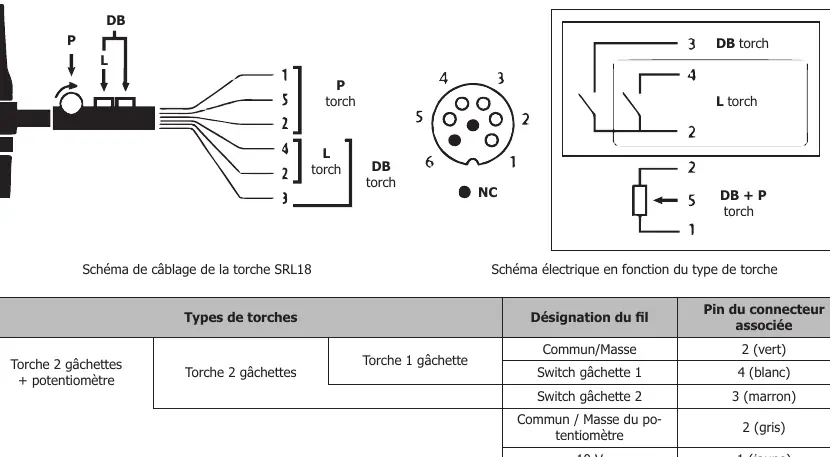
- Wiring diagrams for different torch types
Model compatibility
- 201L model includes an integrated cooling unit.
- Compatible with manual remote control (ref 045675) and foot pedal (ref 045682).

Manual page author
David Miller
Documentation analyst
Organizes user manual content into clear summaries, with attention to model details, product context, and everyday usability.