Electronics / AV Splitters
User Manual for Hall Technologies 1800-RA 18-Channel VGA Video Splitter
Quick guide for the Hall Technologies 1800-RA 18-Channel VGA Video Splitter. Learn how to set up, configure signal boosting for long cables, and understand technical specifications.
Quick answers from the manual
Quick answer
- The 1800-RA is a rack-mountable VGA video splitter with 1 input and 18 outputs. It supports resolutions up to 1600x1200 and features signal boosting for outputs 1-16 to drive cables over 100 feet. p. 2
Key actions
- Configure signal boosting for long cables p. 2
Problems and fixes
Interference or signal issues on long cables
Ensure the cable is connected to a monitor for proper signal termination, or disconnect the cable from the splitter if not in use.
p. 2Technical specifications
| Parameter | Value | Meaning | Pages |
|---|---|---|---|
| Resolution | 1600x1200 | Maximum supported resolution at 60-85 Hz | p. 2, 3 |
| Power | 100-240V AC | Input power requirement | p. 3 |
Where to find it in the PDF
- Description and Setup p. 2
- Specifications and Diagram p. 3
- Warranty and Regulatory p. 4
Table of contents
Manual images
Click an image to enlargeQuick Guide
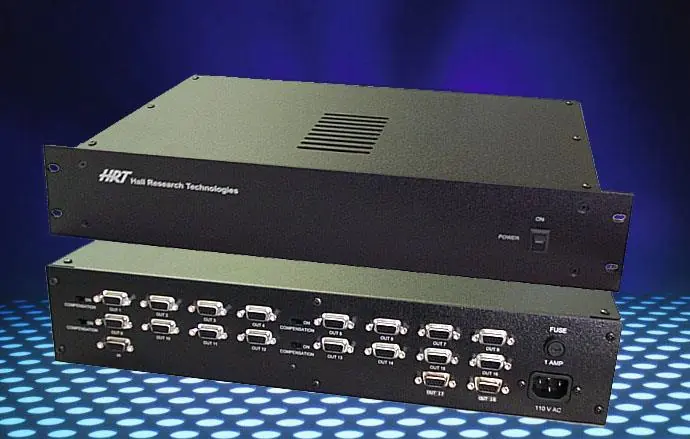
The Hall Technologies 1800-RA is a rack-mountable VGA video splitter designed to distribute one VGA input to 18 VGA outputs. Key operational highlights include:
- Signal Boosting: Outputs 1-16 feature adjustable signal boosting for cables longer than 100 feet.
- Fixed Outputs: Outputs 17 and 18 are always set to normal signal levels and are suitable for monitors within 100-150 feet.
- Resolution: Supports resolutions up to 1600x1200 at refresh rates of 60 to 85 Hz.
- Daisy-Chaining: Outputs can be expanded by daisy-chaining multiple units.
Description
The 1800-RA is a rugged, low-power, and reliable VGA (RGBHV) video splitter. It is designed for high-resolution video distribution and includes a built-in universal power supply. The unit comes with a 6 ft multi-coaxial cable for connection to the PC's video output.
Setup
Ensure your package includes the Video Splitter unit, a 6-foot VGA-Type video cable, and a power cable. Follow these steps to install:
- Locate the HD15 female video output connector on your computer.
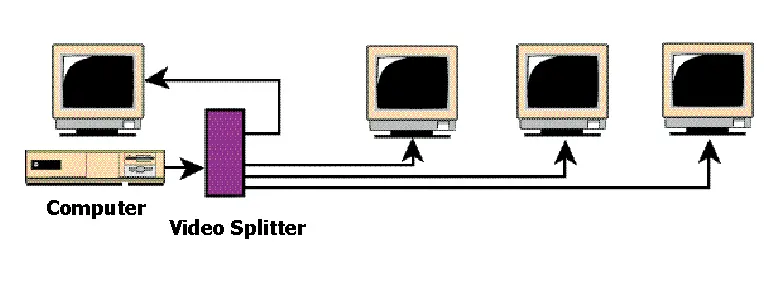
- Connect the input of the Splitter to the computer using the supplied cable.
- Connect your monitors directly to the outputs of the Splitter or use high-quality extension cables.
- Connect the AC power cord to the Splitter.
Driving Long Cables
Outputs 1 through 16 are divided into 4 groups of 4 channels (e.g., Group 1: Out_1 to Out_4). Each group has a switch to set the output drive capability:
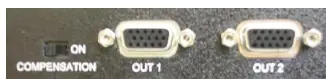
- Normal: Set the switch to the left if the connected cable is less than 100 feet.
- Boosted: Set the switch to the right if the connected cable is longer than 100 feet.
Note: If using long video cables (greater than 25 feet), ensure the cable is connected to a monitor to properly terminate the signals. If the cable is not connected to a monitor, disconnect it from the Splitter to avoid signal issues.
Specifications
- Dimensions: 15.5" wide x 3.19" high x 10" deep.
- Connectors: HDD15 female (Input and Outputs).
- Bandwidth: DC to 250 MHz Min. - 350 MHz Max.
- Input Impedance: 75 ohms on RGB, 330 ohms on H,V.
- Power Requirement: 100 to 240V AC, 50-60 Hz, 25 Watts.
Warranty
The equipment is covered by a 2-year warranty against defective workmanship and material. The warranty is void if the item is subject to improper use, negligence, or unauthorized modification. To obtain service, follow the RMA (Return Material Authorization) process by contacting Hall Research with a description of the failure and shipping details.
Practical help
Common problems
Image quality issues on long cables
Ensure the cable is connected to a monitor for proper signal termination. If the cable is not connected to a monitor, disconnect it from the splitter.
Signal too weak on long cables
For outputs 1-16, ensure the corresponding group switch is set to the right (boosted) position if the cable length exceeds 100 feet.
Before use
- Verify package contents: 6ft VGA cable, power cable, and splitter unit.
- Locate the HD15 female connector on the computer.
- Ensure monitors are connected directly or via high-quality extension cables.
- Check cable lengths to determine if boost switches are required.
Images and diagrams
- The connection diagram illustrates the PC connected to the Video Splitter input, with multiple monitors connected to the splitter outputs.
Model compatibility
- Outputs 17 and 18 are fixed and cannot be boosted.
- Outputs 1-16 have boost switches for cables >100ft.

Manual page author
Emily Carter
User documentation editor
Prepares concise manual descriptions and highlights the most useful setup, operation, and maintenance information for readers.