Electronics / Networking
User Manual for Secomp Value 2-Way DVI Video Splitter 14.99.3501
Quick guide for the Secomp Value 2-Way DVI Video Splitter (14.99.3501). Learn how to connect your devices, understand technical specifications, and set up your dual-display configuration.
Quick answers from the manual
Quick answer
- The Secomp 14.99.3501 is a 2-way DVI splitter that distributes one DVI input signal to two identical outputs simultaneously, supporting resolutions up to 1080p. p. 2
Key actions
- Connect input source and output devices p. 3
- Connect power supply p. 3
Technical specifications
| Parameter | Value | Meaning | Pages |
|---|---|---|---|
| Resolution | 1920x1080p | Maximum supported video resolution | p. 2 |
| Power | 5V DC @ 2A | Required power supply | p. 3 |
Where to find it in the PDF
- Introduction and Features p. 2
- Specifications p. 2, 3
- Connection and Operation p. 3
Table of contents
Manual images
Click an image to enlargeQuick guide from the manual
The Secomp 14.99.3501 is a DVI splitter designed to distribute a single DVI input signal into two identical outputs simultaneously. It features signal buffering and amplification, allowing for long-distance transmission up to 10 meters. The device is plug-and-play, requiring no complex settings, and supports resolutions up to 1080p.
Package Contents
Before installation, ensure the following items are included in the shipping carton:
- Main unit
- 5V DC Power Supply
- User Manual
Panel Descriptions
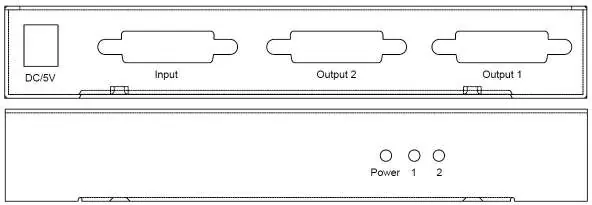
The device features a rear panel with a DC/5V power input, one DVI input port, and two DVI output ports. The front panel includes LED indicators for Power, Output 1, and Output 2.
Connection and Operation
Follow these steps to set up the device:
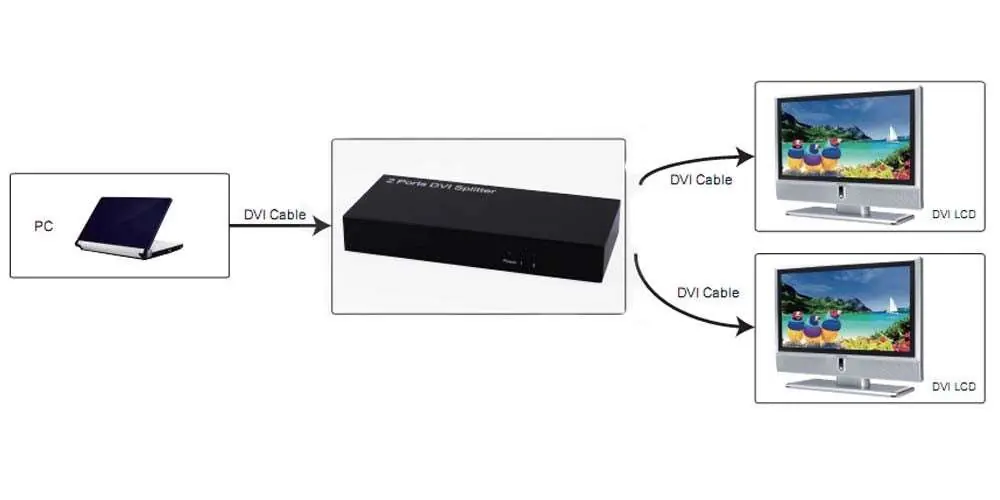
- Connect your DVI input source (e.g., PC) and output devices (e.g., LCD monitors) to the splitter using DVI cables. Note that DVI cables are optional and not included.
- Insert the DC connector of the 5V power supply into the splitter.
- Connect the AC side of the power supply to a wall outlet.
- Turn on the power.
Attention: Always insert and extract cables gently to avoid damaging the ports.
Specifications
The device supports the following technical parameters:
- Resolution: Up to 1920x1080p (Full HD).
- Power Requirement: 5V DC @ 2A.
- Power Consumption: 8W (Max).
- Video Bandwidth: 2.25Gbps/225MHz per channel.
- Audio Support: Supports uncompressed audio (LPCM) and compressed audio (DTS Digital, Dolby Digital, DTS-HD, Dolby True HD).
- Dimensions: 155 x 70 x 23 mm.
- Weight: 265g.
Practical help
Common problems
No signal on displays
Ensure all DVI cables are securely connected and the power supply is plugged in. Verify that the input source is active.
Signal degradation
Ensure the cable length does not exceed 10 meters for optimal signal transmission.
Before use
- Verify all items are in the box: Main unit, 5V DC power supply, User Manual.
- Ensure you have compatible DVI cables (not included).
- Check that your power source is compatible with 5V DC.
Images and diagrams
- The splitter takes a single DVI input from a PC and distributes it to two identical DVI outputs (LCD monitors).
Model compatibility
- Supports HDCP.
- Supports uncompressed audio (LPCM) and compressed audio (DTS Digital, Dolby Digital).

Manual page author
Michael Turner
Technical manual editor
Reviews PDF manuals for structure, safety notes, and practical product details so readers can find the right information quickly.