Home Appliances / Small Kitchen Appliances
Hamilton Beach 14525F Steamer Iron User Guide
Quick guide for the Hamilton Beach 14525F Steamer Iron. Learn how to steam garments, use the steam iron function, and properly store your device to prevent damage and burns.
Table of contents
Manual images
Click an image to enlargeQuick guide from the manual
This guide provides essential instructions for operating your Hamilton Beach 14525F Steamer Iron. Always allow the iron to preheat for 2 minutes before use to prevent water from dripping. Never steam garments while they are being worn. If you have any questions, call 1-800-851-8900; do not return the product to the store.
How to steam a garment
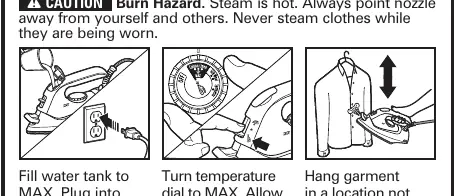
- Fill the water tank to the MAX line.
- Plug the iron into an outlet.
- Turn the temperature dial to MAX.
- Allow 2 minutes for the iron to preheat.
- Move the lever to the STEAMER position.
- Hang the garment in a location not susceptible to heat or moisture.
- Slowly move the iron vertically up and down.
How to steam iron
- Fill the water tank to the MAX line.
- Plug the iron into an outlet.
- Allow 2 minutes for the iron to preheat.
- Move the lever to the STEAM IRON position.
How to store the iron
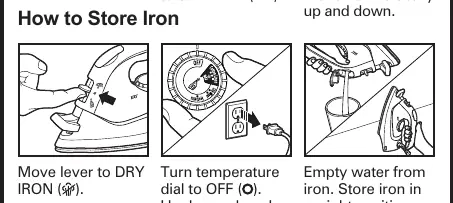
- Move the lever to the DRY IRON position.
- Turn the temperature dial to OFF.
- Unplug the iron and allow it to cool.
- Empty the water from the iron.
- Store the iron in an upright position.
Safety warnings
Burn Hazard: Steam is hot. Always point the nozzle away from yourself and others. Attempting to steam iron on a lower temperature setting or failing to allow the iron to preheat for 2 minutes can result in hot water dripping from the soleplate.
Manufacturer information
Hamilton Beach
Practical help
Common problems
Hot water dripping from the soleplate
Ensure the temperature is set high enough and allow the iron to preheat for at least 2 minutes before steaming.
Burn hazard
Always point the nozzle away from yourself and others. Never steam clothes while they are being worn.
Before use
- Fill water tank to the MAX line.
- Plug the iron into a standard outlet.
- Set the temperature dial to MAX.
- Allow 2 minutes for the iron to preheat.
Images and diagrams
- The diagrams illustrate the lever positions for 'STEAMER', 'STEAM IRON', and 'DRY IRON' modes.
- The storage diagrams show the correct sequence of turning the dial to OFF and emptying the water tank.

Manual page author
David Miller
Documentation analyst
Organizes user manual content into clear summaries, with attention to model details, product context, and everyday usability.