Electronics / Televisions
User Manual for Hisense 100BM66D Digital Signage Display
Quick guide for the Hisense 100BM66D 100-inch 4K UHD Digital Signage Display. Includes technical specifications, connectivity options, dimensions, and key features for installation and operation.
Table of contents
Quick guide from the manual
The Hisense 100BM66D is a 100-inch 4K UHD Digital Signage Display designed for 24/7 operation in retail and corporate environments. It features built-in wireless screen sharing, an ambient light sensor for smart power management, and supports both landscape and portrait orientations. The display runs on Android 9.0 and includes a cloud-based content management system (VisionInfo).
Product Overview
This display is engineered for mission-critical environments with zero downtime. Key highlights include:
- Wireless Screen Sharing: Built-in application for seamless wireless sharing from any device.
- Round-the-clock operation: Dual-core System on Chip (SoC) technology for reliable 24/7 performance.
- Smart Power: Ambient light sensor automatically adjusts brightness to save energy.
- Anti-Glare Coating: Reduces reflections without compromising image quality.
Technical Specifications
The display features a 100-inch VA panel with 4K resolution (3840 x 2160) and a 120Hz refresh rate. It offers 500 nits of brightness and a 5000:1 contrast ratio. The operating environment should be maintained between 0°C and 40°C with 10% to 80% humidity.
Connectivity
The device supports a wide range of inputs and outputs:
- Inputs: 2x HDMI (2.0), 1x DP (1.2a), 2x USB 2.0, 1x RS232, 1x LAN.
- Outputs: 1x HDMI (2.0), 1x Headphone jack.
- Wireless: IEEE 802.11a/b/g/n/ac (2.4G & 5G).
Physical Dimensions and Mounting
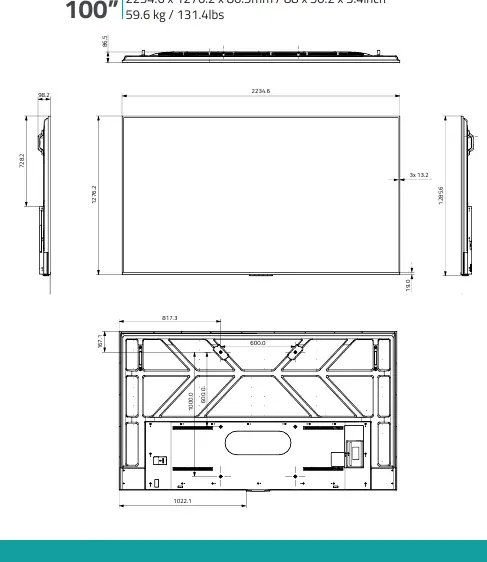
The display measures 2234.6 x 1276.2 x 86.5 mm and weighs 59.6 kg. It utilizes a 600mm x 600mm VESA mounting pattern. Ensure the mounting surface is capable of supporting the weight of the unit.
What's in the box
The package includes the following items:
- Power cord
- Remote control
- RS232 Cable
- User Manual
- Battery
Manufacturer information
Hisense
Practical help
Common problems
Display not mounting correctly
Ensure the wall mount is compatible with the 600mm x 600mm VESA standard and can support the 59.6kg net weight.
Content not displaying properly
Verify the orientation (Landscape or Portrait) matches your content requirements and check the input source connection (HDMI/DP).
Network connectivity issues
Check the LAN connection or ensure the Wi-Fi signal (2.4G/5G) is stable for cloud-based content management.
Before use
- Verify all package contents are present (Power cord, Remote, RS232 Cable, Manual, Battery).
- Confirm the installation location meets the temperature (0°C-40°C) and humidity (10%-80% RH) requirements.
- Ensure the mounting surface supports the 59.6kg weight.
- Check that the VESA mount matches the 600mm x 600mm pattern.
- Prepare the necessary input cables (HDMI/DP) for your content source.
Specs in practice
- Brightness: 500 nits
- Provides high visibility even in brightly lit environments.
- Resolution: 3840 x 2160
- 4K UHD resolution for detailed and realistic imagery.
- Refresh rate: 120Hz
- Ensures smooth motion for video content.
- VESA: 600mm x 600mm
- Standard mounting hole pattern for wall brackets.
Images and diagrams
- The dimensions diagram illustrates the overall width (2234.6mm), height (1276.2mm), and depth (86.5mm).
- The rear view diagram highlights the VESA mounting hole locations (600mm x 600mm).
Model compatibility
- Supports Android 9.0 operating system.
- Wi-Fi supports IEEE 802.11a/b/g/n/ac standards on both 2.4G and 5G bands.

Manual page author
Michael Turner
Technical manual editor
Reviews PDF manuals for structure, safety notes, and practical product details so readers can find the right information quickly.