Toys / RC Models & Drones
User Manual for Hobbywing QuicRun WP 10BL120 G2 Electronic Speed Controller
Quick guide for the Hobbywing QuicRun WP 10BL120 G2 brushless ESC. Includes wiring instructions, throttle calibration, programming steps, and troubleshooting.
Table of contents
Manual images
Click an image to enlargeQuick guide from the manual
The Hobbywing QuicRun WP 10BL120 G2 is a high-performance brushless electronic speed controller (ESC). Before first use, it is critical to calibrate the throttle range to match your transmitter. Always ensure proper soldering of wires to avoid short circuits and disconnect the battery after every use to prevent deep discharge.
Connections
Follow these steps to connect your ESC:
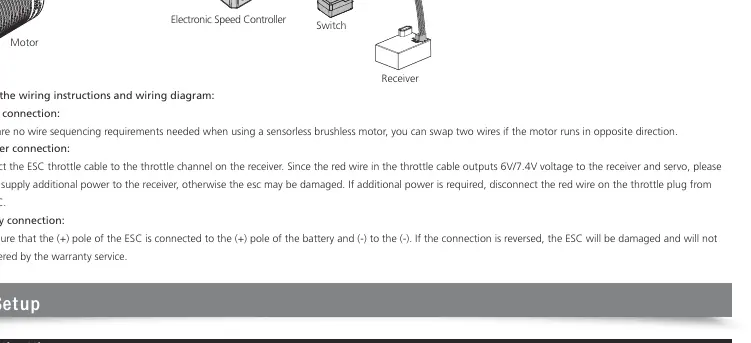
- Motor Connection: There are no specific wire sequencing requirements for sensorless brushless motors. If the motor runs in the wrong direction, swap any two of the three phase wires.
- Receiver Connection: Connect the ESC throttle cable to the throttle channel on the receiver. Do not supply additional power to the receiver, as the ESC provides 6V/7.4V via the throttle cable.
- Battery Connection: Ensure the positive (+) pole of the ESC is connected to the positive (+) pole of the battery, and negative (-) to negative (-). Reverse polarity will damage the ESC.
ESC Setup (Throttle Calibration)
You must calibrate the throttle range when using the ESC for the first time or if transmitter parameters (TRIM, D/R, EPA) change.
- Turn on the transmitter and set throttle channel parameters to default (100%).
- With the ESC turned off but connected to a battery, hold the SET button and press the ON/OFF button. Release the SET button when the red LED flashes.
- Neutral Point: Leave the transmitter at neutral, press the SET button. The red LED will turn off, and the green LED will flash once with a beep.
- Full Throttle: Pull the throttle trigger to the full throttle position, press the SET button. The green LED will blink twice with two beeps.
- Full Brake: Push the throttle trigger to the full brake position, press the SET button. The green LED will blink three times with three beeps.
- The motor can be started after calibration is complete.
Programming Method
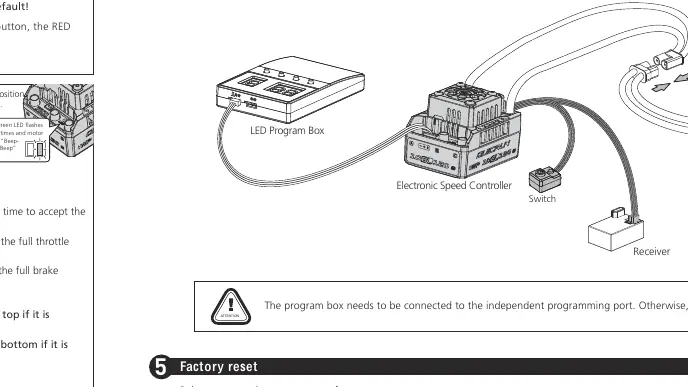
The ESC supports parameter adjustment via an LED program card. Connect the program card to the independent programming port on the ESC. Use the ITEM and VALUE buttons to select and change parameters, then press OK to save.
Factory Reset
You can restore factory settings using two methods:
- SET Button: With the throttle trigger in neutral, press and hold the SET button for about 10 seconds until the red and green lights flash simultaneously. Re-power the ESC to complete.
- LED Program Card: Connect the card, press the RESET key, then press OK.
Troubleshooting
If you encounter issues, check the following:
- Motor does not start, red light flashes: Check battery voltage and connections.
- Car goes in reverse when forward throttle is applied: Swap any two of the three motor phase wires.
- Motor stutters or unable to start: Check for poor connections between ESC and motor, or check if the ESC is in protection mode (low voltage or overheat).
- LED displays three horizontal lines: The program box is connected incorrectly. Ensure it is connected to the independent programming port, not the throttle cable.
Manufacturer information
Hobbywing
Practical help
Common problems
Motor does not start, red light flashes
Check battery voltage and ensure all plugs are soldered and connected correctly.
Car moves in reverse when forward throttle is applied
Swap any two of the three phase wires connecting the motor to the ESC.
Motor stutters or stops during operation
Check for poor connections or if the ESC has entered low-voltage/overheat protection mode.
LED displays three horizontal lines when using program card
The program box is connected incorrectly. Connect it to the independent programming port, not the throttle cable.
Before use
- Ensure all wires are properly soldered to avoid short circuits.
- Check battery polarity (+ to +, - to -) before connecting.
- Calibrate the throttle range before the first use.
- Set the BEC voltage (6V/7.4V) according to your servo specifications.
- Ensure the transmitter throttle channel parameters (D/R, EPA, ATL) are at default (100%).
Images and diagrams
- Wiring: Connect the ESC throttle cable to the receiver, motor wires to the motor, and battery to the ESC.
- Throttle Calibration: Hold the SET button while powering on, then follow the neutral, full throttle, and full brake steps.
Model compatibility
- Compatible with Sensorless and Sensored Brushless Motors (only in sensorless mode).
- Designed for 1/10th scale Short Course Trucks and Monster Trucks.
- BEC voltage must not exceed the maximum operating voltage of the servo.

Manual page author
David Miller
Documentation analyst
Organizes user manual content into clear summaries, with attention to model details, product context, and everyday usability.