Home Appliances / Fans
User Manual for Holmes 12-inch Table Fan 32510133
Quick guide for the Holmes 12-inch Table Fan (Model 32510133). Includes assembly instructions, operation, cleaning, maintenance, and safety guidelines.
Table of contents
Manual images
Click an image to enlargeQuick guide from the manual
This manual provides instructions for the Holmes 12-inch Table Fan (Model 32510133). The fan requires assembly, which takes approximately 5-10 minutes. Key maintenance includes periodic cleaning and fuse replacement in the plug if the unit fails to operate.
Assembly Instructions
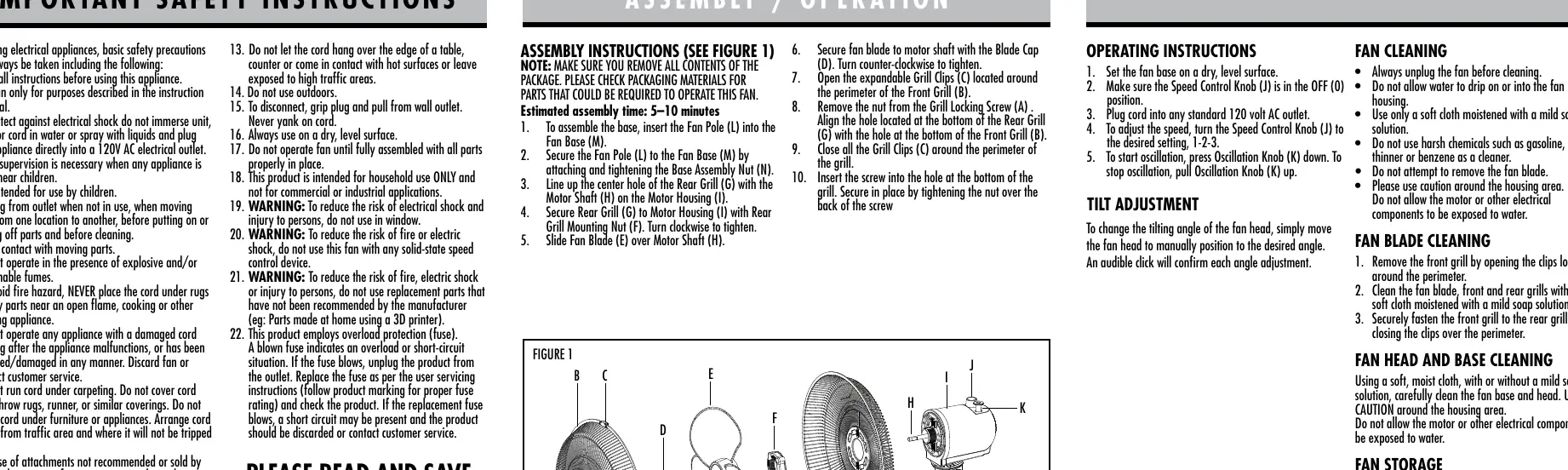
- Insert the Fan Pole (L) into the Fan Base (M) and secure with the Base Assembly Nut (N).
- Align the center hole of the Rear Grill (G) with the Motor Shaft (H) on the Motor Housing (I).
- Secure the Rear Grill (G) using the Rear Grill Mounting Nut (F), turning clockwise to tighten.
- Slide the Fan Blade (E) onto the Motor Shaft (H).
- Secure the fan blade with the Blade Cap (D) by turning counter-clockwise.
- Open the Grill Clips (C) on the Front Grill (B).
- Align the bottom holes of the Front and Rear grills.
- Close all Grill Clips (C) around the perimeter.
- Insert the Grill Locking Screw (A) into the bottom hole and secure with the nut.
Operating Instructions
1. Place the fan on a dry, level surface.
2. Ensure the Speed Control Knob (J) is set to OFF (0).
3. Plug the cord into a standard 120V AC outlet.
4. Turn the Speed Control Knob (J) to the desired speed (1, 2, or 3).
5. To oscillate, press the Oscillation Knob (K) down. To stop, pull the knob up.
Tilt Adjustment
To change the angle of the fan head, manually move the head to the desired position. An audible click will confirm each angle adjustment.
Cleaning and Maintenance
Fan Cleaning: Always unplug the fan before cleaning. Use a soft cloth moistened with a mild soap solution. Do not use harsh chemicals like gasoline, thinner, or benzene. Do not allow water to enter the motor housing.
Fan Blade Cleaning: Open the clips around the perimeter to remove the front grill. Clean the blade and grills with a soft, damp cloth. Secure the grill back in place after cleaning.
Fuse Replacement
If the fan stops working, the fuse may have blown. The plug contains a 2.5 Amp, 125 Volt fuse.
- Unplug the fan from the outlet.
- Slide the fuse cover on the plug towards the prongs to open it.
- Use a small screwdriver to pry the fuse from the metal ends.
- Insert a new 2.5 Amp, 125 Volt fuse into the compartment.
- Secure the fuse with a screwdriver and slide the cover closed.
Manufacturer information
Holmes
Practical help
Common problems
Fan does not operate
Check if the fuse in the plug has blown. If so, replace it with a 2.5 Amp, 125 Volt fuse.
Grill cover is difficult to close
Ensure the fuse is completely secured in place by pressing on the metal ends of the fuse before closing the cover.
Plug does not fit the outlet
This is a polarized plug. If it does not fit, reverse it. If it still does not fit, contact a qualified electrician.
Before use
- Ensure all parts are present according to the assembly diagram.
- Verify the fan is fully assembled before operation.
- Place the fan on a dry, level surface.
- Ensure the Speed Control Knob is in the OFF (0) position before plugging in.
- Check that the fuse is properly seated if the fan fails to start.
Specs in practice
- 2.5 Amp, 125 Volt
- The required rating for the replacement fuse.
Images and diagrams
- Figure 1 illustrates the assembly sequence of the fan components, including the base, pole, motor housing, grills, and blade.
- Figure 2 shows the location of the fuse cover on the plug and how to access it for replacement.
Model compatibility
- Do not use with any solid-state speed control device.
- Intended for household use only; not for commercial or industrial applications.

Manual page author
Emily Carter
User documentation editor
Prepares concise manual descriptions and highlights the most useful setup, operation, and maintenance information for readers.