Tools / Saws
User Guide for Honeywell Home DC312XXP2USB Doorbell
Quick start guide for the Honeywell Home DC312XXP2USB doorbell. Learn how to install, pair, select melodies, and troubleshoot your device.
Table of contents
Manual images
Click an image to enlargeQuick Guide from the Manual
This document provides essential setup and operation instructions for the Honeywell Home DC312XXP2USB doorbell. Ensure you have all components before starting. The device is designed for simple wireless operation and requires a CR2032 battery.
Installation and Setup
To prepare the device for use:
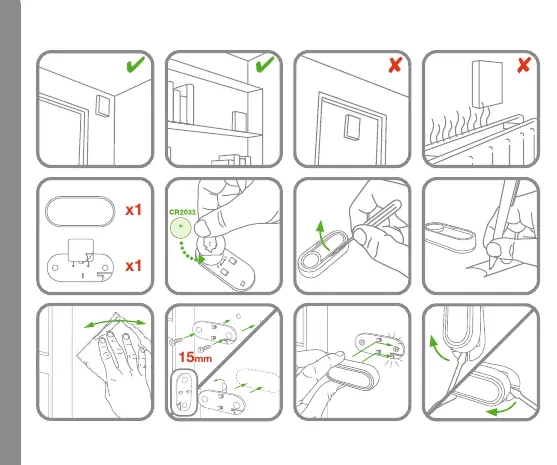
- Insert the CR2032 battery into the unit.
- Mount the device using the provided screws (15mm).
- Avoid installing the doorbell on metal surfaces, as this can significantly reduce the wireless range.
Linking and Pairing
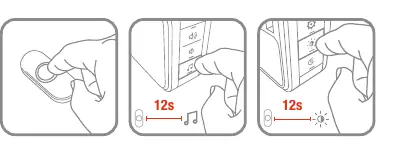
To link the doorbell, follow the pairing procedure. If you encounter issues, hold the button for 12 seconds to reset the device and enter pairing mode. The indicator light will assist in confirming the status.
Optional Features and Melodies
The doorbell supports multiple melodies. The melody played depends on the number of times the button is pressed:
- x4 presses: Hello, Ding Dong, Telephone, Soft Alert.
- x6 presses: Hello, Ding Dong, Westminster, Marimba, Piano, Soft Alert.
- x8 presses: Hello, Ding Dong, Westminster, Marimba, Piano, Bell, Telephone, Soft Alert.
Troubleshooting
If the device is not functioning correctly, perform a reset by holding the button for 12 seconds. Ensure the battery is fresh and correctly oriented. For further support, visit livewell.honeywellhome.com.
Official resources from the manual
Manufacturer information
Honeywell Home
Practical help
Common problems
Device not pairing
Hold the button for 12 seconds to reset the device and re-initiate the pairing mode.
Melody not changing
Ensure you are following the correct sequence for melody selection (x4, x6, or x8 button presses).
Before use
- Check package contents: doorbell unit, mounting hardware, and CR2032 battery.
- Ensure you have a screwdriver for installation.
- Verify the mounting surface is not metal to avoid signal interference.
- Insert the CR2032 battery correctly into the unit.
Images and diagrams
- The manual includes diagrams for battery insertion, mounting, and melody selection.
- The melody table indicates which chime plays based on the number of button presses.
Model compatibility
- Avoid mounting on metal surfaces as it may interfere with signal range.

Manual page author
Michael Turner
Technical manual editor
Reviews PDF manuals for structure, safety notes, and practical product details so readers can find the right information quickly.